IT support is the function that keeps a company's technology usable for the people working there. Fixing problems and handling requests fall under it. Keeping the devices and the accounts working comes under it also.
The IT support meaning stays the same regardless of your company size, only who does the work changes. A small company will have one person on it, or it will use an outside provider. A dedicated team with levels and a ticketing system is what bigger companies run.
This guide will help you understand what IT support means, its types, and the levels. Also, the request flow and the roles are covered. How IT support differs from a help desk is covered here too. We have also covered small businesses and what good IT support looks like.
Key Takeaways
- IT support helps your employees with the technology problems they are having and fulfills their requests, like a password reset or a new laptop assignment.
- The work can be organized in two ways. One way is by area, like desktop, network, applications, and security. The other way is by level, where self-service comes first, and the specialists come at the end.
- Requests are handled in a fixed order, they come in first, then they get triaged, then resolved, and the ones that cannot be resolved should be escalated before the ticket is closed.
- Small companies can manage with one internal IT person, and a managed service provider is used along with that person.
- Good IT support should have one clear place where people can ask, every request should get an owner, and response targets are set according to the priority.
What Is IT Support?
IT support is the help a company gives to its own people for the technology they use at work. The definition of IT support is simple and covers the problems that get reported along with the requests that come in every day.
Put simply, the IT support team is the one who is working to keep laptops and accounts in working condition as employees expect them to be.
IT support means two different things, and the difference is about who is getting the help. If it is inside the company, employees will be the ones getting help with their needs, like laptops, accounts, and software needed in their day-to-day job. A company that sells a product will also have IT support for the customers who bought that product. Both are called IT support, only the audience for it changes.
The support work is put into a formal structure in bigger companies. IT service management is the practice that tells how the services should be delivered and supported. IT support comes under it.
What Does IT Support Do?
IT support fixes technology problems that people have at work, and it handles the requests they raise every day. Below, we have outlined the eight IT support responsibilities that come up in most companies:
- Password and account issues: Someone gets locked out of an account after entering a wrong password too many times, and IT support is the one who unlocks it or resets the password.
- Access requests: Access to a shared drive or to a new tool has to be requested, and the request will go to IT support once the manager approves it.
- New hire setup and offboarding: Before a new person joins, the laptop and accounts should be ready on the first day. The same work happens in reverse when someone leaves, and all the accounts have to be closed.
- Hardware problems: Laptops stop charging, monitors are not being detected, printers fail. IT support will repair the device or give a replacement from the spare stock.
- Software installs and updates: New software gets installed by IT support, and the updates are pushed by them also.
- Network and VPN issues: When the VPN keeps dropping, or the office wifi is slow, people report it to IT support, and in many cases the fix has to come from the provider.
- Security alerts and phishing reports: An employee forwards a suspicious email that is asking for login details. IT support checks it and tells the rest of the company if the attempt is a real one.
- How-to questions: How to share a calendar, how to put email on a new phone, these questions come to IT support daily, and most of them have the same answer every time.
Types of IT Support
The types of IT support can be grouped in two ways, by the area of technology that is being supported and by the way the support reaches the person. Most companies will have a mix of both.
By Area
- Help desk: The first point of contact for employees, where the questions and the requests come in before anything else happens.
- Desktop support: Laptops, desktops, printers, and the software installed on them are handled here.
- Network support: Covers the wifi, the internet connection, the VPN, and the firewall that the office runs on.
- Application support: The business applications like email, the CRM, or the HR system get supported here, including the errors inside them and access to them.
- Security work: It covers the phishing reports that employees send, the alerts that come from the security tools, and the patching that has to be done.
- Cloud and SaaS administration: In the cloud tools a company subscribes to, the accounts and the licenses are created or removed by IT support.
By Delivery
The second grouping is about who does the work and where it is done from. In-house IT support means the company has its own people doing it, and they are on the payroll like any other employee. Outsourced or managed support is when a provider is paid under a contract to do the same work, either fully or for some parts of it. Remote IT support is done without coming to the person's desk, using chat, a call, or a remote session on the machine. On-site support needs someone to be physically present, which is the case for hardware work and for anything on the office network.
The four do not line up against each other in a single row. A managed provider can also provide remote support. The in-house team will do both remote work and on-site work.
IT Support Levels
IT support levels are the layers that a request moves through before it gets solved. The request starts at the lowest level, and it goes up only when the people there are not able to solve it.
The levels of IT support are not set up the same way in every company. In a small company, the same person will be doing level 1 and level 2, with level 3 going to an outside provider.
Moving a request up to the next level is called escalation, and escalation management is the practice that decides when it should happen. In most ITSM documentation, the levels are called support tiers, where the tier 1, tier 2, and tier 3 split is defined in more detail.
How IT Support Works
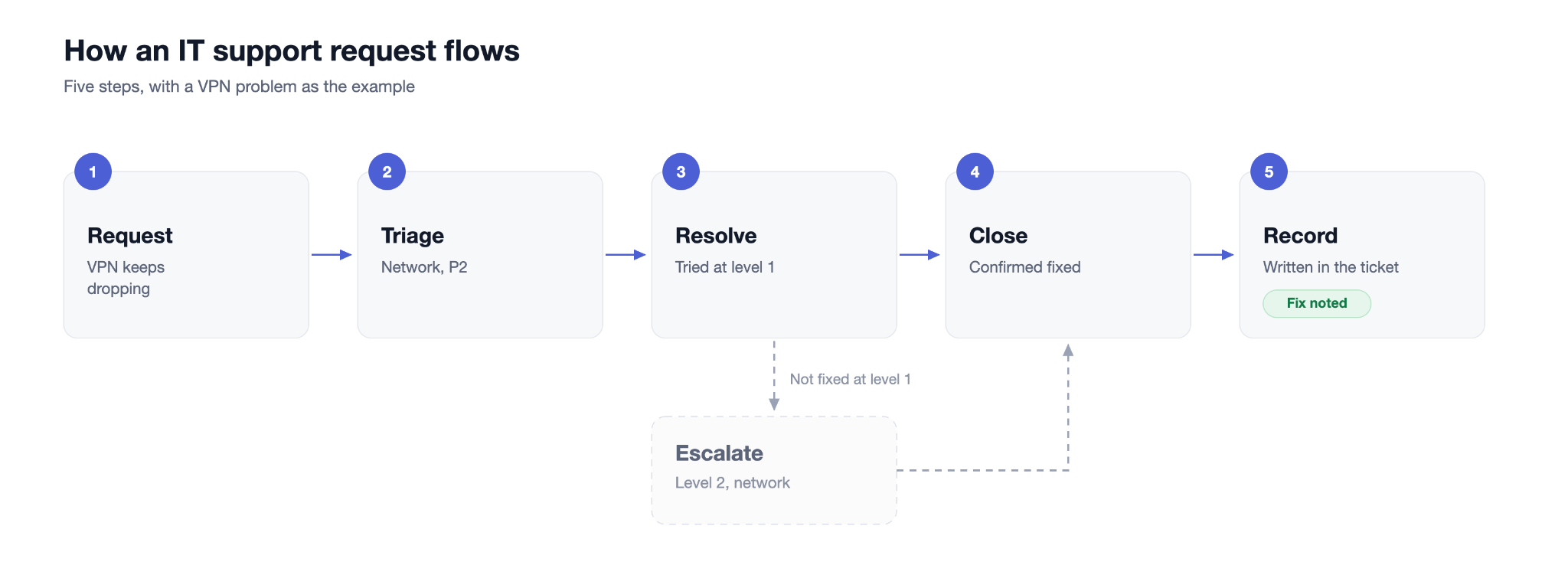
The IT support process is mostly the same in every company, and it runs in six steps.
- The request comes in: An employee reports the problem, or they ask for something they need. It can come from a chat message, an email, or a form, whichever channel the company has given to them.
- Triage: Category and priority are given to each request. Something that is broken becomes an incident, and incident management covers how these are handled. Access to a tool or new software is not a breakage. Requests of this type come under service request management, and approval is taken first before the work starts. Priority depends on how many people are affected and how urgent it is.
- Resolve at first contact: Many of the common issues are solved by the same person who has picked up the request, like a password reset or an unlock, and a troubleshooting guide with the known fixes written in it helps them to work faster.
- Escalate when needed: If the first level is not able to solve it, the request goes up to a specialist or to the vendor. Whatever has been tried already should be written on the ticket. Otherwise, the next person repeats the same thing.
- Close and confirm: The person who raised it is informed what was done, and the ticket gets closed after they confirm it is working now.
- Record the fix: The fix is written in the ticket itself. Fixes that repeat go into the knowledge base also, so next time people can find the answer by themselves.
IT Support Channels and Tools
Every company gives its employees one or more channels for reaching IT support. The tools come after that, they are what the team works with once the request is in.
Channels
- Chat, in Slack or Teams, where people are already working.
- Email, sent to a support address that turns it into a ticket.
- A portal or a form, with fields the person fills in before submitting.
- Phone, for urgent things and for people who are not sitting at a desk.
- Walk-up, when somebody comes to the IT desk directly.
Tools
- Ticketing system: Every request gets logged here with an owner, a priority, and a status.
- Knowledge base: The answers that get asked again and again are written here for people to find.
- Remote access: Lets a technician see the screen and fix the machine without going to the desk.
- Device and asset management: Keeps a record of which laptop is with which employee, and what is installed on it.
- Identity management: Accounts, passwords, and the access a person has in each tool.
- Monitoring: Watch the servers and the network, so the team knows about an outage before the tickets start coming.
Among these tools, the identity and device ones are where an integration helps the most, and the reason is that account changes and device details get asked for every day. In Suptask, the Okta integration prepares the account and password changes so a manager can approve them before they are applied. Device details are brought onto the ticket by PDQ Connect, and the software deployments that have been approved can be sent from there also.
IT Support in Chat
Chat is where the work conversation is already happening, and a question for IT starts as a message in Slack or Teams before anybody thinks about opening a form. A message by itself has no owner on it and gets scrolled past. Chat-based IT support works when the message becomes a tracked request, with an owner on it and a status that can be seen.
Suptask is one of the tools built for this, working as a Slack help desk. Employees ask in a help channel or in a direct message, and the request becomes a ticket with an owner, priority, and status. Employees do not have to open a portal or make a second login for it, because an IT help desk in Slack keeps everything in the thread where the question was asked.
The questions that repeat can be answered without a person, using the rule-based IT helpdesk chatbot and AI assistants. In Suptask, the AI assistants answer the how-to questions from IT's own documents, and whatever they cannot answer stays in the thread for a person to pick up.
IT Support Roles
IT support roles are titles for the different parts of the support work, and a company adds them as it grows.
- Help desk technician: The first person to take the request, who answers the common questions and does the resets.
- Desktop support technician: Laptops, desktops, and the software on them are handled by this role, including the setup for new joiners.
- Systems administrator: Keeps the servers and the email system running. Accounts and permissions are managed in this role also.
- Network administrator: Everything that carries the connection is in this role, which means the wifi, the switches, the firewall, and the VPN.
- IT manager: An IT manager owns the whole support function, with the budget, the vendors, and the priorities.
In a small company, these titles do not exist separately. One person will be doing the help desk work along with the desktop work, and an outside provider gets called in for the servers.
IT Support vs Help Desk vs Service Desk
IT support vs help desk is a question that comes up because the terms get swapped for each other in everyday use. IT support is the broad function, and a help desk or a service desk is a way of organizing it.
A help desk is the narrower of the two, built around fixing what is broken and getting the ticket closed. A service desk takes the requests and the approvals also, with a catalog of the services people can ask for. Approvals and a catalog are the whole service desk vs help desk difference, and a company that only fixes broken things can manage without them.
IT Support for Small Businesses: In-House, Managed, or Both
IT support for small business comes down to one choice, which is whether to keep the work internally or hand it to a provider. Most companies end up using both at different stages.
A managed service provider is an external company that takes this work under a contract, and managed IT support from them can cover the whole function or only the parts the internal person is not able to do.
The first IT hire becomes necessary when the person covering IT was hired for a different job, and the requests are taking up part of every week.
Whichever way it is set up, the requests need one place to land. A small team can run that in Slack, and help desk software for small business keeps each request as a ticket without a portal to maintain. Providers use the same arrangement with their clients. An MSP help desk runs through a Slack Connect channel, so the tickets stay visible to the provider and the client both.
What Good IT Support Looks Like
The most obvious signs of good IT support can be seen in the six things, and any size of company can put all of them in place.
- One clear place to ask: Every employee should know where the IT request has to go, and anything that comes from a side route gets pointed back there.
- An owner on every request: Each request has an owner and a status to keep the requester informed about the progress made on their request.
- Response targets by priority: A P1 that affects the whole office should not wait in a queue with other requests like a password reset.
- Answers written down for common questions: Repetitive questions should have knowledge base articles written for them, so employees can find a fix without raising a ticket.
- Communication during an outage: When something is down for everybody, one update posted in the channel will stop the same ticket from coming again, and a second update after the fix closes it for the people who never raised anything.
- A monthly look at what is driving the requests: Keeping count of what came in helps identify the problems that are repetitive, and causes get fixed to prevent them from coming back.
Targets in the table are starting points only, every company has to set its own as per the business need.
Response time is one measure, the other ITSM KPIs cover resolution times, backlog size, and repeat tickets.
Example: A Day of IT Support at an 80-Person Company
Victor is the IT lead at a company of 80 people. The entire support function is handled by him alone, with one outside provider kept on contract for the network side. A normal working day for Victor is given below, and most of the requests in it are the ones that any IT team would be getting.
- 08:45: Lena is not able to log in to her account. Her identity is verified by Victor over a call, and the password reset is done for her after the verification is complete.
- 09:30: Access to the finance drive is needed by Sebastian for a report that has been assigned to him. Approval for it comes from his manager in the ticket itself, and the account change gets prepared through the Google Workspace integration in Suptask so it can be applied after the approval.
- 11:00: Jenny raises a ticket about her laptop, which is not charging at all. A spare laptop is given to her the same day so her work is not stopped, and the laptop that is not charging goes to the vendor with a repair ticket.
- 13:15: Three different people report that the VPN keeps dropping while they are working. All three are kept as a single incident instead of three separate tickets. Escalation to the network provider is done by Victor, along with the details that were collected from each of the three people.
- 15:00: A new hire is joining on Monday, so the preparation for that is taken up in advance. The accounts, along with the laptop, are made ready from the onboarding checklist, and nothing remains pending for the joining day.
- 16:30: The week is reviewed by Victor at the end of the day. The VPN issues and the access requests are found to be the two things that are driving most of the tickets, the VPN part is already with the network provider.
Set Up the Basics in a Week
The basics of IT support can be put in place within a week, and four actions are enough to begin with. None of them needs budget approval or a new tool. Each one can be done with whatever the company is already using.
- Pick one place for the requests: A single channel has to be decided for everything that comes to IT. Employees should be told about it, so the other routes get used less over time.
- Give every request an owner: Putting a name against each request at the time it comes in helps to remove the question of who is looking into it.
- Write the answers for the 10 most common questions: The questions that get asked repeatedly should be listed out first. A short answer for each one of them can then be written in a document or in the knowledge base, so the employees are able to find it without asking anybody.
- Set response targets for P1 and P2: Only the two highest priorities need a target in the beginning, the rest can be added once P1 and P2 are being met.
Frequently Asked Questions
What are the typical duties of an IT support technician?
The duties of an IT support technician are mostly around the daily requests that are coming from employees. Technology questions are answered by them, the hardware and the software problems get fixed, the password resets are done. Setting up the accounts and the devices for new hires is part of the same job. Anything complex is passed on to the specialists. Most of this work is tracked as tickets, so the record of what was done stays with the request itself.
What is an example of an IT service?
Setting up a laptop and the accounts for a new employee is a common example of an IT service. Password resets are another one, along with access to the shared drives, the software installs, and the VPN support. Each of these is a service because the employee is asking for something to be provided, and nothing is broken in any of them.
What skills does IT support need?
Troubleshooting is the main skill in IT support, because the problem has to be narrowed down before it can be fixed. Knowledge of the common devices and the software that a company runs is needed along with it. Clear communication matters just as much, and the ability to explain a fix in plain language is what the non-technical employee needs from them. Patience is part of it too, since the same question keeps coming from different people.
What is remote IT support?
Remote IT support means the problem is fixed without the technician coming to the person's desk. Chat, a call, or a remote access tool is used to see what the issue is, and the fix gets applied from wherever the technician is located. A large part of the everyday issues can be handled this way, and the on-site visit is kept for the hardware problems that need somebody physically present.