Wrangle Alternative for Slack Ticketing
Suptask is a Wrangle alternative built for Slack. Plans start at $15 per agent per month, billed annually, and every plan charges only for agents, so requesters are free.

Wrangle Compared With Suptask

Suptask
Wrangle
Wrangle Compared With Suptask
Slack Integration Level
Suptask
Fully integrated to Slack, plus web app
Wrangle
Integrated to Slack, plus web app
Slack App Integration
Suptask
Complete Service Desk: table and card views, custom filters and new ticket requests natively in Slack and Web
Wrangle
Fixed views; dashboard in the web app
AI Assistants in Slack
Suptask
Build any assistants: answer from knowledge documents, deflection and perform agentic actions
Wrangle
Fixed deflection agent, on the $59 plan only
Workflow Automation
Suptask
Prompt-based through AI Assistants, plus rule-based automations
Wrangle
Visual flowchart builder
Email to Slack Ticketing
Suptask
✓ with AI categorisation and routing, custom-styled email layout
Wrangle
✓ via forwarding
Slack Connect for External Customers
Suptask
Unlimited channels at no extra cost; external users track tickets in the Suptask app
Wrangle
5 channels included, then $5 per channel per month
Integrations to HRIS, Directories and MDM
Suptask
Yes, multiple available (Hibob, BambooHR, Iru, Jumpcloud etc)
Wrangle
Through Zapier or Slack Workflow Builder
Microsoft Teams
Suptask
✗
Wrangle
✓
Security & Compliance
Suptask
SOC 2 Type II, GDPR, HIPAA BAA, EU hosting
Wrangle
SOC 2 Type II, custom DPA
What Suptask Gives You That Wrangle Doesn’t
AI Answers and SSO at $38 per Agent
 AI answers common questions from the knowledge sources your team maintains
- Single sign-on for the whole team
- SLA management and automated approval workflows
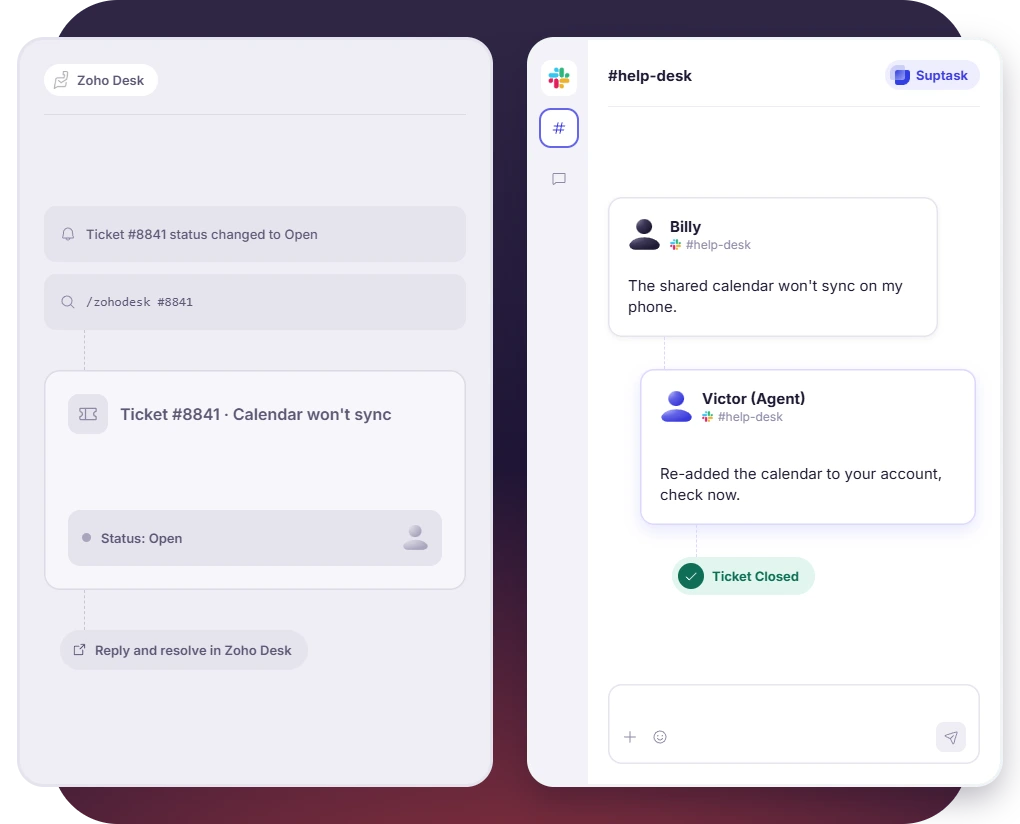
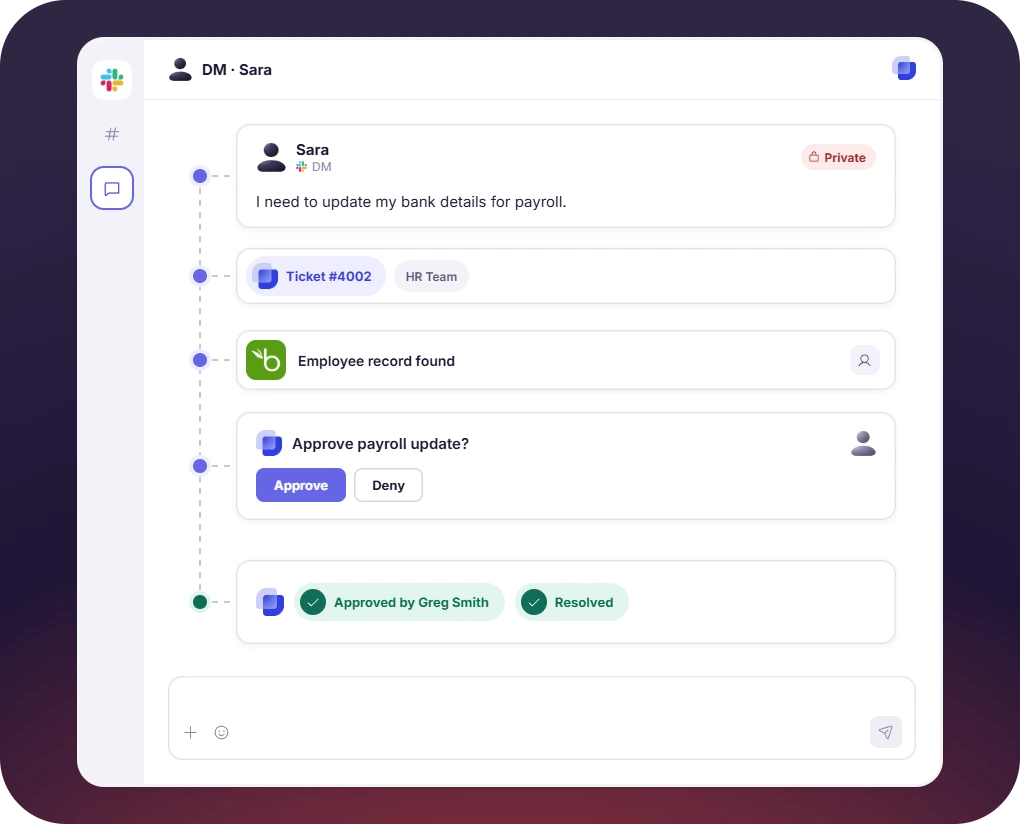
Suptask Connects HR and IT Systems Natively
- Connect BambooHR, HiBob, or HaileyHR for employee details on the ticket
- Connect Iru or PDQ Connect for device and patch information
- HR, identity, and device connections are available on the Custom plan
Turn Slack into a help desk your team will actually use

Why Teams Move From Wrangle to Suptask

Pay per agent
Every Suptask plan is priced per agent, with no three-seat minimum, so small teams pay only for the agents they have.

Unlimited customer channels
You can add unlimited customer channels without a per-channel charge.

SSO from $38
Single sign-on (SSO) is available from $38 per agent per month on the Growth plan.

HR and IT connected
Native integrations with HR and IT systems let Suptask add employee, access, and device context to tickets.
Pricing: Suptask vs Wrangle
Suptask
Suptask starts at $15 per agent per month, billed annually, with no minimum number of agents.
14-day free trial on the Growth plan, no credit card needed
AI Assistants, SLA management, and SSO from $38 per agent per month, with no AI add-on per seat
Wrangle starts at $39 per agent per month, billed annually, with a three-agent minimum.
Wrangle
Wrangle starts at $39 per agent per month, billed annually, with a three-agent minimum

Workflow assignees and admins are counted as billed users
AI answers, Copilot, and native integrations are available from the Scale plan at $59 per agent per month
Five Slack Connect channels included, then $5 per channel per month
Already trusted by fast-moving support teams.



Frequently Asked Questions
What is a good Wrangle alternative for Slack ticketing?
Suptask is a Slack ticketing system that handles the same work as Wrangle. Tickets are created and handled in Slack channels. The Growth plan includes AI answers, SLA management, and single sign-on at $38 per agent. Plans start at $15 per agent per month on annual billing. There is no agent minimum.
Wrangle has three plans. Pro is $39 per agent per month on annual billing, or $46 on monthly billing. Scale is $59 on annual billing, or $70 on monthly. Enterprise pricing is by quote. Pro and Scale both have a three-agent minimum, which puts the starting cost at $117 or $177 a month. Each of the two plans includes five Slack Connect channels. After that, each extra channel is $5 a month. Wrangle also has a 14-day free trial with all features and no credit card, and no free plan is listed. Suptask’s plans start at $15 per agent per month on annual billing.
Yes. The Pro and Scale plans both need at least three agents. On annual billing, Pro starts at $117 a month, and Scale starts at $177 a month. The minimum applies to a team of one or two people as well. Suptask has no agent minimum. A team of two is billed for two agents.
Both tools handle tickets in Slack. Wrangle also works in Microsoft Teams, which Suptask does not. Suptask is built for Slack only. Wrangle has a no-code workflow builder, with approvals and checklists in Slack threads. On Suptask, AI answers and single sign-on are included from $38 per agent per month. Wrangle keeps ticket deflection on the $59 Scale plan, and single sign-on is on the Enterprise plan. Suptask also connects to HR, identity, and device tools on the Custom plan. Slack Connect support for customer channels is unlimited on every Suptask plan, with no per-channel fee.
Yes. Wrangle works in Slack and in Microsoft Teams. Suptask works in Slack only. Companies that also use Microsoft Teams need that support, and Wrangle covers both. For a company that works in Slack, Suptask covers the same ticket work.
Add Suptask to Slack and your agents are ready to work. Start with one channel or one team by setting up its Inbox and ticket forms, then move the other teams over.