Escalation management is how a support team hands off an issue to someone with more expertise or authority when a first owner can't resolve it in time. However, when the handover happens, either the context gets dropped, or nobody picks up the ownership in the next step. The requester is left waiting with no update coming.
This guide covers the escalation types, levels, and the step-by-step ticket escalation process, along with customer escalations and IT incident escalations. We have also talked about the example timers by priority, three message templates, and metrics that show if the escalation process is working.
Key Takeaways
- Escalation management is the handover of an issue to someone with more expertise, that one is called functional escalation. Hierarchical escalation is when it goes up for more authority.
- A clear trigger, a named owner on each level, and the full context attached, these are what an escalation needs.
- Timers and SLAs are used for automatic escalation, so a stalled ticket does not wait till someone notices it.
- The steps are the same for customer escalations and internal IT escalations, only the people change.
- Escalation rate and time to escalate should be tracked, with the escalations reviewed, so the same issue is not repeating.
What Is Escalation Management?
Escalation management is used for identifying the point where an issue goes beyond what its first owner can do. The next owner is decided at that point, and the handover to them is part of the same practice.
The requester waits less, because an issue is not kept with an owner who cannot close it. Specialists on the second line receive only the issues that actually need their skill. Escalation management is a standard part of customer support and of internal service desks.
Escalation policy is the written form of these rules, and escalation path is the route each issue type follows. Without the policy written down, each escalation gets decided fresh by whoever is holding the ticket.
Types of Escalation
Escalation types are separated by the direction the ticket moves in, and by what triggers the move.
Functional Escalation
Functional escalation is the sideways move, from the first owner to someone with the right skill or the right access. The authority level stays the same here, the change is only in expertise.
Hierarchical Escalation
Some issues need approval before they can be closed. The first owner may know the fix already, but the permission for it is with somebody above. Hierarchical escalation moves the ticket up the reporting line for that permission, or for a decision on an exception.
Automatic Escalation
Automatic escalation is triggered by a timer instead of a person. A rule tracks the time on the ticket against the SLA, and the move happens when a threshold is crossed.
In Suptask, the automatic escalation rules are set per Inbox. A ticket near its threshold is escalated to a manager, and a time-in-status rule picks up the ones that stall.
Priority-Based Escalation
Priority-based escalation works at intake. A ticket logged as critical does not begin at the first line. It goes to senior staff or to the on-call person, and no skill check is done first.
Sentiment-Based Escalation
An upset requester or a key account can also move a ticket up. Sentiment-based escalation is based on who is asking and how the message reads. The rule needs to be kept narrow, because escalating every strongly worded message fills the senior queue.
Escalation Levels
Many support teams work with four escalation levels, and the escalation path names which one comes next.
The Ticket Escalation Process, Step by Step
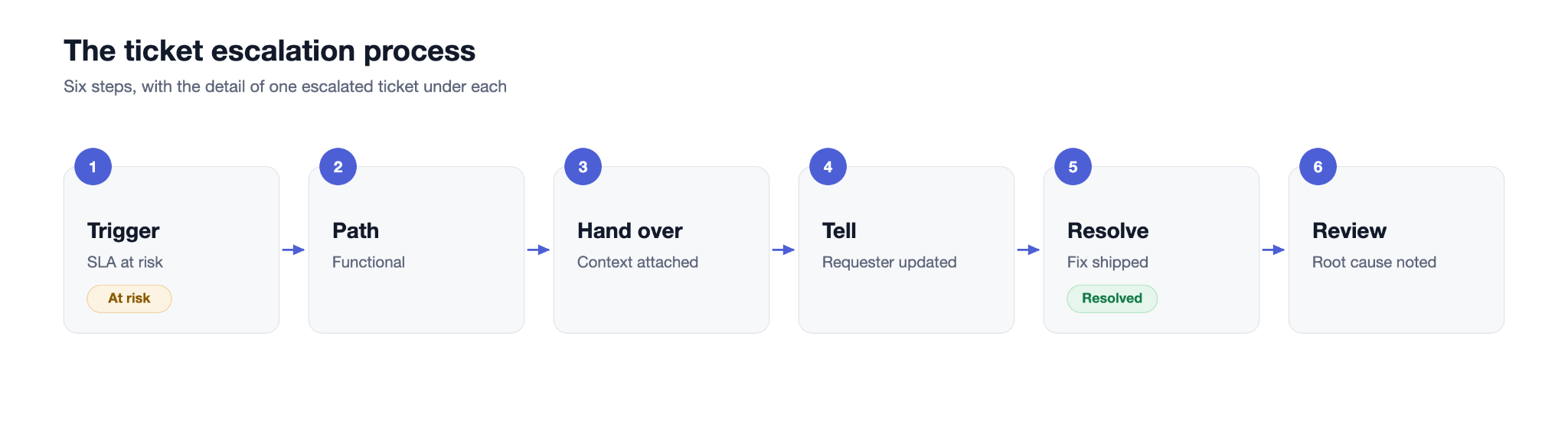
An escalation workflow is the set of steps your team should be following whenever a ticket has to move to somebody else. The following six steps should be written down as an escalation procedure, because that will help every agent to work the same way.
1. Spot the Trigger
The trigger is the point where the ticket has gone past what the first owner can do. A skill gap is the common one, the agent simply does not know the fix. SLA getting close to its threshold is also a trigger, and so is a priority that has been logged as critical. An upset requester can be one. Approval that the agent is not allowed to give is also a trigger.
2. Pick the Path
The agent picks the path that the ticket will take. If the ticket needs a different skill, then it should go sideways, that is, functional escalation. If it needs an approval or a decision, it should move up the reporting line, which is a hierarchical escalation. In some cases, both functional and hierarchical escalation can happen on one ticket, if the specialist does the fix and the manager approves the exception.
3. Hand Over With Context
Context should be attached to each ticket before it is escalated. It should include what happened, what has been tried already, what the requester needs, and the deadline. The new owner can then start from that summary, and they do not have to read the whole thread. If this step gets skipped, the ticket escalation comes back to the first owner again, for the same information.
4. Tell the Requester
The requester should stay updated with progress on each ticket. The status should have information like who the owner of the ticket is now, and when they can expect to hear back. Giving an actual time matters, because vague commitments like "soon" will only make them check the thread again and again.
5. Resolve and Update
At this step, the new owner will start working on the ticket and post the updates in the same thread. A fixed interval should be kept for these updates, so that the first owner and the account manager are not asking for a status separately. The requester reads the same thread, so one update serves everybody.
6. Close and Review
The ticket gets closed after the requester confirms that the fix is working. The reason why the ticket got escalated should also be recorded in one line. Once a month, you can read these reasons together, and the ones that keep repeating will show you where the real problem is. Missing knowledge article, a training gap, a product bug, these are the usual ones.
Customer Escalations in B2B Support
In B2B support, the person raising the escalation is a named contact at a company that has signed a contract. Your team already knows who they are, and the account manager knows when the renewal is coming up. A customer service escalation in B2B is handled with the account in mind as well as the ticket. Escalation handling is one part of B2B customer service, and the same contacts stay with the account over the whole contract period.
Many of these escalations are technical also, and the fix has to come from the engineering team. The customer escalation then moves in two directions at one time. The specialist works on the fix, and the account manager is kept informed because the relationship is their responsibility.
Customer escalation management in B2B works better when a few rules are fixed in advance, such as:
- One owner should be on the ticket at any time, even when more than one person is working on it, because the customer needs one name to ask.
- The conversation should stay in one channel only, and a second thread should not be opened for the same issue.
- The account manager can follow the ticket without owning it, and that way they are seeing the updates without being in the middle of the work.
- Updates should go out on a fixed cadence, even when there is nothing new.
Some teams are keeping Zendesk for their larger customers, and they do not want to move everything at once. The Zendesk integration lets a ticket be escalated from Slack into Zendesk, and the status is synced back.
Incident Escalation in IT
On the IT side, the first line is the service desk, and the incident escalation goes to a resolver group when the service desk cannot fix it. A resolver group is the team that owns the system, such as the network team, the database team, or the identity team. The escalation can also go outside the company to the software vendor when the fault is in their product. All of this is one step inside incident management, and the rest of that practice covers logging, categorizing, and closing.
The IT escalation process also moves upward when the impact of the incident keeps growing. A fault that started with one user can spread to a whole department, and at that point the IT manager has to be informed. Decisions about downtime and about what is told to the business are with them.
Some incidents grow past what the normal incident escalation process can handle. Once the impact crosses the threshold your organization has set, the incident is declared major and major incident management takes over. A separate channel is opened for it, the updates go out on a fixed schedule, and a lead is named for the whole thing.
Teams that are running their help desk escalation in Slack can keep all of it in one place. Incident escalation in Slack means the resolver group is added to the same ticket, and the updates are posted back in the channel where the incident was raised.
Customer Escalation vs IT Escalation
The six steps run the same way on both sides, the trigger right through to the review. Who is at each step changes, and that part has to be written down separately for the customer side and for the internal side also.
Escalation Triggers and Timers
The time a ticket can stay at one level should be decided in advance, and by priority. A P1 and a P4 cannot be given the same number of hours.
The numbers above are illustrative only, your own SLAs should decide the real ones. Support teams who ask this question do not get one answer back, because the right timer depends on the size of the team and on what the contract has promised.
The priority itself comes from a prioritization matrix, where impact and urgency are scored together. A ticket logged at the wrong priority will then escalate at the wrong speed. Escalation timers should be kept tighter than the SLA target itself, and that is one of the SLA best practices worth writing into the policy.
Let the timers escalate for you. In Suptask, SLA thresholds by priority alert the team before a breach and escalate to a manager. Time-in-status rules catch tickets that stall.
Escalating Inside the Conversation
In chat-based support, you should not be starting a new ticket for the escalation. The specialist can simply be added to the thread that is already running, and your requester is then having only one place to look. The specialist also gets the full history, so nobody has to paste it again. A new ticket splits the same conversation in two, and then the requester will have to repeat whatever they have already said.
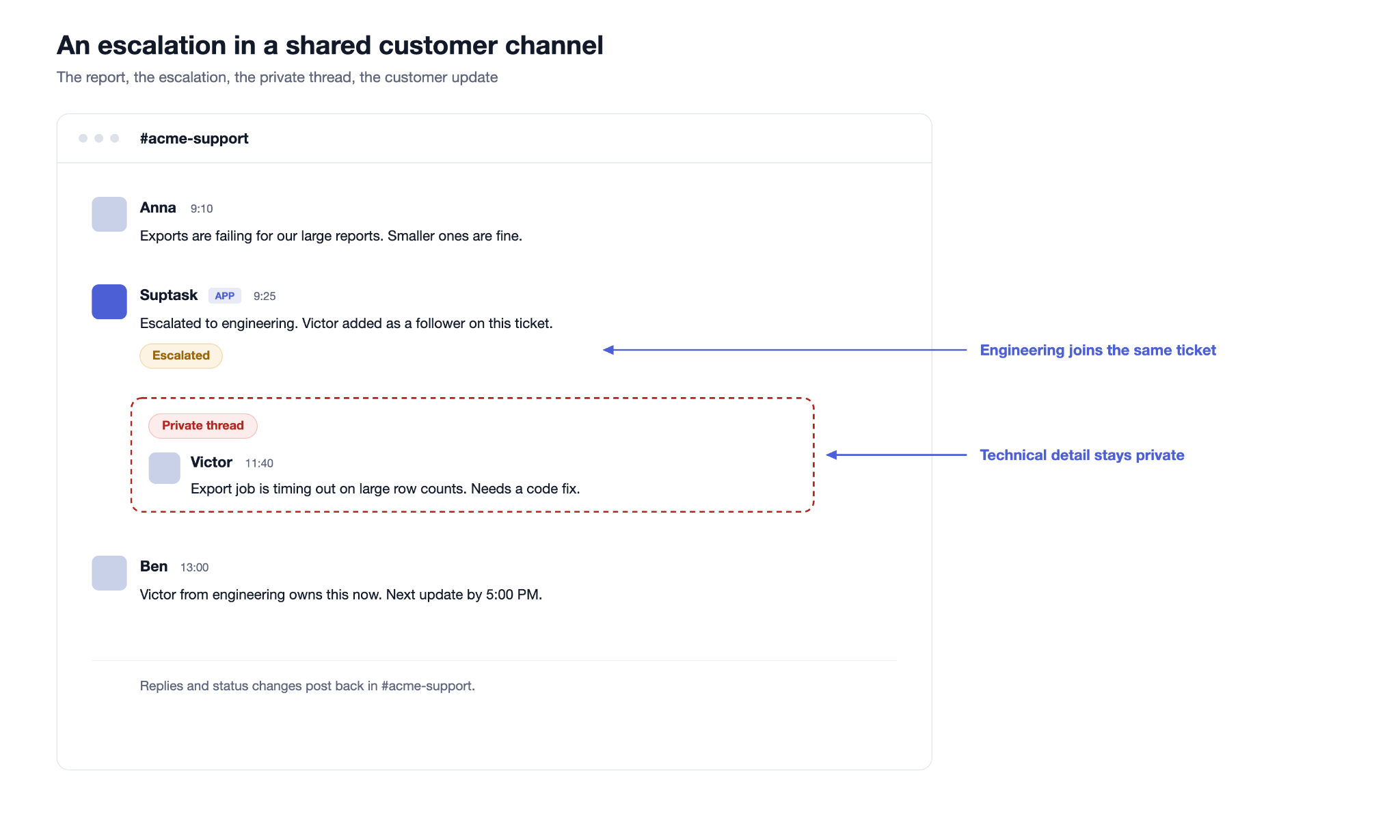
Everything in the escalation does not have to be visible to the requester. Log lines, stack traces, two engineers checking a configuration between them, all of this can be kept in a private thread only. A private thread is helpful for keeping that part away. What should go back on the public channel is the outcome that includes what was wrong and what has been done for it.
In Suptask, the escalation is adding the engineering team as followers on the same Slack thread. If the issue is fully owned by some other team, then the ticket should be moved to a second-line inbox. The technical detail is kept inside a private thread. Replies and the status changes are posted back into the channel from where the request came.
The same requirement is there for B2B customer support software also, because your customer should be seeing only the progress. Suptask can be used as a Slack help desk for employee requests also, and the escalation works in the same manner there. From the ticket itself, an engineering issue can be opened with the Jira integration, and the GitHub integration does the same thing.
Escalation Message Templates
The message that goes out at the time of escalation is doing a lot of work. It has to say who is holding the ticket now, and it has to say when the next update will come. If either of these is missing, then the person on the other side is left guessing, and they will come back after some time asking the same question again. Politeness in an escalation comes from giving the other person something they can act on immediately.
To the customer
We've passed this to [team] because [reason]. [Name] now owns it, and you'll hear from us by [time].
The customer message should be kept short, three lines at most. Nothing about who made the mistake has to go in there, and no explanation of your internal process either. Your customer only needs two things from this message, the name of the person who has it now, and the time by which somebody will come back to them. Everything else can wait for the update.
To a manager
A manager is going to read this message in between other things, so the decision that is needed should come at the end where it is easy to find. Writing only the issue and the impact turns the message into a status update, and then nothing moves. Ask for one decision in one message. If two decisions are needed, then two messages should go out. Otherwise, the manager will answer the first one and leave the second.
[Customer or team] is blocked on [issue]. The impact is [impact]. We have tried [what was tried], and it has not worked. A decision is needed on [decision] by [time].
To engineering
Steps to reproduce: [steps]. Environment: [version, browser, region]. Customer impact: [who is affected and how]. Priority: [P1 to P4]. Ticket: [link].
The engineering team will mostly not read the full ticket thread before they start on it. Everything needed to reproduce the problem has to be in the message itself, and the ticket link is there for whatever detail they want afterwards. Priority has to be written in also. Otherwise, the issue goes into the backlog at the same level as everything else.
One rule covers all three of them. Say what is happening next, and say when it will happen. The other team's name should not come into the reason at all, because a message that is blaming somebody gets forwarded around and the issue stops moving.
Example: A B2B Escalation From Message to Fix
At 09:10, Anna posted in the shared channel between her company and the support team. Exports were failing for her large reports while the smaller ones completed normally. Ben picked it up and reproduced the same failure by 09:15. The company has two documented fixes for export failures, but neither of them worked.
A skill gap was the trigger. Ben escalated functionally at 09:25 and added Victor as a follower on the ticket. The debugging process moved into a private ticket thread, since the log output and the queries were of no use to Anna. Anna received one message in the channel, naming Victor as the owner and promising an update by one o'clock.
Carly Larson started following the ticket at 09:30. She is the account manager on the account and the renewal was due the next month, so she needed visibility without taking the ticket from Ben.
Victor traced it in the afternoon. The export job was timing out above a certain row count, which needed a code fix. He linked the engineering issue to the ticket at 13:00, and Ben posted the update in the channel.
The fix shipped the next morning. Anna confirmed at 10:00 that her large exports were running, and Ben closed the ticket. The reason was recorded on it, a missing timeout limit on the export job, and the same item went into the engineering backlog.
Escalation Management Metrics
Six metrics can help you to know whether the escalation management process is working or not. None of them means much alone, but together they tell a lot:
- Escalation rate: The share of tickets that leave their first owner in a month.
- Time to escalate: How long a ticket stays with the first owner before it moves.
- Time from escalation to resolution: The gap between the handover and the confirmed fix.
- Reopen rate after escalation: How many escalated tickets come back after they were closed.
- Escalations by reason: The split across skill gap, approval needed, priority, and SLA risk.
- Repeat escalations for the same issue: Separate tickets escalated for one underlying cause.
An increasing escalation rate is not automatically a problem. It can mean triage is catching the hard tickets earlier, and it can also mean the first line has lost access to something it used to handle. Read it alongside the customer service KPIs the team already tracks, first response time and resolution time in particular.
Escalation Management Best Practices
- Write the escalation policy and name the escalation path for each issue type. A billing dispute and a login failure should not land in the same place.
- Triggers should be set per priority, so a P1 moves on a timer a P3 never reaches.
- The basic ticket facts, what happened, what was tried, and the deadline, go across with the ticket every time.
- One name holds the ticket at any moment, even when several people are working on it. Two owners mean each one waits for the other.
- Every handover gets a message to the requester naming the new owner and the next update time.
- Once a month, read the recorded reasons together. The ones that repeat become the fix list for the next quarter.
- An escalation that keeps repeating is a gap somewhere else. A missing knowledge article, training that did not cover it, or a product bug are the usual gaps.
Write Your Escalation Policy in an Hour
An escalation policy can be written in four steps:
- Start with your levels and the name against each one. Level 1 is the frontline, Level 2 is the specialist, Level 3 is engineering or the vendor, and above that is a manager. Write a real name next to each level, because a team name alone leaves the ticket with nobody.
- The next should be the timer for P1 and P2. The lower priorities can wait for the second version.
- Copy the three message templates into wherever your team keeps its saved replies. The customer one, the manager one, and the engineering one.
- A monthly escalation review goes in the calendar before you close the document. The agenda is the recorded reasons and the list of what to fix.
- Statuses are the other half of this. Which status a ticket carries while it is escalated, and who changes it, is part of your ticket lifecycle.
Frequently Asked Questions
What does it mean to escalate a ticket?
Escalating a ticket simply means handing it to someone with more expertise or more authority. It's done when the current owner can't resolve the issue in the time the ticket has been given. The ticket doesn't start fresh. It keeps its history and whatever is already attached to it. So, the requester should be told who owns it now.
What are the four stages of escalation?
Not exactly fixed. Four is the common count, though no standard sets it. Frontline support, then a specialist or second line, then engineering or an outside vendor, and management above those. Each level has its own owner and its own response targets. Some teams run three levels, some run five. So, what matters is a named owner at each one.
How do you escalate politely?
Say why the ticket is moving, who's taking it over, and when the person will hear back. Keep it factual. Don't put the other team's name in the reason, because a message that assigns blame gets forwarded instead of answered. Everything the next owner needs should be in the same message. A short, specific message reads as care being taken.
What is the difference between an escalation and a transfer?
They're not the same thing. A transfer moves a ticket to another queue or another person, and the reason is routing. The issue landed in the wrong place. An escalation moves it because the issue needs more expertise or more authority than the current owner has. Thus, the deadline tightens, and the follow-up gets closer.