Customer support tiers classify support staff into hierarchical tiers to ensure that all requests are processed by someone who can best deal with the request. They apply to both customer service teams and IT support teams, often called a tiered customer service model or IT support model.
Whether you run a customer support department or an IT helpdesk internally, this process ensures that easy-to-resolve tasks are given to the first-line staff members, while difficult ones remain with experts.
Tiered customer service increases the efficiency of your support department by decreasing resolution time, making the right allocation of resources, avoiding unnecessary escalations, etc.
This article will walk you through the process of customer support tiers, functions of each tier, comparison between tiers of IT support and customer service departments, and much more.
What Customer Support Tiers Are
Customer Support tiers are an organized way to distribute responsibility for support issues depending on their complexity and how much authority is needed to solve them. Rather than each agent performing all kinds of tasks, tickets progress through a set number of levels before reaching someone who is able to solve them.
The same concept applies in case of customer service and IT support. This structure is also referred to as customer service tiers, IT support tiers, or levels of IT support, depending on the organization and context. The organization remains the same while the kind of work changes.
For instance:
- A Tier 2 customer service ticket would be a billing system problem that needs to be solved from the backend side.
- An IT Tier 2 ticket would be diagnosing problems with VPN configuration.
Even though the nature of the task is different, both of them require greater technical expertise than what the frontline employees possess.
It is also common practice to see customer service levels, customer service tiers, or levels of IT support in support documentation. Similarly, L1/ L2/ L3/L4 supports are just other names for Tier 1, Tier 2, Tier 3, and Tier 4.
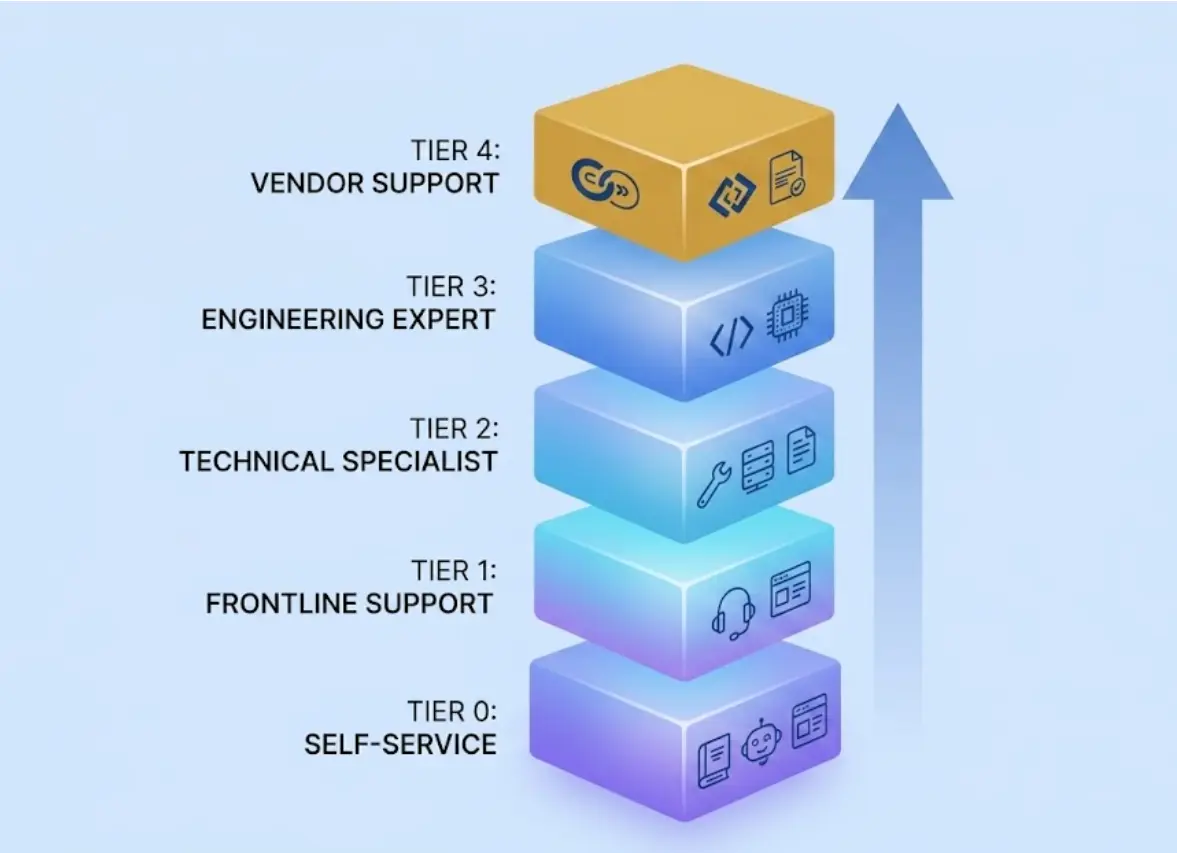
Organizations typically adopt one of these tiered customer service models:
- Tier 0: Self-service support
- Tier 1: Frontline support
- Tier 2: Technical or specialist support
- Tier 3: Expert or engineering support
- Tier 4: Vendor or third-party support (optional)
The smaller organizations integrate both Tier 2 and Tier 3 activities, whereas the bigger organizations supporting enterprise software or hardware have a better advantage using a full five-tiered customer service model.
Why Tiered Support Exists
Why do support tiers matter? Because not all problems demand the same degree of technical skills.
It’s costly to have engineers handling password reset requests and answering simple product-related queries. On the other hand, asking frontline support personnel to figure out why the infrastructure is failing or debugging the software causes delays for everyone.
The primary idea behind a support tier model in customer service is to make sure that every single request is sent to the lowest tier that can resolve it. This approach is a core part of the IT support model and tiered customer service strategies used to balance workload and reduce unnecessary escalation.
How does a support tiers approach help?
- Avoids unnecessary escalations
- Saves resolution time
- Enables specialists to handle complicated cases
- Enhances customer and employee experience
- Brings down the costs of providing support
Another key principle is shift-left.
Shift-left is when you move commonly recurring resolutions to lower support tiers. When Tier 2 keeps addressing the same problem, it is not about keeping escalation tickets for the same problem open. Rather, it involves documenting the solution and adding knowledge base articles, changing the troubleshooting script, or automating the process to make it possible for Tier 1 or Tier 0 to address similar requests.
Teams that adopt shift-left practices start getting lower ticket volume on high tiers and higher resolution rates on the first attempt.
On the contrary, when no structure exists within an IT support environment or a customer support environment, the exact opposite tends to happen.
The Five Levels of Support, From Tier 0 to Tier 4
Although different companies design their support tiers differently, all tiers from tier 0 through tier 4 generally have similar processes from self-service to expert support.
Tier 0 — Self-Service
This tier 0 supports the resolution of issues without the actual involvement of humans. This tier provides users with everything they need to resolve simple issues on their own.
Resources that can be found at Tier 0 usually include:
- Knowledge base articles
- Documentation in the help center
- AI chatbots
- Community forums
- Automatic password reset
- Product walk-throughs
- Status pages
- In-app onboarding tools
The customer support staff usually uses FAQs, product manuals, and chatbots to answer frequently asked questions before involving any agents.
The IT team automates repetitive requests such as password reset, installation of software, and permission requests.
If users fail to use self-service, then the problem is moved to Tier 1. Effective self-service resources such as knowledge bases, FAQs, and automated assistance can reduce repetitive support contacts and help shift routine issues away from frontline agents, improving efficiency across the support organization
Tier 1: Frontline Support
Tier 1 support is the first point of contact involving a human.
In customer service environments, Tier 1 agents answer questions using knowledge bases, internal documentation, and established workflows.
Within IT departments, Tier 1 technicians handle intake, initial troubleshooting, and routine technical requests.
Typical Tier 1 responsibilities include:
- Order status updates
- Billing questions
- Account changes
- Password resets
- Software installation assistance
- Basic troubleshooting
- Product usage questions
- Access requests
The primary responsibility of Tier 1 isn't solving every issue. Instead, agents should recognize when an issue falls outside their authority and escalate it before valuable time is lost.
Escalation usually happens when:
- System permissions are required
- No documented solution exists
- Standard troubleshooting has failed
- The issue has already been reopened
Tier 2: Technical or Specialist Support
Tier 2 support sits between frontline support and engineering teams. It handles issues that Tier 1 cannot resolve but that do not yet require full engineering intervention from Tier 3.
It deals with issues which need more technical knowledge, higher privileges, and product knowledge that is not available at the Tier 1 level.
Unlike Tier 1 technicians, Tier 2 technicians are usually allowed access to backend systems, logs, configurations, and policy overrides.
Depending on the company, Tier 2 professionals can specialize in networking, integrations, infrastructure, billing systems, applications, or endpoint management.
Some examples of Tier 2 tickets are:
- Problems with billing system
- Integrations problems
- Connectivity issues
- Log analysis for applications
- Database problems
- Multi-user configuration issues
- Auth problems which require backend investigations
Another important thing about Tier 2 is that this is the level at which ownership issues crop up the most.
Many organizations do not realize that quite often Tier 2 becomes a sort of a dumping ground for any problem that could not be solved by Tier 1. This is one of the most common structural issues in support teams. Without clear boundaries, Tier 2 receives incomplete or improperly escalated tickets instead of focusing on specialist-level work.
Without good job definitions, Tier 2 will become the destination for all the tickets which, in reality, belong to Tier 1, while real complex problems will get postponed.
Good handoffs are extremely important in this case.
A proper Tier 2 escalation should include:
- Steps already taken by Tier 1
- Exact error messages
- Screenshots or logs
- Time of issue occurrence
- Reproducibility details
- Customer or system context
If Tier 1 handoffs are incomplete, Tier 2 ends up repeating basic troubleshooting instead of working on deeper technical problems. This increases resolution time and reduces efficiency across the support structure.
Tier 3: Expert or Engineering Support
Tier 3 support involves problems that need the highest level of technical expertise.
A Tier 3 support team comprises software developers, network engineers, or other professionals who have access to systems not available at other support levels.
Some activities in which Tier 3 participates include:
- Software bugs necessitating changes in source code
- Infrastructure problems
- Data restoration
- Investigation into security matters
- Finding root causes of incidents
- Product-related problems for which no resolution is found
A Tier 3 group must be concerned with depth and not the number of tickets.
If the engineers spend time solving problems that can actually be solved by Tier 1 or Tier 2 with proper documentation or training, then there’s an escalation problem and not a Tier 3 problem.
Tier 4: Vendor or Third-Party Support
Every organization does not have to necessarily have a Tier 4 support process defined.
Tier 4 support needs to happen when the resolution requires the help of an outside organization rather than your own internal staff.
The situations that need to include:
- Warranty replacement for hardware
- Issues with cloud service providers
- Issues related to third party software
- Payment processing issues
- Vendors running the infrastructure
Even though the vendor might do the actual work, ownership of the process should stay in the hands of your internal support process.
Customer Service Tiers vs. IT Support Tiers: What's Actually Different?
Customer service tier levels and IT tier support level structures are identical in nature. What is different about them is the activities that are performed by each department.
Some of the biggest differences include:
The ratio of self-service vs. human assistance also varies.
Technical teams tend to automate many of their Tier 0 requests since many problems in this category can be resolved using automated troubleshooting procedures. At the same time, customer service teams use self-service extensively but sometimes need human assistance early in the process due to case specifics.
In organizations that provide services to both end-users and internal staff, customer service and IT support tiers are maintained separately.
How Escalation Should Actually Flow
Escalations are a natural part of the tiered customer support model, and it does not indicate that something went wrong. It just indicates that there was something requiring more authority or knowledge than what the current support tier has.
What we want to do is not prevent escalations but make sure that tickets escalate swiftly, and with all context available for the next level of support to continue where it left off.
We need to escalate a ticket to the next support tier if:
- The fix requires permissions the current support tier does not have.
- There is no process in place to troubleshoot that particular problem.
- There have been past attempts at troubleshooting that have failed.
- There is some sort of specialist knowledge or engineering expertise needed.
Every escalation should include:
- Summary of the issue
- Past troubleshooting steps
- Exact error messages
- Screenshots
- Time stamps
- Details about the system or customer that matter
The greatest mistake people make is the cold handoff.
The ticket being passed on without any or insufficient context means that the following individual needs to ask the same questions and carry out the same diagnosis. The customer gets frustrated having to restate his problems, whereas internally, time is wasted duplicating something which is already done.
Effective customer support tiers pay equal attention to handovers and to ticket resolution.
Designing Your Tier Structure
There is no one-size-fits-all support hierarchy that will work for all organizations. What works best for you depends on what you sell, how many tickets you have, your team size, and the technological sophistication involved.
Rather than designing your hierarchy according to positions, design it based on decision-making power.
Ask questions like:
- What can be resolved by following written procedures?
- What requires escalated access rights?
- What demands policy overrides?
- What necessitates engineering knowledge?
Having answered these questions, assigning people to the right tier is much easier.
There are a few best practices which can make sure that your support tier system is still effective as you expand your team:
- Define the responsibility of each tier through documentation.
- Formulate escalation guidelines based on authority, and not based on seniority.
- Define the information requirements for each escalation.
- Review the boundary limits of each tier after any update to the infrastructure of products.
- Keep updating documentation to ensure that recurring issues shift to tier 0 or tier 1 through time.
Another popular approach by many organizations is to formulate an ITSM framework using the ITIL framework.
When the Tiered Model Breaks
The hierarchical structure can be applied effectively to many companies; however, it has certain shortcomings.
Awareness of the most common issues will help to deal with them in advance.
Cold Handoffs
The lack of documentation leads to greater inefficiency than the process of escalation itself.
When all the steps undertaken by Tier 1 have to be repeated by Tier 2, the resolution is delayed, and the support team does additional work.
With proper documentation and systematic ticket handover, this problem is easily solved.
Complex Incidents Requiring Multiple Teams
Some problems cannot be addressed in the frame of one support tier.
Major outages, security events, and infrastructure failures are usually handled by specialists across all help desk tiers at once.
Rather than going through an orderly sequence of transfers between the teams, the company prefers swarming – collaboration of specialists from the start of work on an incident. Swarming is the complement, not the alternative to escalation.
The skillful incident management becomes very important for organizations experiencing service interruptions.
Over-Tiering Small Teams
Five-level support is not necessary for all businesses.
A team of five people hardly requires a five-level structure.
What works well in small companies is the following structure:
- Level 0 - self-service
- First-line support
- Only one route for escalations for complex issues
Additional approvals just slow down the process of solving problems.
KPIs by Tier
Each tier has varying duties, thus their performance needs to be assessed based on varying criteria.
Measuring performance through one KPI at all levels will lead to incorrect comparison as the time taken for Tier 3 is bound to be more compared to Tier 1. Many of these KPIs align with ITIL service management metrics used in ITSM environments
Here's a practical breakdown:
Don't compare tiers to each other. Each tier should be measured independently. Comparing Tier 1 and Tier 3 using the same metrics leads to misleading performance conclusions because their work types are fundamentally different. Measure individual teams according to their expected tasks.
If you are monitoring service-level agreements among support teams, then SLA management is essential for your KPIs to have any real value.
Tiers in a Slack-first Support Workflow
Many of these support teams already interact within Slack but have an additional step where they need users to leave the channel to open tickets in a different portal.
A slack-first approach eliminates this additional step.
Instead of moving between different applications, employees can simply create a ticket right from the conversation they are currently in.
Tier 0 becomes different for a chat environment too.
Instead of going to another section of the knowledge base, users can go to the FAQs, automated answers, and even bots right from within Slack before creating a ticket.
Escalation is simplified even further.
Once a ticket moves from Tier 1 to Tier 2 within a single Slack conversation, all the previous conversation, screenshots, and other information about previous troubleshooting is already linked with the ticket.
Many companies which take up this approach use it to connect their support tiers with the Slack ticketing system. It helps reduce context loss during escalation.
Is Tiered Support Right for Every Team?
Not necessarily.
When your support team has to manage only a small volume of clear requests, using customer service tiers is too complicated for your case.
The smaller teams usually can manage without:
- Well-documented process
- Defined ownership
- Simple escalation procedure
- Product knowledge sharing
Customer service tiers are useful when the number of tickets grows and specialization starts to appear.
Some indicators of the necessity to use customer support tiers:
- Constant interruption of the senior staff because of the routine requests
- Many reassignments of the tickets
- Rise of the reopen tickets' amount
- Increasing time of the tickets resolution
- Special questions always processed by the same people
At this point, the support tiers system comes in handy.
Conclusion
Each support organization is challenged with the necessity to find the most appropriate person to resolve a problem in the fastest way possible. This is exactly what customer support tiers allow doing.
When forming customer support tiers or IT support models, one should keep in mind that routine issues must be resolved as quickly as possible, as close to Tier 0 or Tier 1 as possible, while specialists must concentrate on issues which really demand their attention.
An effective tiered customer service approach relies on a well-structured workflow, the right support tools, proper documentation, SLA management, a clear escalation process, and strong ownership of responsibilities.
If you want to streamline this process and improve how support requests move across different levels, Suptask helps teams organize, assign, and resolve tickets more efficiently through structured workflows and automation.
FAQs
What is Tier 1 support?
Tier 1 support is the initial level of human support. It deals with basic requests including resetting passwords, account changes, billing issues, and basic troubleshooting using procedures. More complex queries which need advanced knowledge are referred to Level 2.
What is Tier 2 support?
The Tier 2 support team is made up of specialists who possess more technical knowledge and higher-level access to the system. They look into the problems that the Tier 1 team is unable to solve.
What is Tier 3 support?
Tier 3 is handled by engineers and technical specialists who address software defects, hardware failures, security events, and other issues that require root cause analysis.
What is the tiered customer support model?
A tiered structure in customer support assigns support personnel to various tiers based on the nature of the problem. Issues are dealt with at the lower tiers, while technical expertise is concentrated in the upper tiers.
What are L1, L2, L3, and L4 support?
L1, L2, L3, and L4 are simply different names for Tier 1, Tier 2, Tier 3, and Tier 4 support. Many IT organizations prefer the "L" terminology, while customer support teams often use "Tier."
What are the five levels of customer service?
The five standard customer service levels are Tier 0 (self-service), Tier 1 (frontline support), Tier 2 (specialist support), Tier 3 (engineering or expert support), and Tier 4 (vendor or third-party support).
What's the difference between Tier 0 and Tier 1?
Tier 0 provides self-service resources such as knowledge bases and chatbots without involving a human agent. Tier 1 is the first level where a support representative actively works with the customer or employee.
Are customer service tiers and tiers of IT support different?
No. Both follow the same structure. The difference lies in the staff, tools, and types of issues handled rather than the tier model itself.
Are "tiers" and "levels" the same thing?
Yes. The terms are interchangeable. Tier 1 is the same as Level 1 or L1 support, and the same naming convention applies through Tier 4.
Do small teams need support tiers?
Not necessarily. Smaller organizations often work well with simple escalation paths and strong documentation. Formal support tiers become more beneficial as ticket volume, technical complexity, and specialization increase.