ServiceNow Alternative for IT Teams Working in Slack
Looking for ServiceNow alternatives? Suptask handles IT requests and approvals in Slack, with pricing from $15 per agent per month, billed annually.

Suptask and ServiceNow, Side by Side

Suptask
ServiceNow
Suptask and ServiceNow, Side by Side
Slack App Integration
Suptask
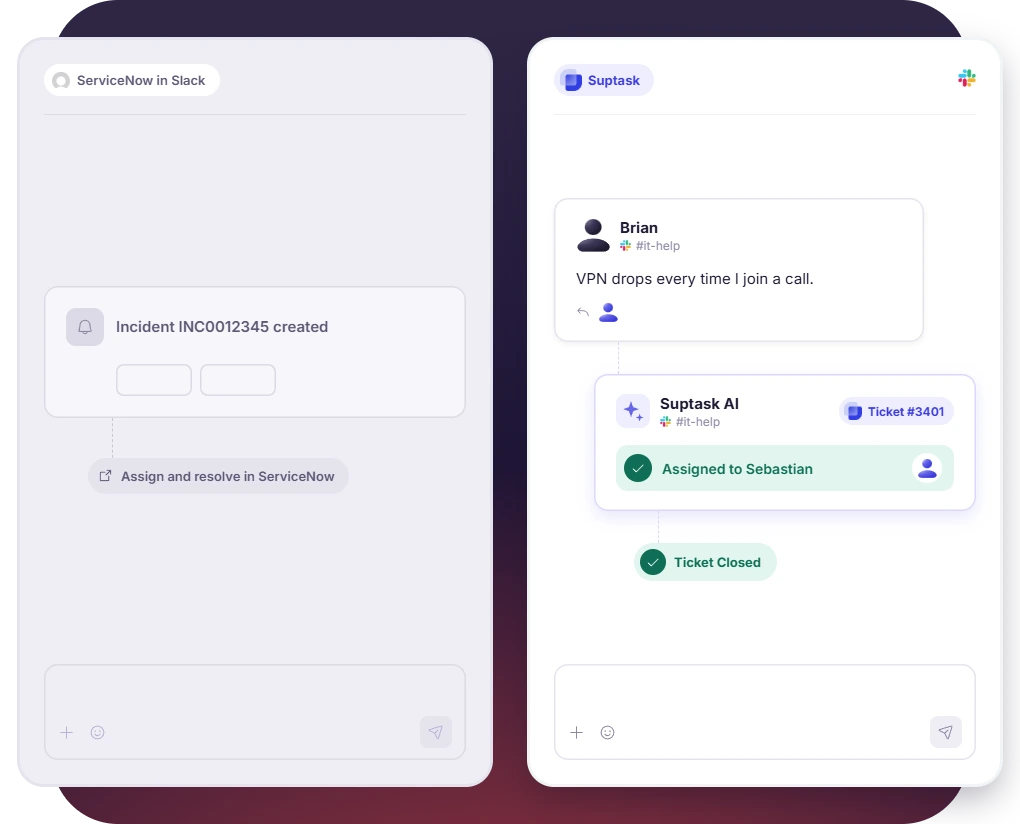
Complete Service Desk: table and card views, custom filters and new ticket requests natively in Slack
ServiceNow
Limited: create incidents, receive record notifications and preview shared records; work happens in the ServiceNow instance
Number of Slack apps to install
Suptask
One unified app
ServiceNow
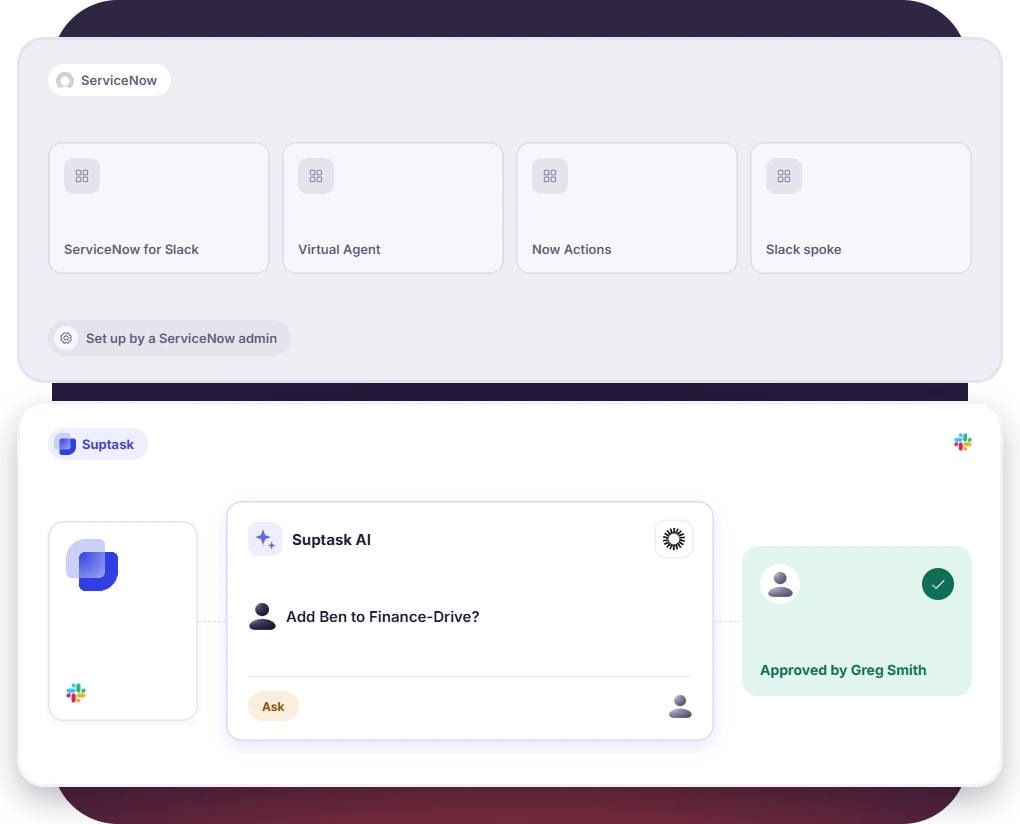
Several: ServiceNow for Slack, Conversational Integration for Virtual Agent, Now Actions, plus the IntegrationHub Slack Spoke for automations
Ticket Intake in Slack
Suptask
Help channels, DMs, emoji reactions and forms, routed to any inbox
ServiceNow
Message action or shortcut to create an incident
AI Assistants in Slack
Suptask
Build your own: answer from knowledge documents and perform actions
ServiceNow
Virtual Agent chat in Slack via a separate integration; AI depends on the ITSM package
Workflow Automation
Suptask
Prompt-based through AI Assistants, plus rule-based automations
ServiceNow
Flow Designer and IntegrationHub, configured by ServiceNow administrators
Setup
Suptask
Add to Slack and agents are ready
ServiceNow
Register an OAuth application in the instance, then connect with instance URL, client ID and client secret
Slack Connect for External Customers
Suptask
Unlimited channels at no extra cost; external users track tickets in the Suptask app
ServiceNow
Not described in the Slack app’s documentation
Security & Compliance
Suptask
SOC 2 Type II, GDPR, HIPAA BAA, EU hosting
ServiceNow
SOC 2 Type II, ISO 27001, FedRAMP High (Government Community Cloud)
Microsoft Teams
Suptask
✗
ServiceNow
✓
Suptask Covers the Ticket Work ServiceNow Keeps Outside Slack
Agents Stay in Slack for the Whole Ticket
 In the same Slack thread, agents reply, assign, change status, and close the ticket
- Agents turn any message into a ticket with an emoji or a form, or automatically with rules
- Support agents can view, sort, and manage all tickets from the Suptask app’s home screen in Slack
AI Assistants Prepare IT Requests, and a Person Approves Them
- Request approval in the thread, with one approver or several in order
- Common questions get answers from your knowledge base, on Suptask’s Growth plan
- The Assistant prepares account and access changes in Okta, Microsoft Entra, or Google Workspace for an agent to approve
Turn Slack into a help desk your team will actually use

Why Teams Move from ServiceNow to Suptask

Prices upfront
Suptask has transparent pricing, so you can budget before making a commitment. Only the Custom plan is quoted, based on your requirements.

Self-serve setup
Your IT team adds Suptask to Slack, then sets up Inboxes, forms, and routing themselves.

No request portals
Employees keep raising requests in Slack, and requesters are free on every plan.

Closed in Slack
Agents can resolve requests in the Slack thread instead of switching to another tool.
Pricing: Suptask vs ServiceNow
Suptask
Suptask starts at $15 per agent per month, billed annually, with no minimum number of agents.
14-day free trial on the Growth plan, no credit card needed
Every plan includes unlimited requesters and Slack Connect channels
AI Assistants, SLA management, and SSO from $38 per agent per month, with no AI add-on per seat
ServiceNow
ServiceNow doesn’t publish prices. ITSM is sold by quote on annual contracts.

The Foundation, Advanced, and Prime packages are licensed per fulfiller seat
Slack features are split across several apps; automations use Flow Designer or IntegrationHub
A ServiceNow System Administrator has to set up the Slack app
Already trusted by fast-moving support teams.



Frequently Asked Questions
What is a good ServiceNow alternative for IT teams that work in Slack?
If your employees work in Slack, Suptask is a strong ServiceNow alternative built inside Slack. The ticket is captured, assigned, and resolved in the same thread. Nobody opens a portal, and requesters are free on every plan.
ServiceNow doesn’t publish prices, so you need to contact its sales team for a quote. The ITSM packages are Foundation, Advanced, and Prime, and the price depends on the number of users and the modules you choose. Suptask publishes its prices, starting at $15 per agent per month, billed annually.
Yes, for ticketing in Slack. Requests, incidents, and approvals all happen on one ticket in Slack. If you need a CMDB, a change management module, or IT operations monitoring, ServiceNow covers those and Suptask doesn’t.
Yes, ServiceNow works in Slack through several apps. They can create an incident from a message or the shortcuts menu, post records into a channel, and send alerts. Setup isn’t self-serve: it needs a ServiceNow System Administrator.
It depends on your requirements and team size. ServiceNow has no published prices, and the setup needs a system administrator. Smaller teams want a price they can see upfront and a setup they can finish themselves.
One queue at a time. Start with requests that already come in through Slack, since there’s nothing to migrate for those. Suptask connects with ServiceNow, so both can run while you move the rest. Book a demo to plan the move.