AI in HR means using artificial intelligence to handle routine HR tasks, like answering employee questions, drafting job descriptions, and identifying attrition risk.
AI for HR professionals is not just limited to a recruiting tool. A small HR team can handle repetitive questions about leave, payroll dates, benefits, and policy throughout the week. Each question gets answered one at a time, from the company's own documents.
Here, the guide covers how AI is used across the employee lifecycle, with examples and the benefits. AI tools for HR by category are included, along with the free options. We have also covered the risks and the rules worth knowing, along with what should stay with HR people and a 90-day plan to start with.
Key Takeaways
- AI in HR is used across the employee lifecycle, covering hiring, onboarding, employee questions, performance reviews, and reporting work.
- For a small HR team, repetitive employee questions are the place to start because they already have answers written in advance in company documents.
- AI tools for HR can be categorized into seven categories, such as HR service delivery, HRIS, recruiting, performance, learning, analytics, and general assistants.
- Hiring decisions involving AI are regulated in some places, so the bias testing and the transparency notices should be checked before any tool is bought.
- Complaints, investigations, and medical leave should stay with the HR people.
What Is AI in HR?
AI in HR is software that uses a company’s documentation to answer employee questions or write a draft. It is not a single product. A few different technologies fall under the term, and an HR team uses them for different jobs.
Machine learning works on patterns. It reads the historical data and returns a prediction, like a score for attrition risk. Generative AI handles the writing and summarizing tasks, like job descriptions, policy updates, and a summary of the survey comments. AI agents take steps on their own following the permissions that have been set for them, and AI agents for HR are used for jobs like routing a leave request.
HR runs as a service function, the same model that enterprise service management describes for the rest of the business. AI for human resources is applied on top of that model. AI in human resources does not replace the HR team, it handles the part of the work that repeats.
How Is AI Used in HR?
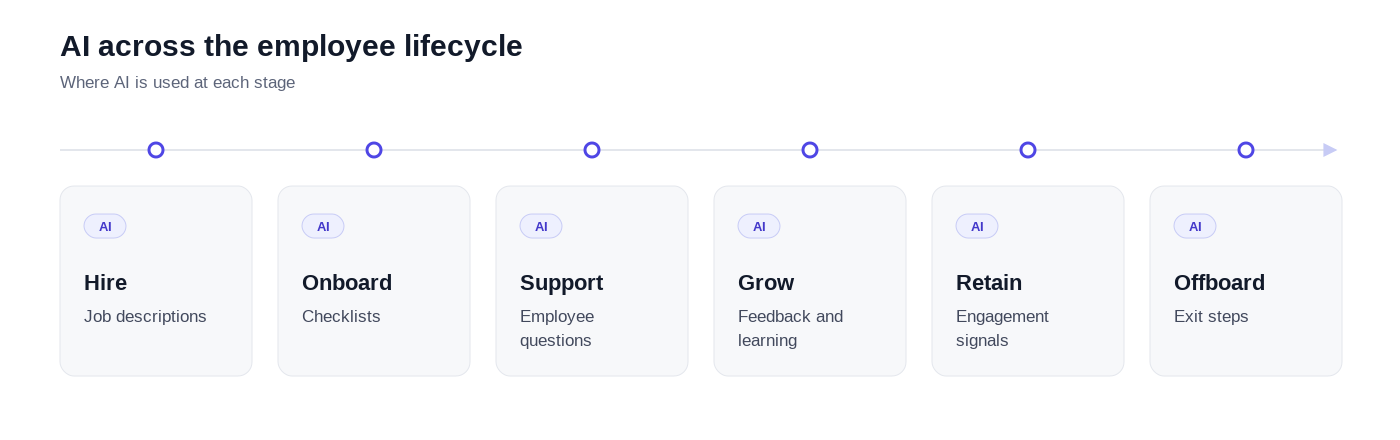
AI helps HR teams to handle the work which repeats, and it is also used for reading the data that is already available with the HR team. AI in HR use cases are spread over the entire employee lifecycle. The list given below includes AI in HR management along with the AI in HR operations side also.
Answering Employee Questions
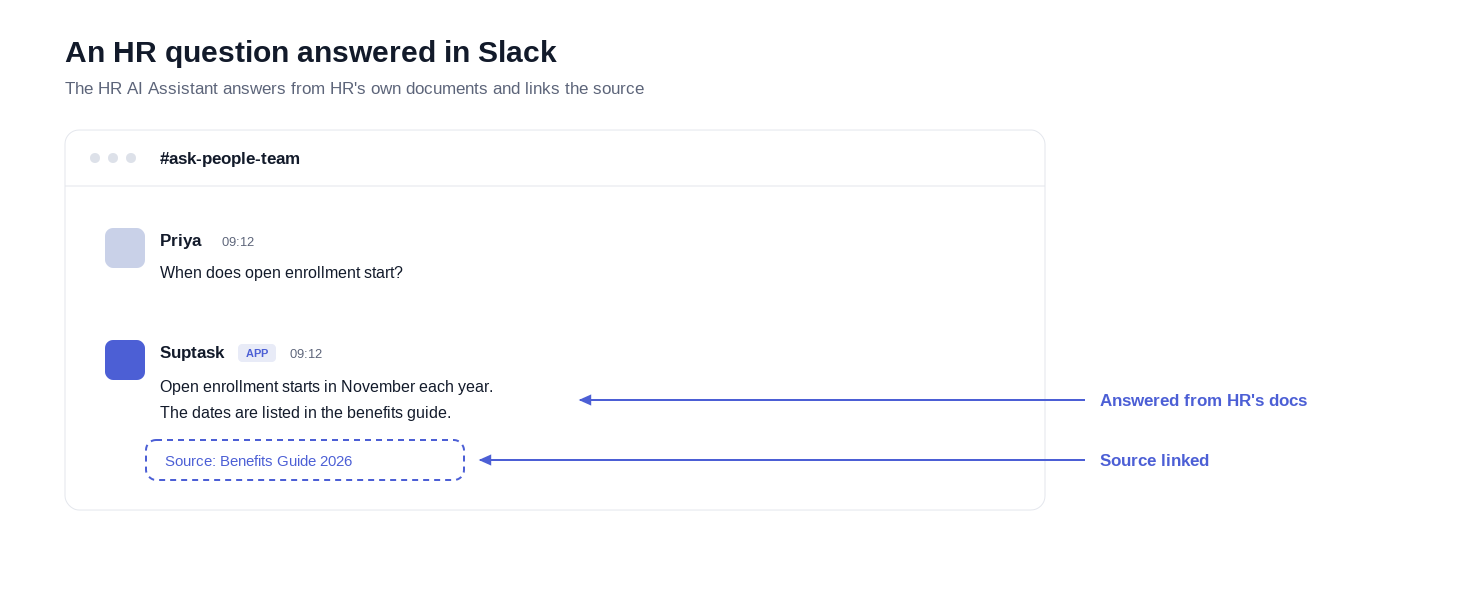
Employee questions like "When does open enrollment start?" already have their answers written in the benefits guide. When such questions are asked, the HR team has to answer them manually each time.
AI is used to read the approved documents and write the answers. This is how AI employee self-service is working on the HR side. Suptask is an HR help desk in Slack where employees can ask in a channel, and the HR AI Assistant gives the answer from HR's own documents. Sensitive HR requests get moved into a private ticket.
Recruiting and Hiring
Generative AI can draft job descriptions, and the recruiters edit them before sharing with the candidates. It can also be used for screening support and interview scheduling during the hiring process.
Onboarding and Offboarding
Onboarding is run on a checklist that is created from the role and the joining date. The questions a new joiner has in the first week can also be answered in the same way. Offboarding uses the same steps in reverse, like the removal of access and the exit documents.
HR Documents and Policies
Drafting work is a big part of HR, like policy updates, offer letters, and internal announcements. Generative AI is helpful for making the first version of these, and then the HR team does the editing on it.
Performance and Feedback
In a review cycle, there is a lot of written feedback that managers have to go through. AI is used for the summarizing of the reviews of one person, and it also points out the places where the wording is vague so the manager can make it more specific before the conversation.
Learning and Development
Skills gaps are a common use case on the learning side. AI does the comparison of the skills a team is having with the skills which a role needs, and then it suggests the learning for that gap. The suggestions still need approval from a person.
Engagement and People Analytics
Survey comments are coming in as free text, and reading them line by line is taking time. AI groups these comments into themes and shows which team has raised what. Machine learning is also used to score attrition risk from the HR records, though the score is used as a signal only.
Benefits of AI in HR
The benefits of AI in HR are mostly about the time that goes into repetitive work and about the consistency of what employees are getting back. HR teams are getting five benefits out of it, such as:
- Repetitive questions, like the leave policy or the payroll dates, are answered by AI from the approved document, so the HR team is not writing the same reply again for every person.
- With AI, every employee is getting the same answer from the same approved document.
- Generative AI makes the first draft of a document like a job description or a policy update, and the HR person is then editing that draft instead of writing it from the start.
- The survey comments and the HR records are read by machine learning for patterns in them, so an engagement issue inside one team can show up as a signal before the next survey cycle is finished, though somebody from HR still has to look at it properly.
- The time that is saved on routine requests goes back to the work that needs a person, like investigations and the difficult conversations.
AI Tools for HR, by Category
The best AI tools for HR fall into seven categories, and the categories do not do the same job. For example, AI HR software for the service desk is a different product from the HRIS, and the recruiting tools are separate again. We have mentioned one or two AI HR tools below for each category.
1. Suptask (HR Service Delivery in Slack)
Suptask is a ticketing tool which is running inside Slack. Employees have been using it for HR questions and requests without opening a separate portal.
Best for: HR teams in companies where the work is already happening in Slack.
Key AI features: AI answers for HR in Slack are generated from HR's own documents, which can be kept in Notion or Google Drive. The HR knowledge base is kept separate from IT's. Requests that are sensitive can be moved into a private ticket in a DM, and the approvals are handled in Slack also.
Pricing model: Per agent per month, with requesters unlimited and free on every plan. Starter is $15, Professional is $24, Growth is $38 on annual billing, with Custom quoted by sales. AI Knowledge Answers are on the Growth plan. Every plan has a 14-day trial, there is no free plan. Suptask pricing
Watch out for: Suptask is built for companies that work in Slack. It handles HR questions and requests, not recruiting, payroll, performance reviews, or learning.
2. HRIS With Built-In AI
BambooHR and Workday have put AI into the record system itself.
Best for: Companies that want the AI inside the HRIS they are already running.
Key AI features: Ask BambooHR is described by BambooHR as an AI-powered sidekick that handles routine employee questions about policy and benefits from company data. The basic version of the assistant is on the Core plan, the company policies and docs version comes on Pro. BambooHR is also using AI for the categorization of free-text eNPS responses into common themes. Workday has Illuminate agents, which include a Performance Agent, deployed through its Agent System of Record.
Pricing model: BambooHR plans start at $10 per employee per month, with volume discounts applied automatically by headcount. Workday is not publishing a standard price list. The cost is quoted per organization, depending on the products selected, the size, and the usage. Workday GO is the packaged option, where the scope and the cost are defined upfront.
Watch out for: the AI capability is tied to the plan tier in BambooHR. Onboarding steps that are held in the HR record can also flow into Suptask through the BambooHR integration on the Custom plan.
3. Recruiting and Hiring Tools
Workable is an applicant tracking system, and its AI is used for the writing part of hiring.
Best for: Teams that are hiring often enough that a system is needed for it.
Key AI features: Generation of job descriptions and interview kits, plus an AI Recruiting Agent which is sold on AI credits.
Pricing model: The Standard plan is $299 a month. AI credits are purchased separately, with volume pricing available for the larger bundles, and the free trial does not include the Workable Agent.
Watch out for: A tool that is scoring, ranking, or filtering candidates falls under the hiring rules, and the bias audit position, along with the candidate notices, should be checked before it is switched on.
4. Performance and Engagement Tools
Culture Amp is used for engagement surveys and performance, and its AI works mostly on the comments that employees write.
Best for: HR teams running regular surveys that are producing more free text than anybody can read.
Key AI features: AI Comment Summaries give summaries of the topics employees raise. AI Comment Comparisons compare the themes between high and low engagement groups.
Pricing model: Culture Amp has three plans, Engage, Perform, and Develop. No price is listed against any of them, the quote has to be requested from the sales team.
Watch out for: Culture Amp states that Comment Topics and Sentiment Classification is part of the core functionality and cannot be disabled, while the other AI features can be configured at the product, account, or survey level.
5. Learning and Development Tools
Docebo is a learning platform that has a skills engine in it.
Best for: Companies with enough roles that the skills gaps are not obvious by looking at them.
Key AI features: The platform is using AI for the enrichment of skills profiles from workforce data. It maps the skills to roles and job architecture. The gaps are identified from that, with the recommendations connected back to Docebo learning.
Pricing model: The plans are Elevate and Enterprise, with no price published against either one. Docebo prices on active learner usage, and the count can be set as monthly, yearly, or registered active users. The AI capacity is bought separately, either as a shared credit pool or on a per-seat basis.
Watch out for: the skills picture is built from the workforce data that is already in the system.
6. People Analytics Tools
Visier is a people analytics platform, and Vee is the generative AI assistant on it.
Best for: HR teams that have the workforce data in one place already.
Key AI features: Vee translates a question into a query and comes back with a narrative answer based on the organization's people data within Visier. Follow-up questions work in the same conversation, and Vee is reachable through Copilot also.
Pricing model: Visier is not publishing a price. The pricing is custom to the organization, and a 30-minute demo is the step before a quote.
Watch out for: Vee is a layer over the people data, which has to be loaded into Visier first.
7. General AI Assistants for HR Work
ChatGPT for HR means the drafting and the summarizing work, it does not mean answering an employee from company policy.
Best for: First drafts of documents and the summaries of long notes.
Key AI features: Drafting of job descriptions, policy updates, letters, and announcements, along with summarizing. Microsoft 365 Copilot Chat is available at no additional cost with eligible Microsoft 365 plans, and adding a Microsoft 365 Copilot license grounds the answers in work context like files, meetings, and email.
Pricing model: ChatGPT has a free tier, the paid plans are priced per user per month. Microsoft 365 Copilot is an add-on that is licensed on top of a qualifying Microsoft 365 plan.
Watch out for: employee personal data should not be pasted into a public AI tool, whatever the question is.
Free AI Tools for HR
Free AI tools for HR are mostly the free tiers of the general assistants, along with a few single-purpose generators. ChatGPT has a free tier. Microsoft 365 Copilot Chat is included at no additional cost for users on eligible Microsoft 365 plans. Workable is running a free job description and interview question generator, which is limited to 3 generations a day without an account, 30 a day with a monthly limit of 100 once signed in.
HR AI software with a real free plan is hard to find. What the free tiers are leaving out is the privacy controls along with the integrations, and those two things matter once a tool is answering real employee questions.
How to Choose AI Tools for HR
The selection of the AI tools for HR depends on where the tool works and what it is allowed to read. The following checklist of seven points might help you choose the best AI tools before any demo:
- Where the AI is working is the first check. A tool that answers in a portal asks employees to learn a new place to go. A tool that answers in Slack or Teams meets them where they already ask.
- Answers should be coming only from the documents HR has approved. A tool that pulls from the open web will give a confident answer about somebody else's policy.
- Privacy and data handling should be the next point in the checklist. The questions for the vendor are what happens to the employee data, where it is kept, and whether it is used for any training.
- Anything that touches hiring or pay needs a bias testing position in writing.
- A person should be able to see the answer and change it before it goes out. Human review is not a feature that gets added later.
- Integrations with the HRIS and with the chat tool decide how much of the work happens without somebody copying things across.
- The plan matters last. AI capability is tied to a tier in several of the tools above, so the plan being quoted should be confirmed to include the AI feature itself.
Risks of AI in HR, and the Rules to Know
The risks of AI in HR are bias, privacy, and the decisions that often happen when AI works without a human reviewing them.
Bias comes from the historical data on which a model gets trained. Privacy is about employee data used by a system that was never approved to hold it. The third risk is a decision that nobody reviewed.
The rules below come into effect when AI is used for hiring or promotion, and not when it is answering a policy question:
- In the United States, Title VII, the ADA, the ADEA all apply to AI used in hiring and promotion, in the same way they apply to any other selection method. The EEOC published technical assistance on this in 2022, then again in 2023, and those documents were removed from its website in January 2025. The statutes themselves have not changed.
- New York City requires a bias audit within one year of use for an automated employment decision tool, along with notices to candidates and employees. Complaints are handled by the Department of Consumer and Worker Protection.
- In the European Union, AI used for recruitment, selection, and decisions on promotion or termination is treated as high-risk under the AI Act. A human making the final call does not, by itself, take the system out of that category.
The rules are changing, and they are different by location, so legal counsel should be involved before any tool that is scoring or ranking people is switched on. None of this is legal advice.
What Should Stay With HR People
Not every task is meant to be handled by an AI tool, and it is better to write that list down before any tool is switched on. The list keeps the AI assistant on the requests it is allowed to answer, and anything beyond that goes to the HR team.
- Complaints and investigations should be handled by the HR people, because a complaint is evidence at the end.
- Somebody who is reporting harassment or discrimination needs a person on the other end of it from the very first message rather than AI working on it.
- Medical details along with leave-of-absence information are restricted data. A general tool should not be holding them.
- With a pay dispute, the actual records have to be opened by a person.
- Performance decisions and the terminations are affecting somebody's job directly, so a model which is doing the summarizing of the reviews is not the one which should be deciding on the outcome of it.
- The hiring decision at the end is also with a person, for the same reasons the rules section above is covering.
AI agents for HR are working on set permissions only, and the autonomy table given there is putting every task into answer, done with approval, or handed over to a person.
How to Start Using AI in HR: A 90-Day Plan
The first ninety days should go on the employee questions, because that part is the low-risk one and the documents behind it are mostly written already.
- Days 1 to 30 are for the listing work: The top 20 employee questions that come to HR should be written down, and one approved document gets updated for each of those questions, so the answer exists in one place that is current. A general AI assistant can be used this month for drafting those updates, with no personal data going into it.
- In days 31 to 60: The AI answers get turned on, but only in the one place where employees are already asking. The "always a person" list is set in the same month; it is the list from the section above. Wrong answers should be reviewed every week in this period, and the fixing is mostly done on the document that is behind the wrong answer.
- One workflow gets added in days 61 to 90, on top of the answers: An onboarding checklist or the document requests are both fine for this, one of them is enough to start. Two numbers are worth having, the time saved on the repeat questions and the employee satisfaction score, and the ITSM KPIs used on the IT side give the same measures for an HR desk.
Start With Your Top 20 Employee Questions
The starting point is the same for every HR team that is looking at this, the questions that keep coming back are the ones to handle first.
- The twenty questions should be written down first, the ones that come to HR again and again through the month.
- After that, each question is checked for one current answer, and where two documents are saying different things on the same question, one of them has to be retired.
- The last action is picking one place where employees are already asking, and the answers are getting turned on in that place only.
If your company is working in Slack, Suptask's plans and 14-day trial are the place to try this on HR questions.
Frequently Asked Questions
Is ChatGPT good enough for HR tasks?
ChatGPT is useful for drafting work in HR, job descriptions, policy text, and emails that go out to everybody. What it does not have is the company's own policies or the employee records, so an answer about a specific benefit or a specific leave rule is going to be a guess that sounds confident. Personal data should also not be pasted into it. For the employee questions a different kind of tool is wanted, the one which is answering only out of the HR documents that have been approved, because then the answer can be traced back to the document it came from.
What is generative AI in HR?
Generative AI in HR is the part of AI which is writing and summarizing. The job posts, the policy updates, and a summary of a long set of review comments, these are the outputs of it. The text is produced from whatever the tool has been given, which is why its accuracy depends on the input. Every draft is still getting reviewed by an HR person before it goes anywhere.
Is it legal to use AI in hiring?
Mostly yes, but some places are regulating how it gets used. New York City is requiring a bias audit along with notices to candidates where an automated employment decision tool is being used for hiring or promotion. In the European Union, the AI Act is treating AI in employment decisions as high-risk, and a human making the final call does not take it out of that category on its own. The rules are different by location, and they keep changing, so local legal counsel should be consulted before any hiring tool goes live.
What is the difference between AI tools and AI agents for HR?
AI tools for HR do one task at a time, the writing of a document or the analysis of some data, and a person is the one who starts it every time. AI agents for HR are going a step further than that, they take the steps themselves within the permissions that have been set for them. The routing of a leave request to the right approver is one example of it, starting the onboarding tasks for a new joiner is another one.