Incident management is the process IT teams use to restore services after an unplanned interruption as quickly as possible. The same definition applies to an outage impacting the whole company or one laptop that is not connecting to the network.
This definition of incident management comes from the ITIL framework most IT teams use for service management. This framework is used for bringing the service back to normal operations by ensuring minimal impact on the business.
This guide covers what counts as an incident, the seven steps of the process, how priorities are set from impact and urgency, the roles, metrics, and how ITIL 4 helps it. We have also included examples too, and how it can run in a small IT team.
Key Takeaways
- Incident management restores normal service after an unplanned interruption or drop in service quality.
- An incident is different from a service request (something asked for), a problem (an incident’s underlying cause), and a change.
- The ITIL process runs from identify and log, through categorization and prioritization, to diagnose, escalate, resolve, and close.
- Priority comes from impact multiplied by urgency, usually expressed as P1 to P4.
- Small IT teams can run the same process without a NOC. Every incident just needs an owner and a priority.
What Is Incident Management?
Incident management is the practice that captures a reported service disruption and works it through to a resolution.
ITIL describes an incident as an unplanned interruption to a service, or a reduction in the quality of it. The goal is to get the service usable again quickly, with disruption to the business kept minimal.
IT incident management covers the services an organization runs its work on, like email, network, and internal applications. For example, an email being down for the sales team is an incident.
ITSM incident management is one practice among several in IT service management, and the attention stays on the service coming back. The reason behind the incident is looked at separately in problem management. Closing an incident requires the service to be working again, with the fix recorded on the ticket.
What Counts as an Incident?
An incident counts when a service stops working or when it starts working worse than it should.
Nothing is broken in a service, which is the main thing that separates a service request from an incident at intake. Repeated incidents with one cause behind them get a problem record opened, and the point when an incident turns into a problem is set by each team’s own threshold.
The Incident Management Process: 7 Steps

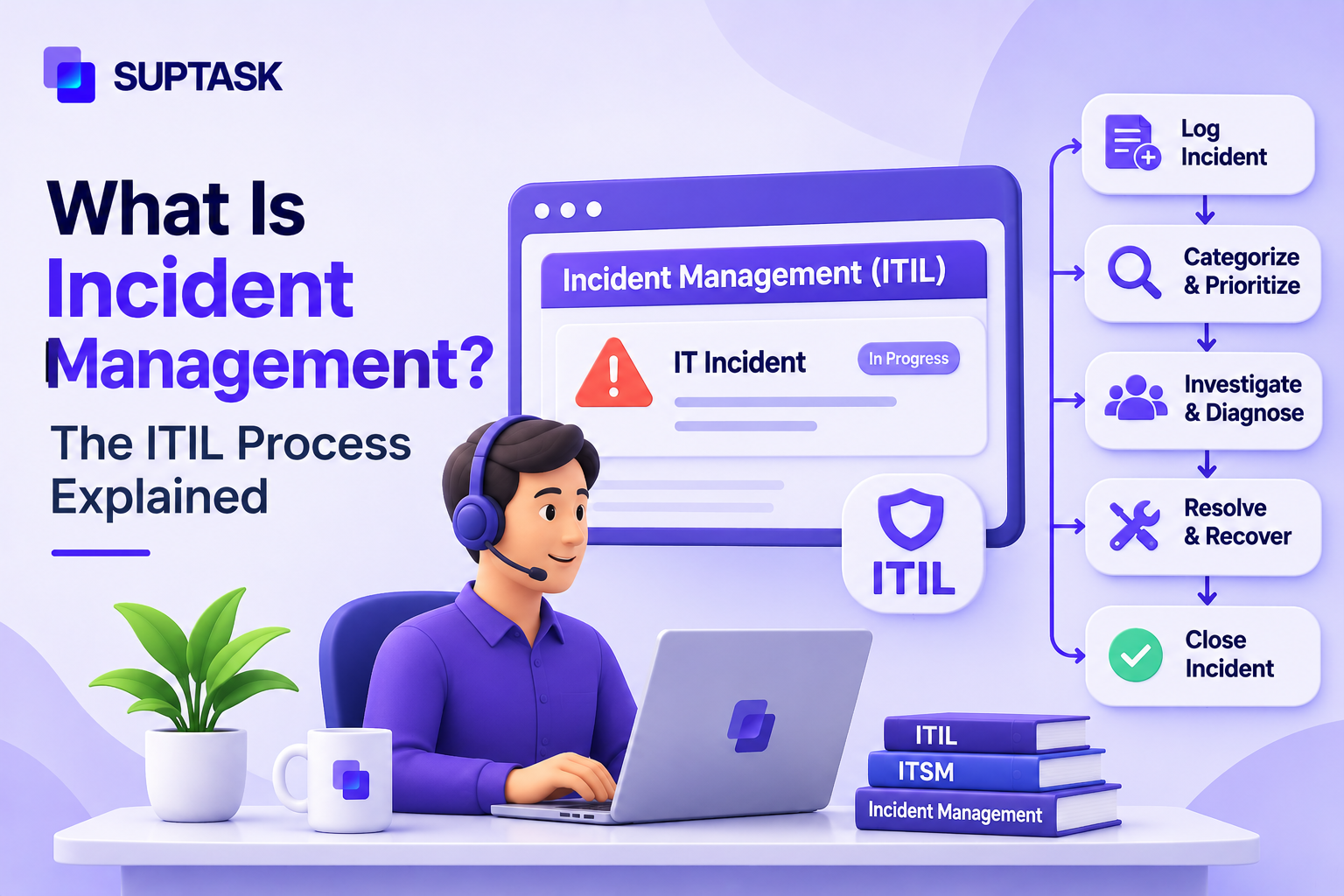
The ITIL Incident management process has seven steps, and each one should be completed before the ticket gets closed.
- Identify: Issue got identified either by a monitoring tool or a user reports that they are experiencing issues with the services. This is the first step in which the issue becomes known to IT, and the team starts working on it.
- Log: Everything should be recorded, such as who reported the incident, affected services, and when it started. If the same ticket gets reported multiple times, it is recorded as one incident.
- Categorize: Each ticket is assigned to a category like hardware, software, network, or access. The incident categories are not fixed by the framework, each organization has its own list, and it should stay short enough for agents to pick from quickly.
- Prioritize: Priority gets set from the impact and the urgency of the incident. Setting it early matters, because the priority decides the response target and who gets pulled in.
- Investigate and diagnose: The first line works through the known fixes, and a workaround gets applied if one is available. Triage happens around the same point where the ticket is sorted by what it needs next. A help desk connected to the documentation can answer known issues from Confluence without the agent leaving the ticket.
- Escalate if needed: Escalation happens in two ways. Functional escalation moves the incident to someone with deeper expertise, and hierarchical escalation brings in a manager when a decision or an SLA risk is involved. For a defect that needs engineering work, the incident can be escalated to a Jira issue with comments and status kept in sync.
- Resolve, recover, and close: Fix is confirmed with the person who reported the incident. Recovery means the service is back to normal use, and the resolution gets written on the ticket along with the category. Closure needs both, so the next occurrence of the same thing can be matched against the record.
Some frameworks group the seven steps into five stages, including detect, log, prioritize, resolve, and close. The work underneath is the same, with fewer headings over it. Each stage of the incident management lifecycle has its own handoff between the first line and the resolver groups.
How to Prioritize Incidents
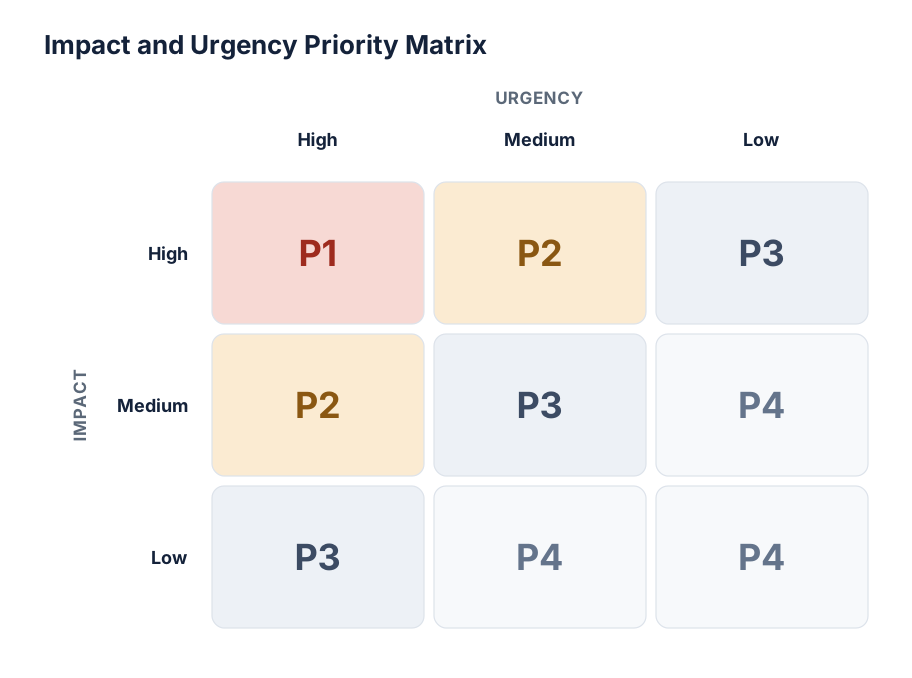
Priority is worked out from impact and urgency together.
Impact is the size of the disruption, measured by how many people are affected and how important the affected services are to the business. Urgency is about the speed of it getting worse, and whether a workaround is available in the meantime. A disk filling up has urgency because the failure is coming, even when nobody is affected yet.
The two get combined in a matrix, with the priority read off the cell where they meet.
Each priority level carries its own response and resolution target.
Examples only. Set targets that match your own SLAs.
Engineering and DevOps teams run the same idea under severity levels (SEV1 to SEV4), with SEV1 as the most serious. The names differ between the two scales, and the levels do the same job. Each level maps to an incident management SLA, which is the agreed response and resolution time for that priority. The targets live in the service level agreement and get checked against the ticket timestamps.
Escalating an Incident
The escalation of an incident runs the first line, second line, then the resolver group that owns the affected system. It is escalated to a vendor when the issue is found inside a product an organization did not build. This is known as functional escalation and maps onto the support tiers a service desk is organized into.
Hierarchical escalation works in the management line. A manager gets involved in the ticket when the incident needs a decision nobody on the technical side has authority to make. The trigger for hierarchical escalation is the impact of it, or a resolution target at risk, and the decision gets recorded on the ticket like any other update.
Roles in Incident Management
These six roles don’t mean having six people. In a small IT team, one person works in two or three roles at the same time. The incident manager in ITIL is a defined role, though the framework does not say it should be a full-time job. One owner per incident is the part that should not be dropped, and the owner’s name belongs on the ticket.
Major Incidents: When the Normal Process Isn’t Enough
An incident becomes a major one when its impact reaches across the business or when a service a business cannot run without has stopped. This has the highest impact on the business and needs to be restored earlier, so a dedicated manager works on the incident.
All the people who work on the major incident get pulled into one channel or room, known as a war room. The steps will be the same as other incidents, with a post-incident review that records what happened and what gets changed because of it.
Incident Management Metrics to Track
A service desk tracks a handful of metrics measured on each incident, such as:
- Mean time to acknowledge (MTTA) is the gap between the incident arriving and somebody picking it up.
- MTTR (mean time to resolve) is used to measure how long the service stayed unusable.
- First contact resolution is the share closed by the first line, with no escalation needed.
- On SLA compliance, the count is how many incidents met their response and resolution targets.
- Reopen rate is measured on the tickets that came back after closure, and it points to closures made without the confirmation step.
- Incident volume by category shows where incidents are coming from, like network or access, and the categories carrying the biggest counts are the ones to hand to problem management.
The same numbers appear in a wider set of help desk metrics, where incident measures get reported next to the request and satisfaction ones. The baseline for each one should come from the team’s own history, since ticket mixes differ between organizations.
Incident Management in ITIL 4
In ITIL 4, incident management is described as a practice meant to reduce the negative impact of incidents by restoring normal service operations as quickly as possible.
The older version of the ITIL framework called the same thing a process, which meant a defined set of steps in a fixed order. A practice keeps those steps, with the people, tools, suppliers, and the information used along with them.
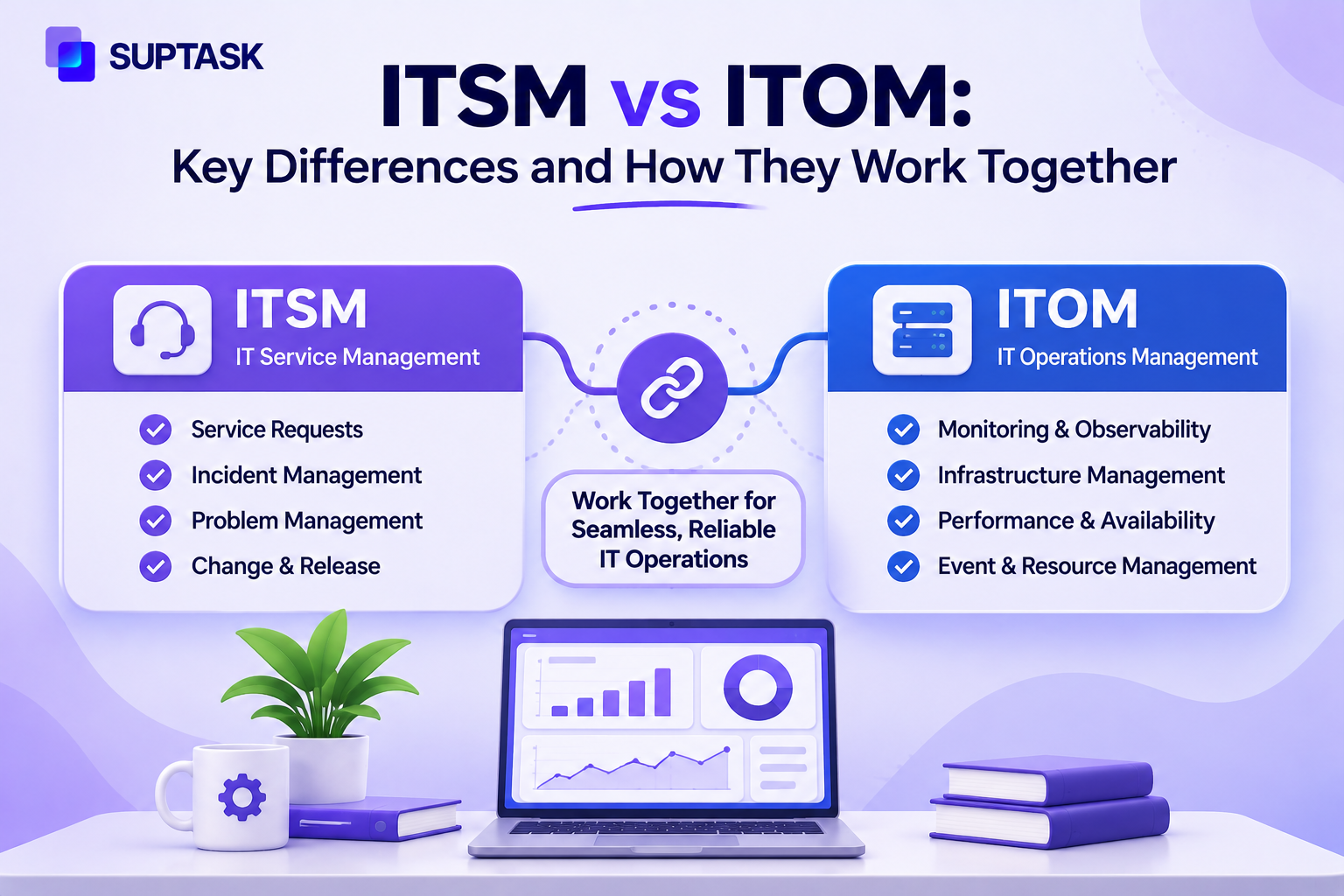
Monitoring and event management is where an incident starts, with an alert raised before the users start reporting anything. Once the service is restored, problem management starts working on finding the root cause. If any change needs to be made, then change management ensures that authorized persons approve it. The response and resolution targets come out of service level management. Knowledge management holds the workarounds and the known errors, which is what the first line reads during diagnosis.
PeopleCert publishes the guidance and runs the ITIL 4 Practitioner certification for incident management.
Incident Management Example: A VPN Outage From Report to Close
Here is how incident management works across each step
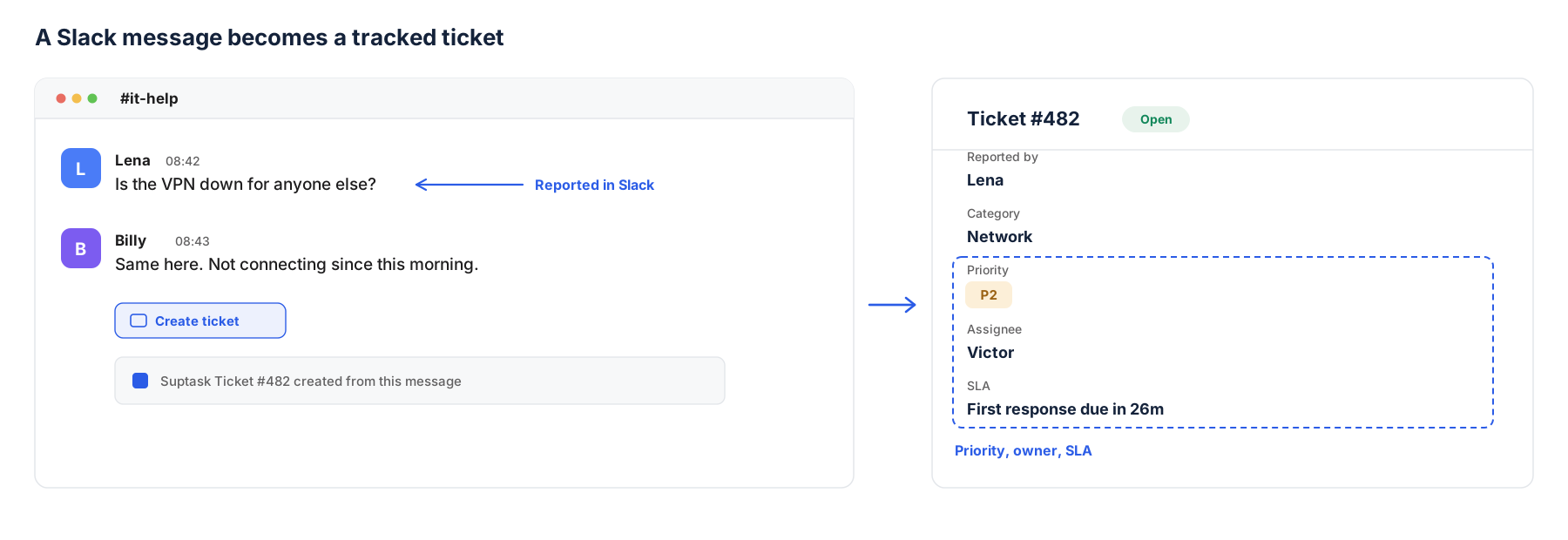
- 08:42 Lena posts in #it-help, asking if the VPN is down for anyone else. Two colleagues reply that they have the same problem.
- 08:44 The service desk logs it as an incident, under the Network category, linked to the thread. With a Slack-native help desk like Suptask, steps 08:44 to 08:46 happen from the original message.
- 08:46 Priority is set to P2. Many users are affected, and the office Wi-Fi works as a workaround.
- 08:50 First line checks the known issues. The VPN gateway certificate expired overnight.
- 08:55 Functional escalation to the network admin, with a status update posted in the thread.
- 09:20 The certificate is renewed, and users confirm they can connect again.
- 09:25 The incident is resolved and closed. A problem record is opened to automate the certificate renewal.
In this example, the priority was set four minutes after the first message, which is what decided the response target. One owner works on the incident across the lifecycle. The thread stays as the record, so the timeline did not have to be rebuilt afterward for the problem record.
Incident Management for Lean IT Teams
A team of two to ten IT people runs the same steps with less structure around them.
Incident intake should come through one channel, so all reports stay in a unified system. You can pick one priority scheme and use it for everything, whether that is P1 to P4 or the SEV levels. Every incident gets one owner named on it, even when the same person is doing the diagnosis as well. Post-incident notes can be kept for P1 and P2 only, a few lines on the ticket.
An incident reported in a chat channel is not a logged incident. The message has no owner and no record of when it came in. So, lean IT teams spend more time between the message and the ticket instead of on resolution.
A Slack-native help desk closes that gap. Suptask can turn an incident report in Slack into a ticket, with a priority and an owner set on it. The conversation happens in the same thread. Alerts posted into a Slack channel by a monitoring app can open tickets automatically, and SLA tracking per priority comes in on the higher plans.
Incident Management Best Practices
Incident management works best when a few things are planned in advance.
- Keep one place for incident intake. It could be one Slack channel, or an address with routes pointed at it.
- Priority gets set within the first five minutes of the report, before the diagnosis starts.
- Status updates go out on a fixed cadence, set separately for each level, and the business is told the schedule in advance.
- Common errors and workarounds should be routed to knowledge articles written at the point when the fix is found.
- Write the escalation rules down. Who gets called, and at what point.
- P1 and P2 incidents get a post-incident review.
- Recurring incidents with one cause behind them should be linked to a problem record, which is where the permanent fix gets tracked.
- Routing and alerting can be automated with rules, like every ticket in the Network category going to the network group without anybody moving it.
AI triage can suggest the category and the priority on an incoming message, which is one of the things an AI help desk is used for.
How to Set Up Incident Management in Your Team?
Setting up incident management can be summarized in the following five steps:
- Write down the definition of what should be counted as an incident and what goes to the request queue.
- Pick the priority matrix and levels like P1 to P4 or the SEV scale.
- Point every reporting route at one intake channel.
- Name the owner for each category, with the escalation contact next to it.
- Put a monthly review in the calendar, where the reopen rate and the SLA misses get looked at.
Incident management tools cover the same seven steps, and they differ in where the reporting starts. If your team already works in Slack, running incidents as Slack tickets keeps the report and the owner in the same thread.
Frequently Asked Questions
What is an ITIL incident?
An incident in ITIL is an unplanned interruption of a service, or the quality of the service is reduced. A server that has failed is an incident. A login that is not working is also an incident, and an application that has become slow is counted as one as well. The thing was working before, and now it is not working, that is the whole test for it. If somebody is asking for a new thing, like access to software, then it is a service request, and it goes through a different process.
What are P1, P2, P3, and P4 incidents?
P1, P2, P3, and P4 are the priority levels used for incidents. P1 is the most urgent one. P4 is the least urgent one, and it can wait in the queue. A P1 is given to a critical outage where many people are affected, and there is no workaround available for them. A P4 can be a small issue that has very little impact on the business. The priority should be decided based on the impact and the urgency together. Every level has its own response target and also the resolution target, and these should come from the service levels your team has already agreed.
Is IT incident management the same as security incident response?
No, these two are different things. IT incident management is used for bringing back a service that got disrupted, like email or the VPN. Security incident response is for threats, a breach, or malware that has entered the network. It has its own process and its own team also. Both of them can work together in a situation where a security event has brought down a service, but after that point, the handling of it stays separate.
Is ITIL still relevant in 2026?
Yes, it is still relevant. ITIL 4 came in 2019, and its practices are still used on the service desks. PeopleCert is rolling out ITIL Version 5 in 2026 also, and the Foundation level of it is available already. The old certifications are not wasted, ITIL 4 Foundation is accepted as a prerequisite for the higher-level qualifications of version 5. One more thing is that the whole framework does not have to be taken at once. You can pick the practices one by one, which is how incident, problem, and change management end up in place without the rest of it.
What tools do teams use for incident management?
A service desk tool is used for logging incidents and for tracking them till the closure. Then there is a monitoring tool which helps to detect the failures before anybody has reported them. On-call tools are used when a person has to be paged outside working hours. If your team is already working in Slack, then the intake can be run from there itself, and a Slack-native help desk like Suptask helps to turn the reporting message into a ticket.