Freshdesk Alternative for Teams That Work in Slack
Suptask is one of the Freshdesk alternatives that keeps requests, discussions, and replies in one Slack thread.

Freshdesk Comparison with Suptask

Suptask
Freshdesk
What Suptask Does That Freshdesk Doesn’t
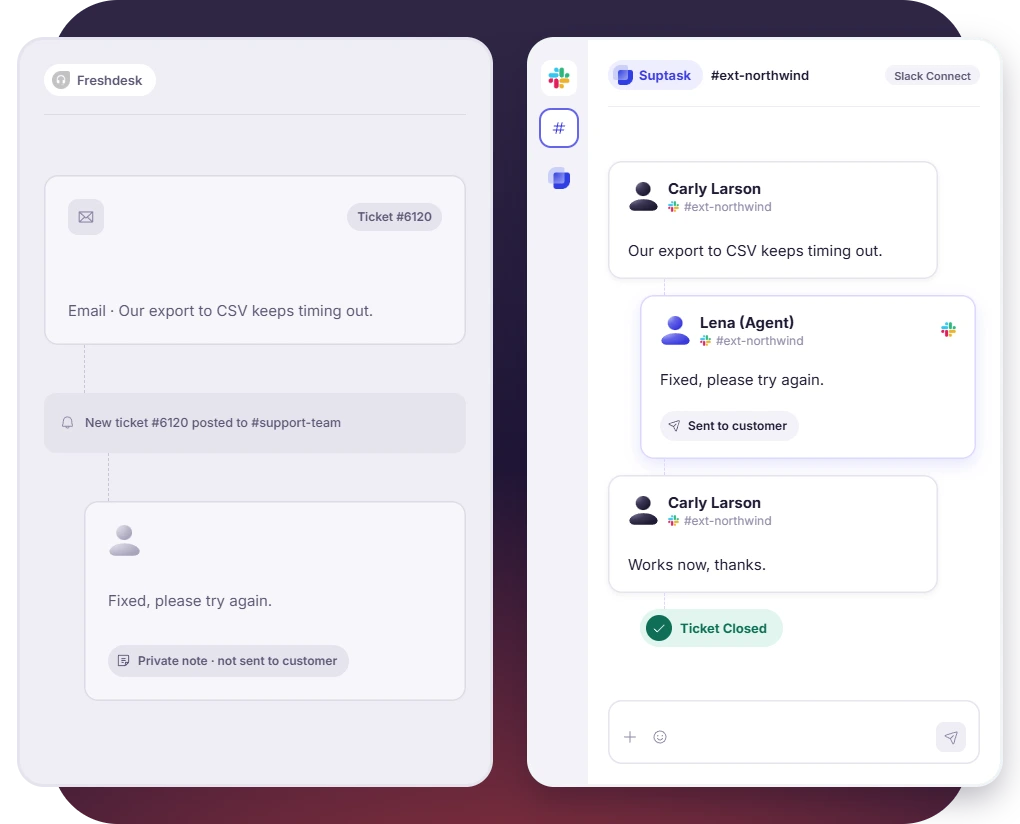
Requester and the Agent Work in One Thread
 One Slack thread holds requester’s message, agent's work and reply
- Private notes remains visible to agents only, while requests see only the replies
- Ticket is assigned, status changes and closes the ticket from Slack thread
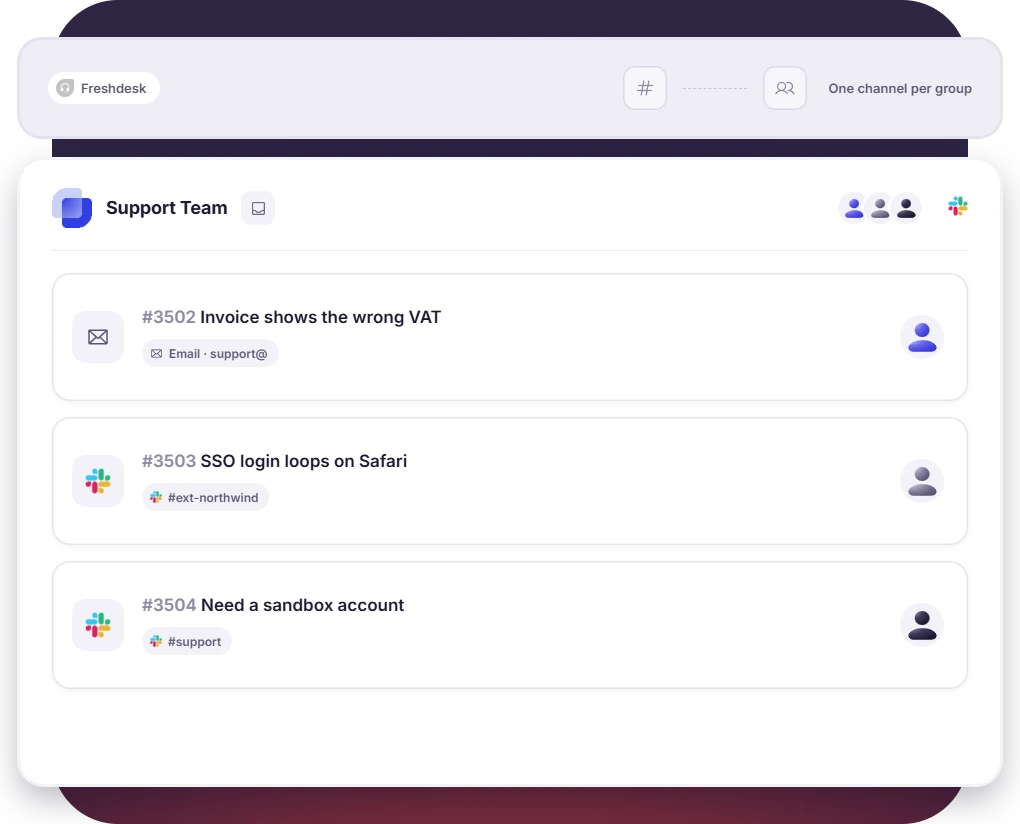
Slack Connect, Email, and Slack in One Queue
- Tickets are submitted and tracked by customers inside the shared Slack Connect channel
- Emails sent to the support address arrives as a ticket in Slack
- Requests from each source land in one Inbox, with matching forms and owners
Turn Slack into a help desk your team will actually use

Why Teams Move From Freshdesk to Suptask

Requesters in Slack
Employees and customers ask, follow up and get answers in the same thread.

Slack replies reach requesters
Internal notes are kept with the team, and the reply is delivered to the person who asked.

Many channels, one inbox
A team channel or a customer channel feeds one Inbox, using the same forms.

Slack Connect ready
The tickets from many customer channels are taken into one Inbox, at no extra cost on any plan.
Pricing: Suptask vs Freshdesk
Suptask
Suptask is priced from $15 per agent per month, when billed annually with no minimum agent commitment needed.
On Growth plan, you can start with 14-day free trial with no credit card needed
Unlimited ticket requesters and Slack Connect channels on every plan
AI Assistants, SLA management, and SSO from $38, with no AI add-on per seat
Freshdesk
Freshdesk pricing starts from $19 per agent per month when billed annually.

Copilot is available as an add-on on Pro ($55) and Enterprise ($89), so a Copilot seat starts at $84
AI agents sessions beyond the first 500 cost $49 per 100
Multiple SLA policies, custom reporting, and external collaborators start on Pro
Already trusted by fast-moving support teams.



Frequently asked Questions
What is a good Freshdesk alternative for teams that work in Slack?
For teams whose requests already start in Slack, Suptask is a Freshdesk alternative built inside Slack. It is not an app that connects to a help desk somewhere else. The requester, the agent, and the reply all stay in one thread. The agents assign the ticket, change the status and close it in that same thread. Plans start at $15 per agent per month, billed annually.
Partly. Freshdesk agents are able to reply from the Home tab of the Slack app. They can also update the agent, the group, the status and the priority. The channel thread works differently. A reply written in a channel’s ticket notification thread is saved in Freshdesk as a private note, which means the requester does not get it. In Suptask the reply is written in the thread and it reaches the requester.
No, there is no free plan listed on Freshdesk’s pricing page. The paid plans start at $19 per agent per month on annual billing. A new Freshdesk account does get a 14-day trial of the Enterprise plan, and the account is suspended if no plan is chosen. Suptask has no free plan either. You can try the Growth plan free for 14 days, and no card is needed. The requesters are free on every Suptask plan, so only the agents are counted.
Freshdesk costs $19, $55 or $89 per agent per month on annual billing. The Freddy AI Copilot is a $29 add-on, available on the Pro and Enterprise plans, so a Copilot seat starts at $84. Suptask costs $15, $24 or $38 per agent per month, also billed annually, with a Custom plan on request. The entry plans are not a like-for-like comparison. Freshdesk includes its AI Agent and SLA management on the $19 plan, while Suptask includes AI Assistants from $38.
Yes, as long as your customers are reaching you in Slack Connect, by email or on WhatsApp. As an alternative to Freshdesk for B2B support, Suptask keeps the request, the internal discussion and the reply in Slack. Email ticketing is on the Professional plan and above. WhatsApp is on the Custom plan. Two things it does not do. There is no phone or voice support, and there is no Microsoft Teams app.
The setup itself is short. Suptask is added to the Slack workspace and the agents are ready to work, so there is no separate account for each agent to connect. Most teams start with one queue, usually the requests that are already arriving in Slack. Once that queue is running, the email address and the remaining channels are moved across. Book a demo and we can plan the move for your team.