An SLA breach can be described as the point where a support team is not able to meet a target that was promised in a service level agreement. First response time and resolution time are the most common ones. An SLA violation is the same thing under another name, and a missed SLA is used for it too.
The SLA clock starts when the ticket is created, and the breach is only recorded at the end of the target time. Everything in between is warning time. A ticket that has missed its target has spent that warning time somewhere, unassigned in a queue, or waiting on a team that is outside support.
The definition and the main types of breaches are covered in this guide, along with the reasons why they keep happening. Also, we have covered the cost of a breach, warnings that help to catch them early, rules to decide how the clock gets measured, steps after a breach, and the reporting at the end.
Key Takeaways
- An SLA breach is recorded when the team does not meet a target that was promised in the agreement. These targets can be first response, resolution, and uptime commitment.
- Tickets that are left unassigned make up a large share of breaches. Also, incorrect priorities and work pending on another team are among the common reasons
- The alert should go out at 50% and 75% of the target time.
- Business hours and the pause while the customer is replying have to be written in the agreement. Without these rules, the reports will show breaches that were never really breaches.
- Updating the customer about a breach is the first step, followed by the fix and then removing the cause behind it. Otherwise, the same ticket will keep coming back.
What Is an SLA Breach?
An SLA breach is when the service commitment written in the agreement is not met in the promised time or the promised level. The same thing is called an SLA violation, a missed SLA, breach of SLA also.
The SLA breach meaning comes down to the numbers in the agreement. A reply that comes just past the target is recorded as breached. A reply that comes a full day late is recorded as breached also. The record does not keep any difference between the two.
Two kinds of promises can be breached. The first is the contract signed with the paying customer, and the response time and resolution time are listed in the SLA of that contract, with what the provider owes when these get missed. The second one is an internal target that the IT team or the HR team sets for the employees of the same company. No contract is signed for it, but the ticket still gets marked as breached once the target time has passed.
An OLA works in the same manner, but between two teams of the same company. Second-line engineering agrees to pick up an escalated ticket within a set time, the OLA is breached if the pickup happens after that.
The difference between SLO vs SLA vs SLI is where the confusion comes up many times. The SLO is kept stricter than the SLA, so a team can miss its own objective, and the customer contract will still be intact.
Types of SLA Breaches
Breaches are not all of one kind. The target that was missed is what gives the breach its type, and four of them come up in service agreements.
First response and resolution breaches are the two that support teams deal with on daily tickets. Uptime breaches belong to hosting and infrastructure contracts. An OLA breach stays inside the company, the customer does not see it, but a resolution breach can follow from it.
Why SLA Breaches Happen
Most of the breaches can be traced back to a handful of reasons, and they are the same ones in most support teams. So, these reasons should be checked first when the breach numbers are going up:
- A ticket can stay unassigned for a long time because nobody is monitoring the queue, and the clock has already started from the time it was created.
- The priority might be set wrong. A request that should have been a P1 gets a P3 label, so the ticket is given a longer target than it needed.
- Routing is another one. If the request goes to a team that does not handle it, then it has to come back again, and the time taken for all of that is counted against the target.
- The answer has to come from another team or from a vendor in many cases, and the ticket should be waiting till they reply. The SLA clock will keep running unless a pause is configured for it.
- Off-hours and holidays. A request that comes in when nobody is on duty will still have its target running.
- You might also be short on agents. If more tickets are coming in than what the team can answer in a day, then no routing rule is going to help with it.
- Some of the targets were not realistic even when they were written. Targets get copied from another company, or they get promised in a sales call, and then the team should be working against a number that was never possible, so it will help to check what a good SLA time should be for each priority and write it again.
Not every breach is a real one. When the clock rules are wrong, the report counts hours the team was never supposed to be working. Business hours missing from the target does it, and a pause that was never configured does it too. The work went out on time, the record says it went out late.
What Happens When an SLA Is Breached?
What happens after a breach depends on the agreement. For example, some agreements have money associated with them, and some have nothing at all. Therefore, the answer is not the same for every team.
The first cost of the breach is the conversation itself. The customer follows up to ask where the reply is, and the request gets pushed to a manager. The escalation pulls in people who were not working on the ticket before.
When it comes to money, an SLA breach penalty can be written in as a fixed amount, or as a percentage of the monthly fee. SLA credits can also be used, where a percentage of the fee is given back for the period in which the target was missed. Although credits are common in hosting and managed services contracts, they are only owed when your contract actually says so.
Sometimes the cost shows up much later. For instance, the breaches get counted at renewal, and procurement usually keeps a record of them. So those missed targets are put on the table when the renewal is being discussed.
A managed service provider sells support under contract, so an SLA breach there takes money straight out of its margin. Every client has its own agreement with its own targets, so an MSP help desk has to track the targets client by client. Reputation matters here also, since buyers ask for references and breach history comes up in those conversations.
Inside the team, a breach changes what gets worked on. The breached ticket is pulled to the front, and the tickets behind it wait longer. Agents who are measured on their SLA numbers will see it against their name, even when the cause was somewhere else.
Catch Breaches Before They Happen
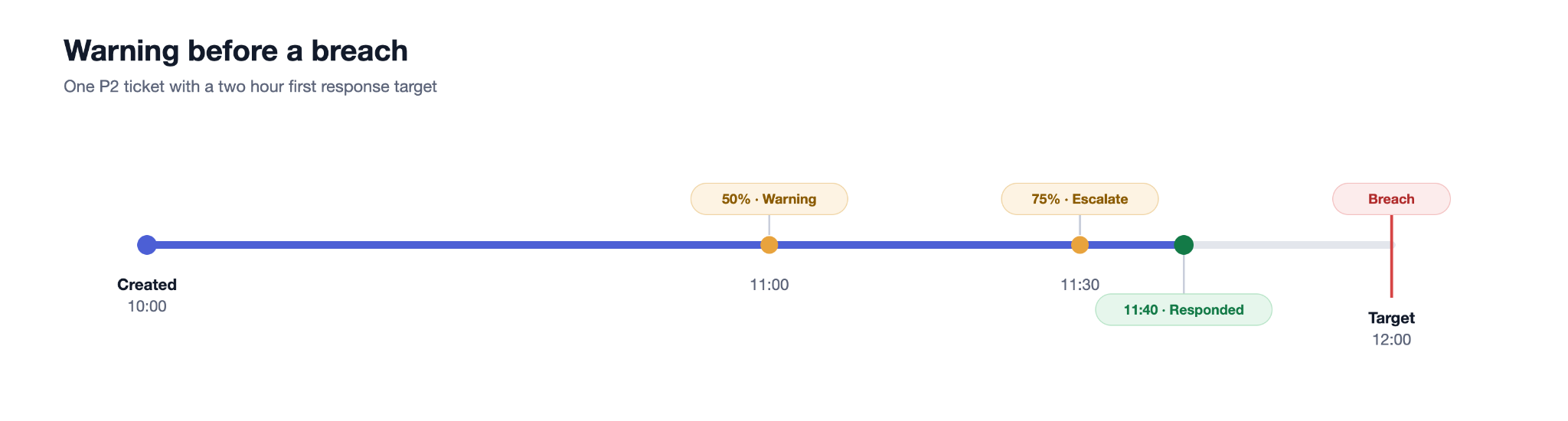
SLA breach management starts before the clock runs out. An alert that fires at the moment the target passes is only a record of the breach, and nobody can act on a record. For instance, a team that gets the warning at half of the target still has the other half to find an owner and send a reply.
Two points on the clock are usually enough. The first one is a warning around halfway through the target, and the second one is an escalation closer to the end.
These numbers are starting points only. You should tune them to the targets in your own agreements, because a 30-minute P1 in one contract can be a one-hour P1 in another.
The alert is a warning, and the work after it is what prevents the breach. A few rules help the team to act on the warning in time, such as:
- Every ticket should get an owner in the first few minutes. A queue that everybody can see and nobody owns is where the first response target gets lost.
- Requests should be routed by type at intake, so the ticket reaches the team that handles it on the first attempt.
- Escalation rules should be agreed and written down before they are needed, and proper escalation management decides who picks up the ticket when the first owner cannot.
- The at-risk queue should be checked daily. Tickets inside the warning window are listed there, and those are the ones to work on ahead of the rest.
In Suptask, SLA targets are set per Inbox and by priority. The team gets SLA alerts in Slack before the target is reached, and the ticket escalates to a manager when nobody has taken it. For a team already running a Slack help desk, the warning arrives in the channel where the work is happening.
Set Clear SLA Clock Rules
Indeed, a large share of breaches comes from the clock rules only. A breach like this means the ticket was handled fine, but the measurement was never set up for it.
The following five rules can help you decide what the clock will count, and these should be agreed with your customer before the first ticket comes in:
- Business hours: Your SLA target should be measured in business hours, and the clock should run in those hours only. A request coming outside business hours will start counting on the next working day. Without this rule, the report will keep showing the breaches that are not actually breaches.
- Business hours for the region: If you are working with a customer in a different time zone, then set different hours for each client. B2B customer support software handles this with business hours set per Inbox, in which every customer region is measured on its own working day.
- Wait on the customer: The clock should pause when the requester has been asked for information, if your agreement allows it. This will prevent the provider from being measured on somebody else’s delay.
- The vendor wait: A fix can depend on a hardware supplier, and the provider has no control over the reply time of that supplier. Sometimes the customer will still refuse to stop the clock for it. Whichever way it goes, it should be decided in the contract and not at the time of the breach.
- The starting point is the last rule: A clock can start when the ticket is created, or it can start when the first message comes in. These two are not the same thing when a request arrives by email and gets converted into a ticket later on. One of them should be defined, otherwise, your reports will be off by the gap between the two.
All five of these rules should be written in the SLA document itself. Then the provider and the customer are measuring the same ticket in the same way, and the breach number can be discussed without an argument over the method.
Per-Account SLAs in B2B Support
One target for all customers is uncommon in B2B. Bigger accounts negotiate tighter response times when the contract is signed. The smaller ones stay on standard terms. Tiered targets are normal in B2B customer service.
So the team runs several targets at once. A ticket from a key account looks like any other ticket in the queue, unless the target is attached to the account it came from.
- Key accounts get their own Inbox, or their own priority band.
- Account managers see the at-risk tickets on the accounts they own. They are the ones in the renewal meeting.
- Breach reports go account by account, and they go before the renewal review.
In Suptask, the key account gets its own Inbox with its own targets and thresholds. A customer support ticketing system set up that way keeps the tighter promise separate from the standard one.
What to Do After an SLA Breach
Five steps follow a breach, and the first one should not wait for the fix:
- Tell the customer before they ask about the breach. A notification that admits the miss and gives the update time is enough and should be sent out the same day.
- Assign a named person to the ticket. The name of the person should also be sent in the message, so the customer feels informed.
- Apply the credits when the contract has them written in. Nobody should have to claim what is already owed to them.
- Find the cause. Check the queue, the routing, the vendor wait, and the clock rule before deciding which one it was.
- Change the process. Routing, staffing, or the rules themselves, and a breach that gets explained but never fixed will come back the same way next month.
A short notification can look like this:
We missed our [response/resolution] target on your request about [topic]. [Name] now owns it and will update you by [time]. We're reviewing why this happened.
Keep the message short, and the update promised inside it has to be kept.
Example: One Breach Caught, One Missed
Two tickets, same priority, same two-hour first response target. One of them was answered in time, and the other one was not.
The one that was caught
- 10:00, a P2 ticket arrives. The target for the first response is 12:00.
- 11:00, the warning fires at 50% of the target. The ticket is still unassigned at this point.
- 11:05, an agent takes it off the queue.
- 11:40, the first response goes out, twenty minutes inside the target.
The one that was missed
- Friday 17:30, a P2 ticket arrives after the shift has ended.
- The Inbox has no weekend coverage, and the SLA was written in calendar hours, so the clock keeps running through Saturday and Sunday.
- Monday at 09:15, the first response goes out.
- The breach is recorded against first response time, and it was already recorded before anybody looked at the queue on Monday.
The difference between the two is not effort. In the first one, the warning reached somebody who was on duty and able to act on it. In the second one, the warning fired into an empty channel, and no rule covered what happened then.
The problem in the second case was the hours when nobody was working while the clock kept running. Business hours belong in the SLA itself, so the clock does not run through nights and weekends unless the customer has paid for that coverage. An on-call rule should sit over P1, in which somebody is reachable outside working hours for the highest priority only.
How to Measure SLA Breaches
One breach count for the whole month will not help you much. A few numbers should be looked at separately, such as:
- The breach rate should be split by priority and by team, because the same total will mean one thing when the misses are on the low-priority tickets and something quite different when they are on P1.
- You should also keep a count of the tickets that are at risk at this moment, and it is the only one in this list that can be worked on during the day, the rest of them are read afterwards.
- Average time from the warning to the response helps to show whether the alerts are being acted on, and if that time is staying close to the target itself, then either the warning is going out too late, or nobody is watching the channel it lands in.
- Breaches should be grouped by their cause also, otherwise, a staffing problem and a routing problem will look the same in the report, and both will get the same fix.
- For the B2B teams, the breaches have to be reported account by account, since that is the number which gets asked for in the renewal review.
SLA compliance should be tracked along with these. It is the same data read the other way, the share of the tickets that met their target. It can be kept with the rest of your ITSM KPIs instead of a page of its own. SLA response time benchmarks will also help to tell you whether the targets were set right, because a high breach rate can be coming from a target that was never achievable.
Set Your Breach Warnings This Week
Three things can be done this week without the need for a new tool:
Start by writing the clock rules first. Business hours, the pause while the customer is replying, the vendor waiting, the point where the clock starts, all of it should be agreed with the customer and put into the agreement itself.
The warnings should be set at 50% and 75% of the target, for P1 and P2 to start with. The lower priorities can wait until the top two are working the way they should.
Last, the breaches from last month should be reviewed by their cause. A list of breaches without the cause attached will not tell you what to change, since a staffing problem and a routing problem need different fixes.
Most of this is ordinary SLA best practices work, and it helps to go through those along with the clock rules before anything gets rewritten. A breach target is only one part of customer support as a whole, and the warnings will not do much if the tickets behind them still have no owner.
Frequently Asked Questions
What does SLA stand for?
SLA stands for service level agreement. The agreement is between a provider and a customer mostly, though two teams of the same company can also have one between them. Response time, resolution time, and uptime are the things that get written into it.
What is an SLA violation?
SLA violation and SLA breach are used for the same thing, and you will see both of them in reports. Either way, it means a target in the service level agreement was not met. The most common one is a ticket that did not get a reply within the agreed time. Missed SLA is used for it by some teams also.
What are SLA credits?
Credits only come into the picture when your contract has a clause for them. SLA credits are money given back, as a refund or as a discount on the next invoice, for the period in which the provider missed its target. Hosting, cloud and managed services contracts are the ones carrying them usually. The amount is worked out as a percentage of the fee. A provider should apply the credit on its own, the customer ought not to be asking for it.
Should the SLA clock pause while waiting on the customer?
It depends on your agreement, and most of them do allow the pause. When the requester has been asked for some information and nothing is coming back, the provider cannot move the ticket anywhere, so counting that time against the target is not fair to them. The rule should be in the SLA itself, with the point where the pause starts and the point where it ends.