An AI customer service agent is an AI that understands a customer’s question, finds the answer in your approved content, takes simple actions, and hands the conversation off to a person when needed.
B2B support works differently. Each customer has named contacts, and the questions coming in are technical ones about setup, API errors, or seat changes. A wrong answer is also noticed on the account.
This guide covers how these agents work, how they are different from a chatbot or a copilot, what they can be used for, how much they should handle on their own, what changes in B2B support, disclosure, setup, and measurement.
Key Takeaways
- An AI customer service agent answers the customer questions from your approved content, and it can take the simple actions also.
- A scripted chatbot matches on keywords, while an AI agent works out the intent behind a question and passes the context on when a person takes over.
- How much it should answer alone depends on the question type. Some questions can be answered directly, and the account-specific ones are better kept as a draft for an agent to approve.
- In B2B support, the AI answers inside each account’s shared channel.
- Customers should be told when an answer has come from AI. A way to reach a person stays open at every step.
What Is an AI Customer Service Agent?
An AI customer service agent answers customer questions without the need for a person. It works on questions that already have an answer in the approved help content.
Questions are often asked in plain words. The AI reads them, finds the matching content, and sends the reply in the same channel. A customer service AI agent is another name for the same thing.
These agents are also capable of doing more than replying. For example, agentic AI in customer service means the AI can take an action, such as checking an order record or updating a seat count. The reading and writing part comes from conversational AI for customer service.
An AI agent is one part of customer support, and the people and the queue behind it are still there. AI in ITSM is for internal IT requests from employees.
When the AI is uncertain about the answer, the request gets routed to a person with the full thread, so the context is there.
AI Agent vs Chatbot vs Copilot
The difference between the three is who the output goes to. A chatbot and an AI support agent are both replying to the customer, a copilot writes for the support agent instead.
Most teams are running an agent and a copilot together. The repetitive questions are handled by AI customer support, and the rest are routed to the human agent with a draft already written and the thread summarized.
How AI Customer Service Agents Work
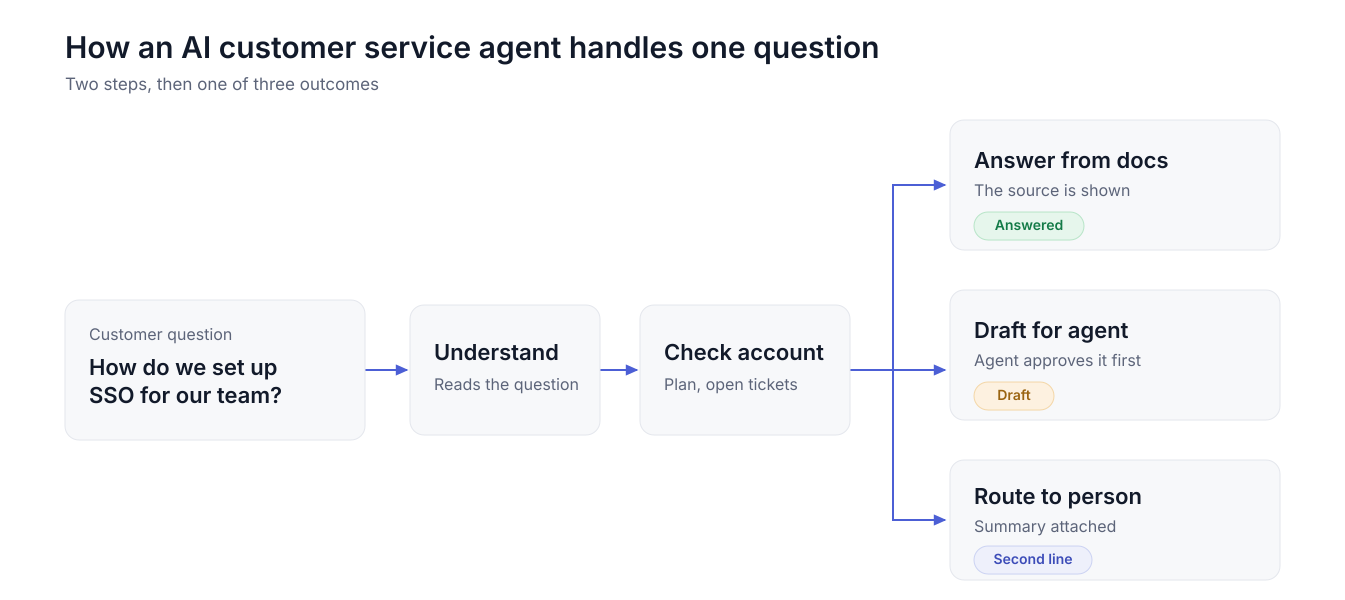
AI customer service agents work on a request in a few simple steps, as given below:
- Reading the message is the first step. Conversational AI customer service is the part that is used to understand what the customer is asking, even when the words do not match the help article.
- The next one is the context of the person who asked. Two customers on different plans should not always get the same answer, so the account, the plan they are on, and tickets that are already open, all of this information is pulled before the reply is written. A Salesforce integration can be connected for this. The HubSpot integration is doing the same job for teams who are on HubSpot.
- The answers are written only from the docs that are approved, with the source cited in the reply.
- Some requests also need an action, like a field that has to be updated or a record that has to be created. If the action is on the allowed list, then the AI can do it, otherwise, it gets prepared, and the agent confirms it later.
- Handoff is the final step. When the AI is not confident, or a person is asked for, the full thread should go to the agent with a summary, so the customer does not have to explain it again.
What AI Customer Service Agents Can Do
An AI agent for customer service should be used for questions that repeat. The answers to those are already written in the knowledge base, and anything beyond the knowledge base should still go to a person.
Some AI customer service agent examples are given below.
B2C Examples
Retail support is where most of these are coming from. Order status is the most common one. The customer is asking where the package is, and the AI can check the record and reply with it.
Returns and exchanges, the policy for both of them is in the help center already. Appointment changes, where a booking should be moved to another slot. Billing questions, like what a charge was for.
B2B Examples
The questions in B2B are more technical, and some of them are:
- How do I configure SSO? Setup questions are the biggest group, and the answer should be in your setup guide already.
- API errors are the other big one. Why did this call fail? There is an answer when the error code is a documented one.
- A copy of an invoice.
- Seat changes. Adding users, removing a team, these should be prepared by the AI, and your agent confirms before anything changes.
- Does the product support this feature? Answered from the docs.
- The status of a known bug should come from the linked issue, so your customer is not asking about it again next week.
How Much Should the AI Do on Its Own?
How much the AI should do depends on the question. The setting is decided by the question type, and a team that puts one setting across everything will get it wrong in both directions.
Agentic AI customer service, where the AI is taking an action on the account also, should be kept on the top row only, and only after those answers have been checked for a while.
Let AI answer, or let it draft. In Suptask, AI writes answers from your product docs in each customer’s Slack channel. Post them directly, or keep them as drafts an agent approves.
See AI answers and drafts in Slack
AI Agents for B2B Support
B2B customer service is built around the account. One customer company has a channel of its own, and the same few named contacts are asking most of the questions in it. The volume is lower than a consumer help desk. What is riding on each thread is higher, because the renewal is attached to that account.
A shared Slack channel per customer is where a lot of these conversations are happening now, and Slack for customer support works in that model.
Three things change for an AI customer support agent here:
- The answer has to be right for that account. A feature that is only on the higher plan should not be offered to a customer who is not on it, so the plan and the setup should be checked before any reply goes out.
- Drafts are working better than auto-posting on most of these threads. The contact is a named person at a company you hold a contract with.
- Escalation to engineering has to carry the context across. The thread, account, what was tried already, all of it should go with the issue, otherwise, your engineer is asking the customer to explain it a second time.
In Suptask, each customer gets a Slack Connect channel of their own, and the tickets from all of those channels land in one queue. AI answers from your product docs can be posted in the channel, or kept as drafts which an agent approves. AI summaries are used at handover, so the person taking over is not reading the full thread. Engineering escalation can link the ticket to an issue through the Jira integration. The GitHub integration does the same job for teams working in GitHub. Suptask is a Slack help desk, and it is used as B2B customer support software by teams supporting customers in shared channels.
Example: A Customer Question in a Shared Channel
One question in a shared channel, start to finish. The names here are examples, the sequence is the normal one.
10:02 Anna, a contact at one of your customers, asks in her company’s shared channel how they should set up SSO for a new team.
10:02 The AI finds the answer in the SSO setup guide and writes a draft, with the source attached to it.
10:05 Ben reviews the draft, changes one line, and posts it. Anna confirms that the setup worked.
14:20 Anna is back with an error after the setup. The AI summarizes what has happened in the thread and routes the ticket to the second line.
14:30 Engineering links a bug issue to the ticket. Status changes on that issue should be visible to the customer in the same channel.
Two days later, the fix ships, the ticket is closed, and a CSAT survey goes out to Anna. Anna did not move to a portal at any point, and the whole thing stayed in one place.
Trust and Disclosure
Customers should know when an answer has come from AI, and a way to reach a person should stay open at every step. The FTC’s business guidance on AI and consumer trust makes the same point, that people should know whether they are dealing with a person or a machine.
- AI answers should carry a label. One line saying the reply was written by AI is enough for most teams.
- The source should go along with the answer. Your customer should be able to open the article it was taken from.
- An option to talk to a person should be there at every step of the conversation, and the handoff should not depend on the customer asking for it twice.
- Complaints, legal questions, billing disputes. The AI should not be handling any of these on its own.
- AI answers should be reviewed every week. Where an answer was wrong, the doc behind it is the thing that needs fixing.
With the label and the source both in the reply, the customer is able to check the answer without asking anyone.
How to Set Up an AI Agent for Customer Support
An AI agent customer support setup should be done in a few steps, and you can follow the ones which are given below:
- You should start by pulling out the top 20 questions that your team is answering again and again, and the ticket history will have all of this already, so there is no survey needed for it.
- Every one of those 20 questions should have a help article or a product doc behind it that is current, because the AI is only going to repeat whatever is written in there, and an AI knowledge base is the place where you should be keeping this content.
- Then you should decide the setting for each type of question, where the how-to ones can be answered automatically, the account-specific ones should be kept as a draft for your agent, and anything high-stakes should always go to a person.
- The customer context should also be connected before you go live, so the account, the plan, and the open tickets are available at the time the reply is being written.
- You should launch it with drafts only and for one segment, like a single customer tier or one product area, because it is easier to check the answers when the volume is small.
- The wrong answers should be reviewed every week, and the topics where the AI has been right can be moved to auto one by one, you should not move all of them together.
How to Measure an AI Customer Service Agent
A few numbers should be checked after the agent goes live. These go along with your usual customer service KPIs.
- Share of questions resolved without an agent. You should count it per question type.
- Draft acceptance rate is how many of the AI drafts your agents are posting without any change in them.
- First response time.
- Reopen rate. An answer that closed a ticket and brought the same customer back was not a resolution.
- CSAT reported at the account level.
- Escalations with the reason for each one, and the reasons will tell you which topics should come off auto.
Start With Drafts on Your Top 20 Questions
You do not need a full rollout to find out whether this works.
- Make the list of your 20 most repeated customer questions.
- Open each one and check that the doc behind it is current. The old ones should be rewritten before anything else happens.
- Run the AI in draft mode for two weeks, and keep a count of how many drafts went out without an edit.
This count is what tells you which topics are ready to be answered automatically. Platforms are different in what they can draft from, and a comparison of the best AI agents for customer support shows which ones work from your own docs.
Frequently Asked Questions
How much does an AI customer service agent cost?
The pricing model is different with every vendor. Some charge per agent seat. Some charge for each AI conversation, and there is a third model where you pay only for the issues that got resolved. Your monthly volume decides what the real cost is, along with the plan, because in most of the tools, the AI is included only in the higher plan. Work out the total on your expected volume for each model, the entry price will not tell you much.
How can you tell if a customer service agent is AI?
A support team that is running it properly will tell you. The AI answers should be carrying a label on it, and asking for a person should be possible at any point in the conversation. Without a label, the timing is the giveaway. Replies coming back in seconds at any hour with a help article linked in them, that is mostly AI.
What is the best AI tool for customer service?
No single tool is the best one for every team. It should answer from your own docs, show the source, and hand off to a person with the full context when it cannot answer. The second thing is where the tool works. A tool that only works on your website is of no use if your customers are writing to you in a shared Slack channel or by email.
Will AI agents replace customer service reps?
In most teams, no. The repeat questions are going to the AI, the drafting is too. People are staying with the complicated conversations, the upset customers, the accounts where the renewal is at risk. In B2B support, the customer still expects a named person when something gets escalated.