Service level management is how a team agrees on service targets with the people it serves, tracks them, and improves the service when a target gets missed.
A target only counts for something if somebody measures it on a schedule and reports what the numbers were. Without that measuring and reporting, the SLA is a signed document, and nobody can say whether the service met it.
So, here in this guide you get the working picture. What the practice covers in ITIL, the documents behind it, and the process from requirements to review. We have also covered OLAs your internal teams depend on, monitoring and reporting, a service review agenda you can reuse, KPIs worth tracking, the watermelon effect, and a lighter version for a small team.
Key Takeaways
- Service level management agrees the service targets with your users, tracks them, and the service gets improved when a target is missed.
- In ITIL 4, it is a practice, in ITIL v3, it was a process that came under service design.
- The documents that carry all of this are the SLA with the customer, the OLAs between your internal teams, and the underpinning contracts your suppliers are held to.
- A report can show green on every target and your users can still be unhappy with the service, so satisfaction should be tracked next to the SLA numbers.
- Small teams do not need the full process. A one-page SLA, three targets, and a monthly look at the results are enough to start with.
What Is Service Level Management?
Service level management is responsible for the agreement on what good service means, and for keeping the service in line with what was agreed. The targets are written into the SLA, which is the part of it most people see.
The targets get agreed with the business first, and the service has to be monitored against them once the agreement is signed. Reporting is done on a fixed cycle, and gaps shown in them are where the improvement work should start. SLA management is the name a lot of teams use for the same work, and service level agreement management is that same name with SLA spelled out in full.
The contract itself is written by legal and procurement, and the practice is only giving them the targets that go in. Fixing the tickets is not part of it, your service desk is doing that work, and service level management reports on how the fixing went against the target.
Service level on its own is a different thing. In a call center, it means the share of calls that are answered within a set number of seconds, so it is one metric only. Service level management is one of the practices under IT service management. It depends on the incident, request, and change work being run properly underneath it.
Service Level Management in ITIL
ITIL service level management means the same work as it is set out in ITIL, a framework for IT service management.
ITIL 4 is the current version, which defines service level management as a practice. A practice refers to a set of resources and steps that exist to do one job. The targets are specific to a business and written in simple terms so they can be easily understood.
ITIL 4 also asks you to prove the targets were met, claiming the service ran well is not enough. The ticket data produces a number for each target, like the share of resolved P2 tickets within the agreed time, and that number is added to the customer report.
ITIL v3 treated it as a process and placed it in the service design stage of the lifecycle. The targets were supposed to be defined while a service is being designed, before the service goes live. Moving from a process to a practice changed the wording and the position in the model, the work on the ground stayed the same.
Key Service Level Management Documents
An SLA is a promise made to the customer. The provider can keep that promise only if the internal teams and the outside suppliers have agreed to times that are written in the agreement. Service level requirements and the service catalog come earlier, they record what the business needs and which services are being offered.
The targets written inside an SLA are also called service level objectives, which is where SLO, SLA, and SLI start getting used as if the three mean the same thing.
Types of SLAs
SLA can be divided into three types, like customer-based, service-based, and multi-level, depending on what each one covers:
- A customer-based SLA is written around one customer and works on each service that customer uses. A finance department running an ERP, reporting tool, and shared mailbox has the targets for all three in one document. The cost of maintaining separate agreements for each customer.
- A service-side agreement covers one service, and the targets remain the same for every department using it. The target stays the same for each department, so one department cannot be given a different target than the others. A department that needs a different target has to get its own agreement.
- A multi-level SLA is written in levels. Rules that are common to everyone are written once at the top, at the corporate level. What one department has agreed on top of those rules goes in the customer level, and the targets for each service go in the service level. A change to a common rule is made once, at the corporate level, and every agreement under it carries the change.
The Service Level Management Process
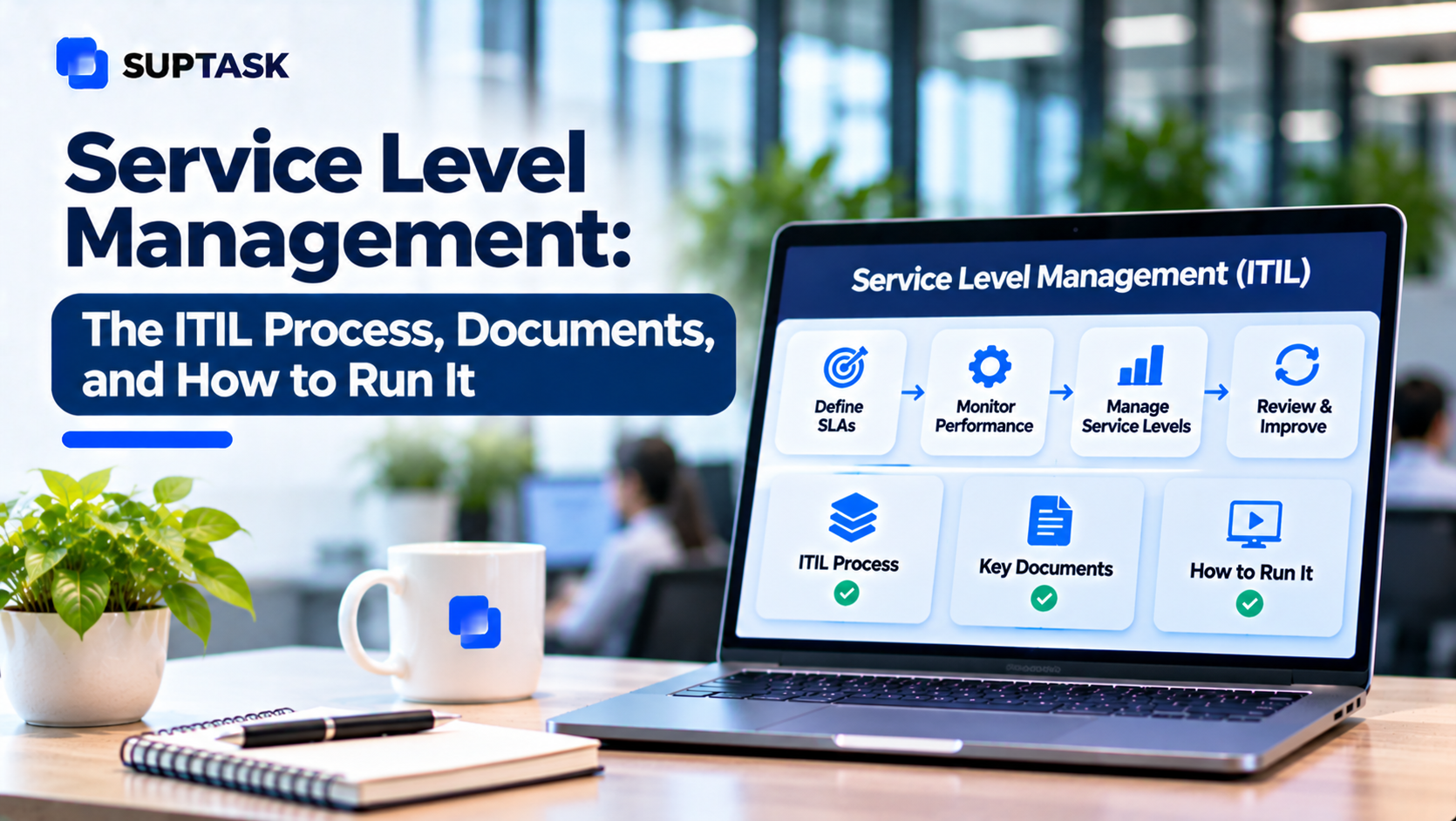
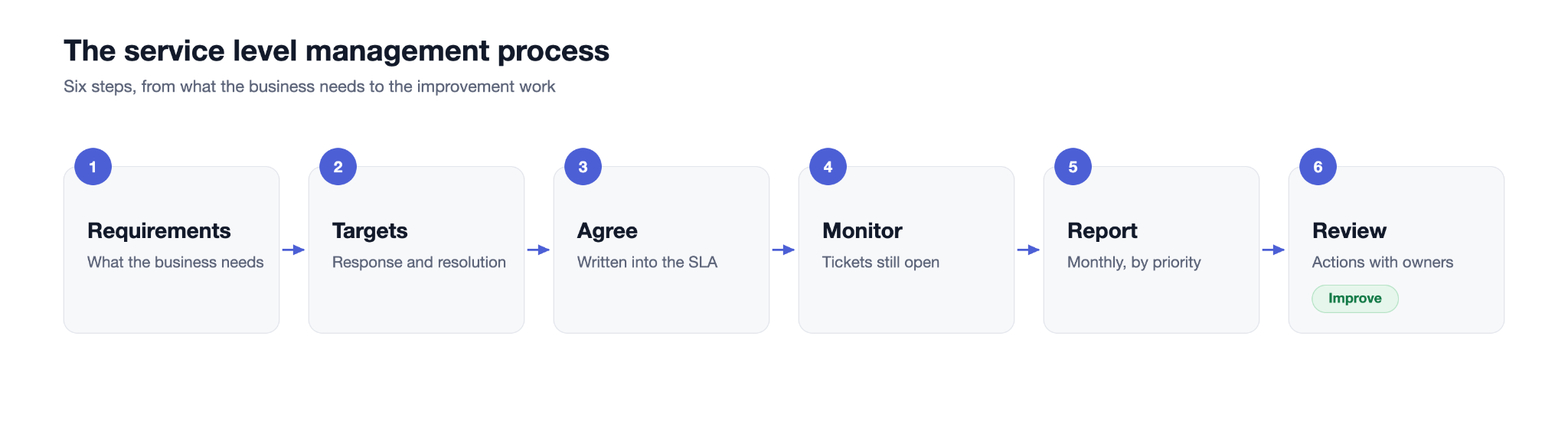
The service level management process can be broken into six steps. You can follow the steps in this order:
- Understand what business needs: The first step is to ask the business what it needs from the service and at what time it is needed. For instance, payroll is needed on the paydays and the warehouse system is needed during the shift hours, so the protection is not required equally for all the hours. If you skip this step, then the targets get decided by whatever the IT team is already measuring.
- Define the targets: Every requirement should be turned into a number which the service desk is able to measure, like the first response time or the resolution time by priority. The number has to be realistic for your team to hit in a normal week, and that is what makes a good SLA time worth agreeing on. Targets copied from another company's SLA will get missed when the volume goes up.
- Agree and write it down: The targets, hours in which they apply, and the exclusions are written into the SLA. The business has to agree to the targets as well, because an SLA only works as an agreement when both sides have accepted it. Exclusions and the escalation path are a part of SLA best practices, and they are the parts that decide if a missed target becomes a dispute or not.
- Monitor while the work is open: Monitoring should be done on the tickets that are still open. A target getting checked only at the month end is just a report, the breach is already done before the report is read.
- Report in plain language: The monthly results are sent to the business in simple words. Compliance by priority, the trend from the earlier months, and the main reasons for the misses are enough for a report. A report that needs an explanation before reading is too complicated for the people it is made for.
- Review and improve. The service review is where the report is discussed, and the actions are decided. Every action should be given an owner and a date, otherwise, the same breach reasons will come back in the next month's report.
OLA vs SLA vs Underpinning Contract
OLA vs SLA is a question of who the promise is made to. An operational level agreement (OLA) is made between two teams inside the same company, and the SLA is the promise made to the customer. The underpinning contract is the third one, signed with a supplier outside the company.
An OLA is saying what one internal team will do for another team and in how much time. The service desk, which is handling a P1 ticket, is depending on the network team, so the OLA is written as the network team acknowledges a P1 handoff within 15 minutes. Onboarding works the same way between IT and HR, where the agreement says the accounts are ready two days before the start date, and HR has to send the joining details early enough for that.
An SLA can only be met when the OLAs behind it are realistic, because the customer-facing target is made up of the internal steps that happen before it. A promise that is agreed with the customer without checking the teams in the middle will get missed in the first busy month.
In an internal help desk where each team is working from its own Inbox, the targets can be set separately for every Inbox, so the acknowledgement time of the network team is tracked in the same way as the customer-facing target.
SLA Monitoring and Reporting
SLA monitoring is the tracking that happens while the tickets are still open, and SLA reporting is what goes to the business once the month is closed. The two get mixed up, though they are used at different moments and for different readers.
The live list of tickets close to their target is the main thing to watch, because a ticket can still be saved while it is open. The warning should reach the assigned agent while time is still left on the ticket. The threshold is set on the time remaining, so the alert fires at a point your team picks. A warning arriving after the clock has run out is only telling you about an SLA breach that has already happened.
The monthly report should be showing compliance by priority and by team, which is what makes it clear where the misses are coming from. The trend from the earlier months is needed also, because one month on its own is not telling you if the service is getting better or worse. The top causes of the breaches go in with one or two actions against them, and a report without actions is not changing anything in the month after it.
In Suptask, the SLA targets are set per Inbox and by priority. The team is getting an alert before a breach happens, and the escalation goes to a manager. SLA tracking in Slack keeps that alert in the channel where the work is already going on. Suptask is a Slack help desk, so a separate portal is not needed for tracking or for reporting, and the SLA analytics are showing the performance per Inbox for the monthly report.
Running a Service Review Meeting
The service review is the meeting where the monthly report gets discussed with the business. The report should be sent before the meeting, so the people in the room have read the numbers already and the time is spent on the discussion. The agenda below splits the meeting into five items and adds up to half an hour.
The causes are getting the biggest share of the time, since that is the only part of the meeting which changes the result next month. Results against the targets can be read out quickly because the numbers are already in the report. The satisfaction part is where the business tells you what the users are saying, and it is not always in agreement with the compliance figure.
Changes planned in the next months belong in the meeting also, like a new office opening or a system going live, both of which are going to move the volumes. The last five minutes are for the actions, each action is given a name and a date before the meeting ends. A review that ends without owners is going to repeat itself in the month after.
Service Level Management KPIs
The following numbers should be tracked for service level management, such as:
- SLA compliance is the share of tickets that met their target, and it should be split by priority because a missed P1 and a missed P3 are not the same thing for the business.
- The waiting time before a human replies is the first response time.
- Resolution time is counted from the ticket being raised to the fix being confirmed, and the business hours have to be taken out of it, or the number will look worse than it really is.
- Breaches are grouped by cause, which is the one that tells you what to fix.
- On the internal side, OLA compliance shows whether the handoffs between the teams are holding up.
- CSAT comes from asking the requester after the ticket is closed, and the score can go down in a month where every target was met.
- Closed tickets that come back are counted in the reopen rate, a ticket that reopens was not resolved the first time.
An SLA is the promise, a KPI is the measure that shows whether the promise was kept, and the FAQ below puts the difference in one line. The list above is the service level set, the wider ITSM KPIs bring in cost and workload also.
The Watermelon Effect
The watermelon effect is when the SLA report shows every target met and the users of the service are still unhappy with it. The name comes from the fruit, green on the outside and red inside. The targets count how fast the team replied and how fast the ticket was closed. Whether the fix actually worked for the requester is not measured in them anywhere.
Take a ticket that is closed within the target time, and then it reopens. In that month's report, it is still counted as a success, because the clock was stopped when the agent pressed close. Same with the first response. An auto-reply can mark the ticket as responded, and the requester has not heard from a person at all.
The fix for it is simple. Satisfaction and reopen rate should be put in the same report, next to the SLA numbers. The comments that people write with the survey score have to be read also, the score alone is not saying what went wrong. For the services the business depends on most, an experience level agreement can be used. The target in it is written on the outcome the user is getting, the minutes are kept as a second measure.
CSAT read next to the SLA results is what catches it early. On Suptask's plans, the CSAT and performance analytics start at Professional. SLA analytics are on Growth.
Service Level Manager Role
The service level manager is the person who owns this work end to end. The responsibilities are these:
- Agreeing the targets with the business is the first part of it, and the IT team is not deciding them on its own.
- The SLA and the OLAs have to be kept current.
- Reports go out on the cycle, the service review is run by the same person, which keeps the numbers and the conversation about them in one place.
- On the supplier side, the contracts outside the company and the OLAs inside it should be coordinated so the times written in them fit together.
- Improvements come out of the review, and each action is followed till it is closed.
In a small team, the IT lead or the support lead is taking this on along with the other work, and the title is not written down anywhere.
Lightweight Service Level Management for Small Teams
The service level management process remains the same for a small team, and the amount of writing varies. A small IT team has fewer teams to hand off to and fewer suppliers sitting behind the service, so much of the documentation the full process assumes has nothing to hold. What stays useful is the targets, measurement, and the review.
The one-page SLA should carry the scope of what is covered, hours it applies to, three targets, and the way to ask for help. Three targets are enough, a first response time, a resolution time for urgent work, and a resolution time for the rest. More targets on a small team only means more numbers that go unchecked.
One OLA is enough at the start, written for the handoff that happens most. The results should be looked at once a month, even when it is a single line posted in a channel. The business comes in once a quarter for the proper review, where the targets are checked against what the work actually needs now.
The service level management best practices written for large organizations assume a named owner, a documentation set, and a tool behind all of it. Your team should take only the parts that change what the team does.
Let the targets track themselves. In Suptask, each Inbox has SLA targets by priority and business hours. The team is alerted before a breach, and SLA analytics feed the monthly review.
Example: One Quarter of Service Level Management
The service level management examples below follow one quarter at a company of around 200 people. Every figure in it is illustrative.
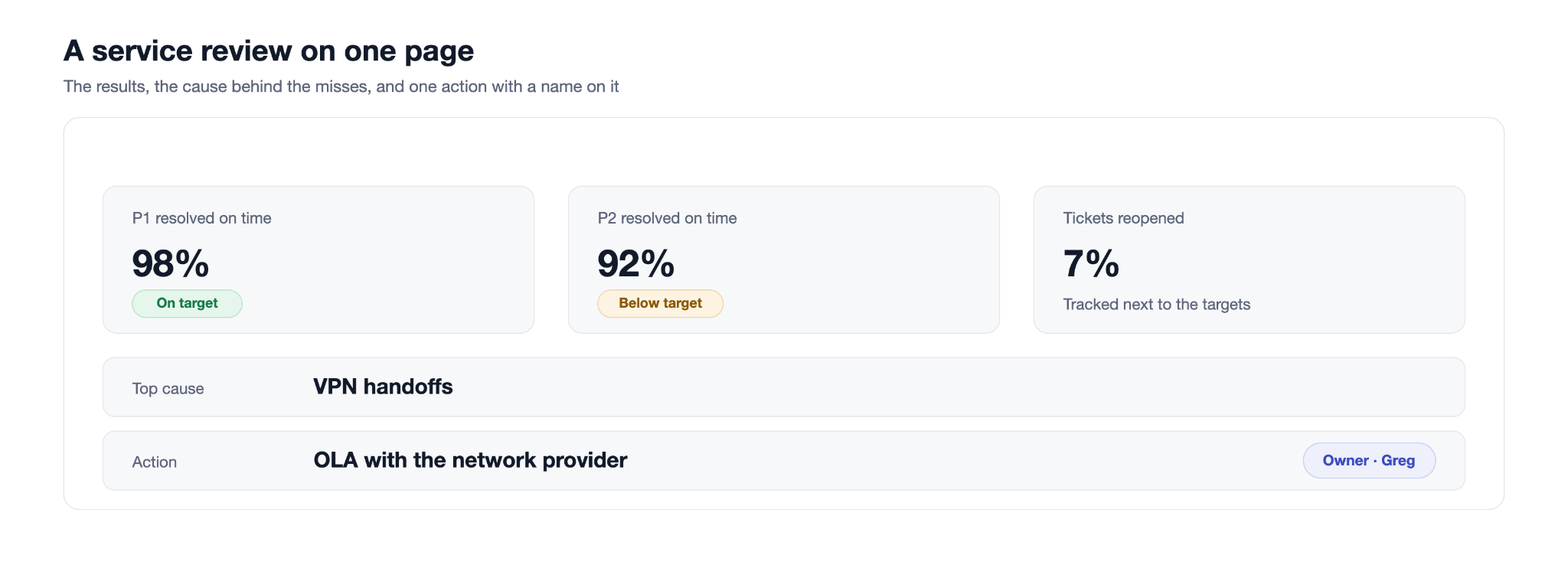
In the first month, the P2 resolution target was set at 8 business hours. The report came back with P1 at 98 percent on time and P2 at 92 percent. Reopened tickets were 7 percent of the ones closed, and the top cause behind the misses was written as VPN handoffs.
Greg, the IT lead, took the action out of that review, an OLA with the network provider with acknowledgement within 1 hour. The reopen rate stayed in the report next to the compliance figures from the second month onward.
The third month had the service review with HR and finance in the room. An onboarding OLA came out of it. The P2 target was kept as it was, and the VPN reopen rate had come down by the end of the quarter.
In this example, the targets did not change, the handoffs did.
Write a One-Page SLA This Month
The first page can be written without a new tool or adapting a new process. The following four things get you to a working version:
- List the services your team supports, then mark the three or four the business would notice going down.
- Set three targets on those ones, a first response time, a resolution time for the urgent work, and a resolution time for the rest.
- One OLA goes in for the handoff behind most of your missed tickets.
- The monthly look at the results should be in the calendar before you close the page, with the quarterly review booked also.
The page gets corrected after each review, and you should keep the corrected version.
Frequently Asked Questions
What are the three types of SLAs?
The three common types are customer-based, service-based, and multi-level. A customer-based SLA is written for one customer, and it covers every service that customer is using. A service-based SLA goes the other way, one service with the same targets for all the customers on it. The multi-level one is built in levels, a corporate level for the rules that apply to everyone, a customer level for what one group has agreed on top, and a service level for the targets of each service.
What is an SLA vs a KPI?
An SLA is the commitment agreed with the customer, like resolving P2 tickets within eight business hours. A KPI is the number you track to see where the service stands, like the share of tickets that got resolved on time. The SLA is the promise, and the KPI is telling you how well that promise is being kept. One of them is agreed with the other side, the other is measured by your own team.
What are the 5 stages of ITIL?
ITIL v3 described five lifecycle stages, service strategy, service design, service transition, service operation, and continual service improvement. Each stage had its own processes, and service level management was one of the processes under service design. ITIL 4 dropped the lifecycle and put a service value system in its place, with practices instead of processes. Service level management is one of the practices in that set.
What is SLA management?
SLA management is the day-to-day work of setting the targets, tracking them, and reporting on the service level agreements. A lot of teams are using it as another name for service level management. The difference, where one is drawn, is that service level management also takes in the reviews with the business and the improvement work coming out of them.