IT change management is the practice an IT team uses to plan, approve, and release changes to systems in a controlled manner without affecting the services that are already running. Google’s SRE book reports that roughly 70% of outages come from a change made to a live system. That is the practical reason for the approval step.
ITIL change management is the framework IT teams follow for having a structured change management process. Change management in IT is a different subject from organizational change management that deals with staff behavior. You will find the change types here, the ITIL process in order, the roles, including the CAB, a request template to copy, a small-team version that needs no CAB, and the metrics that tell you whether any of it is working.
Key Takeaways
- IT change management is used to control the changes that go into systems and services, so that a change does not end up causing an outage.
- Three change types are defined in ITIL. A standard change is pre-approved, a normal change has to be assessed and approved before it goes in, an emergency change is fast-tracked when something is already broken.
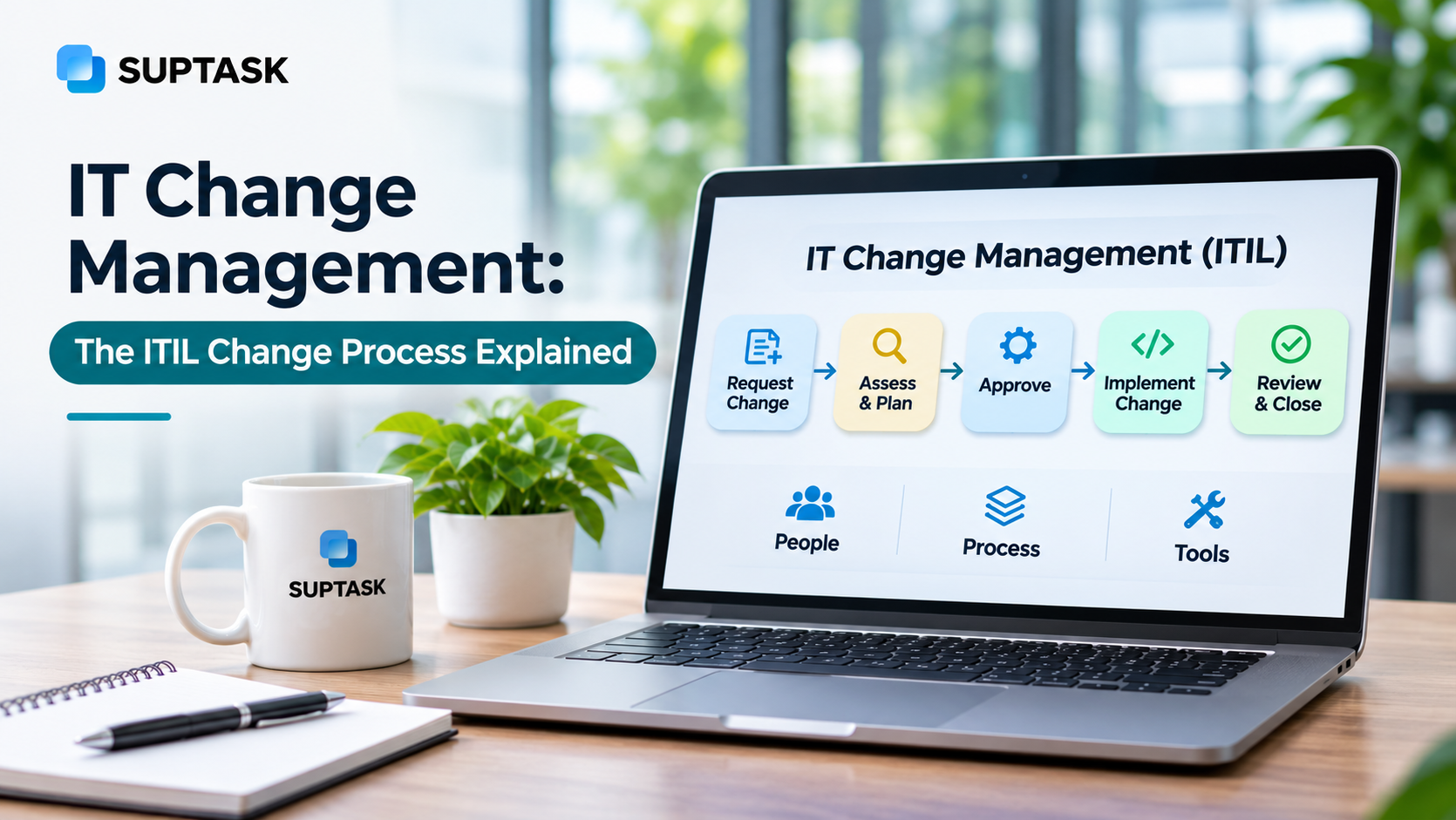
- The process starts with a request for change, then the risk gets assessed, the approval is given by whoever holds the authority for that type of change, the change is implemented, and a review closes it.
- ITIL 4 renamed the practice to change enablement, and the approval effort is matched with the risk level instead of every change getting the same level of review.
- Small IT teams do not need a formal CAB. One peer reviewer on each normal change and a shared change calendar cover most of what a CAB is there for.
What Is IT Change Management?
IT change management is used to decide which changes are allowed into a live IT environment and who has the authority to approve them. A change in this context means any addition, modification, or removal that can have an effect on a service, so a firmware update and a new access rule both count.
ITSM change management is one of the practices inside IT service management, and it works alongside the rest of them. Incident management deals with unplanned breaks, problem management looks for the underlying cause, and service request management handles the routine asks that come in from employees.
Briefly said, change management in IT covers the planned work, which an IT team has decided to do and can therefore review in advance. The goal is a lower number of failed changes and fewer incidents that get traced back to a change. Routine work should not be held up for an approval it does not need. The scope is wide, which includes servers, network equipment, applications, configuration settings, and access rules.
Change Management in ITIL 4: Change Enablement
ITIL 4 renamed change management to change enablement, and it is set out as a practice instead of a fixed process to be applied across all change requests.
ITIL 4 does not prescribe one workflow that every change request has to follow. It defines a practice which includes who can authorize a change at a given level of risk, and the workflow around that authority is left to the organization.
Change management was defined as a process in an earlier version of ITIL. ITIL 4 moves it into a set of practices that run continuously. The first ITIL 4 Foundation material called the practice change control, and the word control drew enough objection that change enablement was settled on before the general release.
The practical part of the shift is in the approvals. Approval effort is matched with the risk of the change, so a low-risk repeatable change does not get the same review as a database upgrade.
The change authority is the person or group responsible for authorizing a change, and ITIL 4 expects the role to be assigned by the type of change. Three roles are named for the practice, change manager, change coordinator, and change authority. The authority can be delegated by type of change to a development team, a technical expert, or a service owner, which is the arrangement the ITIL change process describes. The reasoning is that an authority closer to the work has more visibility over it.
Most of the teams still say change management in day-to-day work, and both terms point to the same practice. ITIL is where the detailed guidance comes from. Change management also appears in other ITSM frameworks, including ISO/IEC 20000 and COBIT.
Types of Changes in ITIL: Standard, Normal, and Emergency
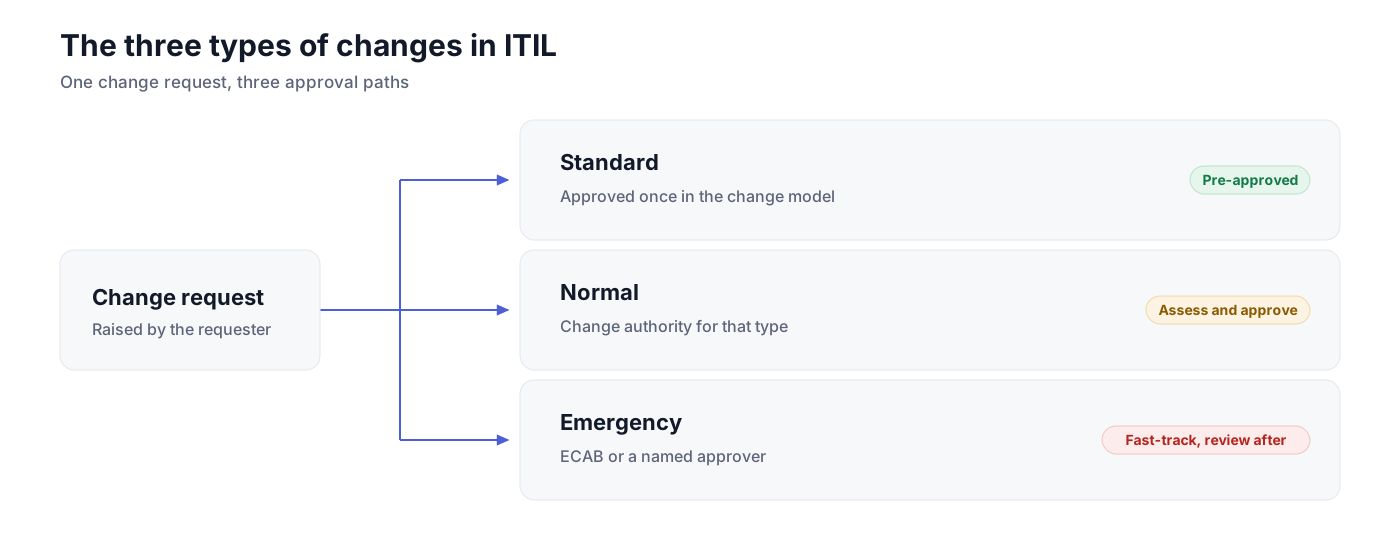
The three types of changes in ITIL are the standard change, \ normal change, and emergency change. The difference between them is the risk. ITIL change management types are also separated by the approval which each one needs, and the approval goes up along with the risk. You should decide the type first, because the type determines who will approve the change.
Standard Change
A standard change is one that is pre-approved already. The approval for it is given one time only, at the time when the change model is written for it, and after that each new instance of the same change can go ahead without asking for a separate authorization. The risk in these changes is low, and a team is doing it again and again, so everybody knows the steps.
Some of the common standard changes are adding a user to a group, routine patching, and a new laptop setup. Work like this is also handled as service requests in the teams that are running a service catalog.
Normal Change
Every normal change has to be assessed first, and then it gets authorized. The assessment covers what the change is touching, what can break because of it, and what the rollback will be. Authorization is given by the change authority for that type of change.
Normal changes are again split into minor and major. The minor ones are lower risk, and for these the change authority can be a person who should be able to decide fast, with some part of the work handled by automation. The major ones are high risk, and these are going to a higher authority, which in many organizations is a board. Firewall rule changes, a database upgrade, rollout of a new application, these all come under normal change.
Emergency Change
An emergency change can not wait. It has to go in immediately, either to fix an outage or to stop one that is about to happen. The approval for it comes from an emergency change advisory board, which is called the ECAB, or from one named person who is authorized to decide at that moment.
ITIL allows some of the steps to be delayed in these cases, like the change request registration and the updating of the change schedule. The record should be completed afterwards. A security patch for an active exploit, or restoring a server that has failed, both are emergency changes. The review is still done after the work is over. An emergency change that came out of a major incident is also getting reviewed once the service is back up.
The ITIL Change Management Process
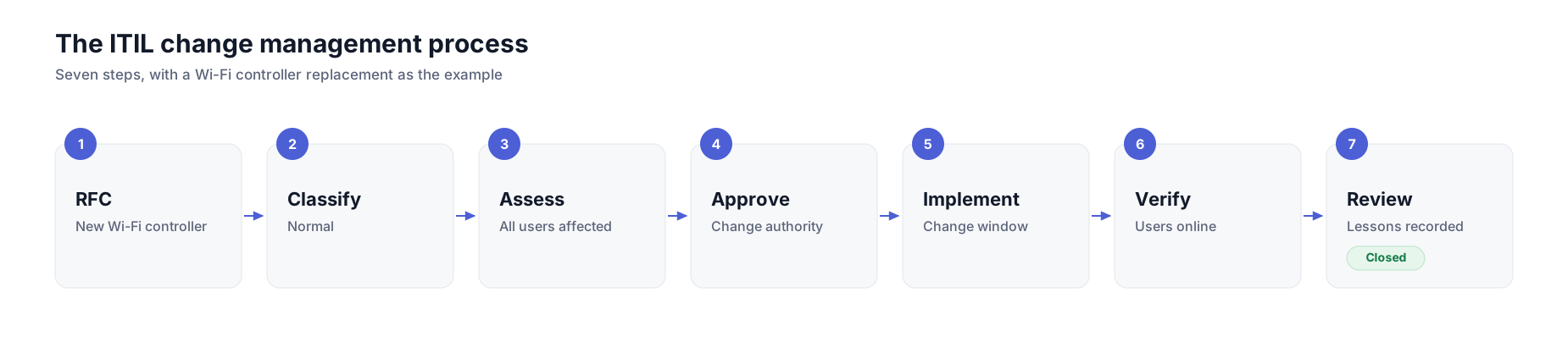
The IT change management process has seven steps in it, and you can use the same sequence for all three change types. Only the approval part will change. The example used below is a replacement of the controller for the office Wi-Fi.
1. Request for change (RFC)
You should start with a request for change, which is called an RFC also. In the RFC, you should write what is changing, the reason for it, who is doing the work, the date you want, and the rollback plan. The Wi-Fi controller RFC will have the new controller in it and the access points that are moving over.
2. Review and classify
Next, the request should be reviewed and classified into standard, normal, or emergency. If the request is incomplete, you should send it back. A request that has no rollback plan can not be assessed.
3. Assess risk and impact
Now comes the risk assessment. You should look at what can break, the number of users getting affected, and the other systems that are depending on it, which your IT asset management records should be showing. A controller replacement is affecting everybody on the office network, so you should not rate it as low risk.
4. Approve
The change authority for that type should give the approval. For the high-risk ones, it goes to the CAB, and the ECAB is there for emergencies. You should keep the approval recorded on the change itself, the audit will ask for it later.
5. Plan and implement
A change like the Wi-Fi controller should be planned outside working hours. Your plan should cover the change window, the testing, and the people who are needed during the work. Then it gets deployed, and the rollback should be kept ready.
When the change is being shipped by engineering, the request can carry a linked Jira issue with the status synced on both sides. For engineering-owned work, this runs the same way as DevOps ticketing.
6. Verify
Then you verify. Somebody should confirm that the service is working for the users, because completing the task is a different thing from the service working. For some days after, you should also keep a watch on the tickets.
7. Post-implementation review and close
The last one is the post-implementation review. Here, you should check if the change has done what it was supposed to do, if any incident has come from it, and what your team will do differently next time. After the review, the change can be closed.
Roles in IT Change Management
The roles are listed in the table below. In a smaller team, you will see one person holding two or three of these roles together, which is normal.
Change Advisory Board (CAB)
The change advisory board is a group that advises on the changes carrying the most risk. Who is in it will depend on the organization, but the change manager, the owners of the affected systems, somebody from the service desk, and in many cases a security representative are the usual members.
In a CAB meeting, the board goes through the normal changes that are waiting, the risk of each one, the schedule, and the conflicts between two changes planned in the same window. The board can approve, reject, or send a change back for more information.
Most teams are not putting every change in front of the board now. A low-risk, normal change should be approved by a single change authority, and the board is kept for the high-risk ones. Matching the approval to the risk is one of the ITIL best practices teams are following today. ITIL 4 also treats the board as one option for the change authority, it is not a compulsory body.
IT Change Request Template
The fields below are an ITSM change management template which you can copy into your form or your ticketing tool. Keep it short enough that people will actually fill it in, and for a standard change, most of these are already answered by the change model.
A request that is missing the rollback plan or the impact line should not go for approval, because the change authority has nothing to assess.
Turn this template into a Slack form. In Suptask, change requests are submitted with your own fields and approved in Slack. Every approval is recorded on the ticket. See IT change requests handled in Slack
Change Management for Small IT Teams
A small IT team with 3 to 8 people won’t need a change manager, a weekly board meeting, and an ECAB. The three change types should be kept, because the types are doing the real work of separating the risky changes from the routine ones. Everything else can be made much lighter.
Begin by documenting the list of pre-approved standard changes like password reset, routine patching, or adding a user to a group. Since these are common requests that are repeated, nobody has to approve them each time.
For normal changes, one peer reviewer can do the job of a CAB. An engineer reads the request, checks the rollback plan, and says yes or no. A simple approval workflow is enough here, where the request goes to one named reviewer and comes back approved or rejected.
A shared change calendar should show what is going in and when, so two people are not working on the same system. Beyond the standard changes, there should be a rollback plan, so expect that one.
Once a month, you should go through the changes that failed. What was missed in the assessment was the rollback testing and whether the request has enough detail in it. Those answers should go back into the standard change list and into the template.
Approvals can happen in chat, and that is fine as long as the approval is recorded on the change itself. A Slack help desk like Suptask is built around that. People submit a change request through a form, and the team can approve change requests in Slack, with each approval recorded on the ticket.
IT Change Management Best Practices
You can start with a few basic practices, such as:
- Match the approval to the risk: A low-risk normal change should not be waiting for the same sign-off as a database migration.
- The standard change list is the one thing which should keep growing. Every time a normal change has gone through a few times without any problem, it is a candidate for the pre-approved list, and moving it there takes review work off the queue.
- Rollback plans, no skipping on those. A change that cannot be reversed should get extra review.
- On the scheduling side, a change calendar and fixed change windows will stop two teams from touching the same system on the same night.
- Users should be told about the changes they are going to notice. A short message before a planned restart will reduce the tickets that land on the service desk.
- Nobody can see which type of change keeps failing unless the incidents are linked back to the change that caused them, and then the review has nothing to work with.
- A change freeze around the critical periods is worth setting, like a year-end close.
- The failed changes and the emergency ones should be reviewed together at a regular interval. A high share of emergencies is telling you the normal process is too slow for the team, which is a problem in the process itself.
Automation changes the arithmetic here. Where a deployment pipeline is doing the testing and the rollback by itself, many of those releases can be treated as standard changes. Automated pipelines are the practical meeting point in the ITIL vs DevOps discussion.
IT Change Management Metrics
Six metrics might help you to know if the change management process is working.
These six are the change-specific ones. The wider ITSM KPIs a service desk is tracking will cover incidents, requests, and the rest of it.
Reading them one by one is not telling you much. The audit is in reading them together. In a process that is working, most of the volume should be standard changes, the emergency ones should be few, and only a small number of normal changes should be getting rejected at approval.
A lot of rejections are pointing at the request form, the requests are going in without enough detail in them. If the emergency changes keep coming, the normal path is taking too long, and people are going around it. A backlog that is growing every month means the approval step has become the bottleneck.
How to Set Up IT Change Management in 30 Days
A working process can be put in place in about thirty days. The four weeks below are a starting sequence, and a team can move faster if the changes are already being tracked somewhere.
- Week 1: Pull out the changes your team made in the last quarter and put each one into standard, normal, or emergency. The exercise is showing you what the real volume looks like, and it gives you the list to work from.
- Week 2: Write the standard change list out of that exercise, the ones that repeated without any problem go on it. Then the RFC template, which you can take from the field list given earlier.
- Week 3: Name the approver for each type of change, and put up a shared change calendar where the team can see it.
- Week 4: Run the post-implementation review on whatever went through during the month, including the ones that went fine. Then the self-audit, standard against normal against emergency, the rejections, anything that failed. After the first audit, the process is running, and it should be looked at again after a quarter.
Frequently Asked Questions
Do small teams need a change advisory board?
No, in most of the small teams it is not needed. One peer reviewer on each normal change does the same job as a board meeting, and it is much faster. A formal CAB should be kept for the high-risk changes, the ones that are touching critical systems or a large number of people.
What is a request for change (RFC)?
A request for change is the formal proposal for making a change. It says what will change, the reason for it, the timing, what can go wrong, and the way to roll it back. Every normal change and every emergency change starts with an RFC. A standard change does not need one each time, because the approval for it is already given in the change model.
What is a change freeze?
A change freeze is a period where only urgent changes are allowed to go in. Year-end close is a common example, and a big product launch is another one. During a freeze, emergency changes can still go ahead, but they need extra approval before anybody touches anything.
What is an emergency change advisory board (ECAB)?
An ECAB is a small group that can approve an emergency change at short notice. The change manager is in it along with the owners of the systems that are affected, and the group is kept small on purpose so that it can be pulled together quickly. The review is still done after the emergency change is finished.
What is a post-implementation review?
A post-implementation review is the check done after a change is finished. It looks at two things, whether the change did what it was supposed to do, and whether anything broke because of it. The review is required for major changes, emergency ones, and any change that failed. Whatever comes out of it should go back into the process, into the template, or into the standard change list.