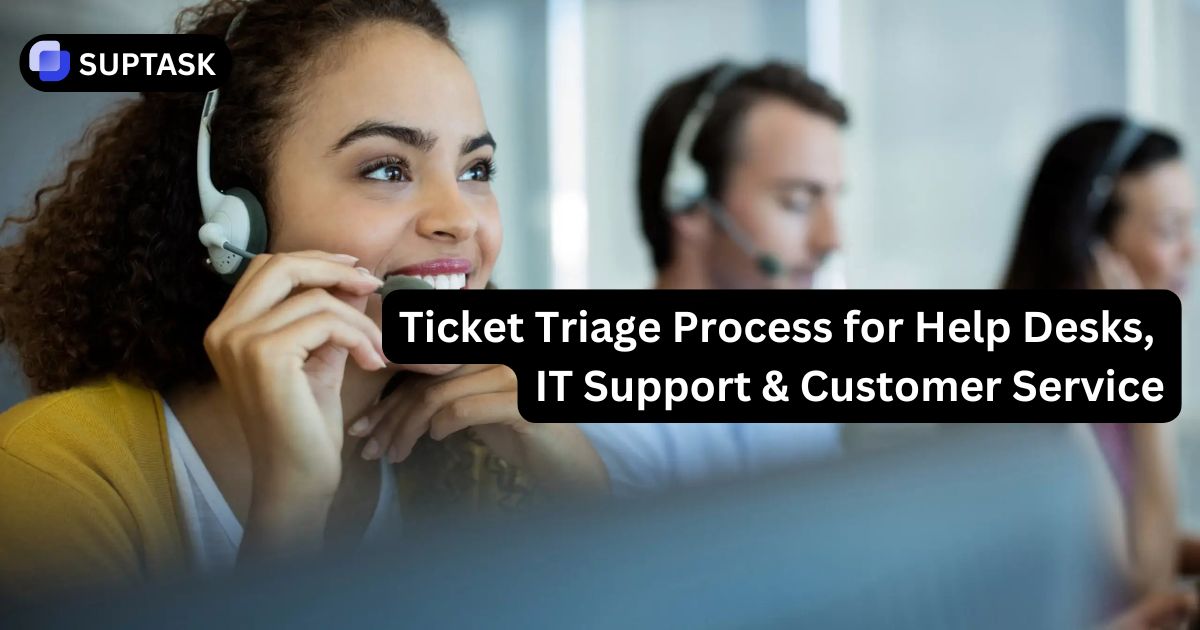
Ticket triage sets the direction for every support request. By organizing, prioritizing, and assigning incoming tickets early, teams respond faster, reduce delays, and ensure issues reach the right people from the start.
If you're unfamiliar with the concept, our guide about the Ticket Triage Definition explains where triage comes from and why it plays such a central role in support operations. In this article, we'll focus on how ticket triage works in help desks, IT support, and customer service.
Ticket triage is more than a best practice. It's the operational foundation that determines whether a support team stays organized, meets SLAs, and resolves issues efficiently, or becomes overwhelmed by a growing backlog.
What is Ticket Triage?
Ticket triage is the entry step in incident management, where incoming requests are analyzed, categorized, prioritized, and routed to the team best positioned to handle them.
"Triage" is derived from the French word "trier," which means "to select". It was adopted from emergency medicine, where it refers to a system for patient classification by severity. Support teams adopted the concept because it is not possible to give all tickets priority at once; some form of prioritization is necessary.
Every new support ticket raises four immediate questions:
- Is the ticket valid and complete?
- Where does it belong?
- What is its priority among other tickets in the queue?
- Can it be solved without involving a human agent?
These four points translate into four tasks that your triage process must carry out each time a new ticket is added to the queue.
The Four Actions Of Ticket Triage:
- Filter
- Route
- Sequence
- Deflect
1. Filter
Filtering happens before a ticket enters the queue. Duplicate tickets, spam, test tickets, and incomplete tickets lacking sufficient information to act on waste agent time when placed in the queue alongside legitimate tasks.
A simple filter check asks whether the ticket includes a requester, a clear problem description, and enough context for someone to begin work. a problem statement, and sufficient information for it to be processed. A password reset request without a username would not be actionable. In the IT support world, an alarm message without a host identifier would likewise be non-actionable.
Do the filtering ahead of time; don't wait until an agent has spent five minutes reviewing it.
2. Route
Routing determines which team or individual should receive the ticket based on category, required skills, and ownership.
A billing dispute sent to the technical support team wastes everyone's time. Likewise, a production outage assigned to a Tier 1 generalist delays the response to a critical issue.
Effective routing starts with a clear and consistent categorization system, making it easier to direct tickets to the right team, whether the process is manual or automated. If you're designing your taxonomy, our guide to Support Ticket categories explains how to build a category structure that improves reporting and routing accuracy.
3. Sequence
Sequencing determines the order in which routed tickets should be handled.
This is where priority determines who gets helped first.
Two tickets assigned to the same agent must have a clear "who first" criterion that does not require manager intervention.
Sequence should not be confused with assignment. A ticket can be assigned without being properly sequenced, which is what causes incorrect prioritization. This is what makes it a triage problem when the agent is dealing with a P4 cosmetic bug while the P1 outage sits in the same agent's queue. It's the system that failed in sequencing.
4. Deflect
Deflection is resolving a ticket without using any of the agent's time, usually by referring to a knowledge base help desk, an automated response, or self-service. Examples include password resets completed through automated workflows, order-status requests answered through an API, or common "How do I?" questions resolved by a knowledge base or chatbot, shipping status pulled from the order API, "How do I export?" question answered by a bot with a reference to documentation; all these are deflects.
Deflection is not a workaround. Deflection is what should be done for simple, repetitive requests. Good deflection is not about reducing tickets but about providing the requested information to the requester. Triage determines what happens next, but successful outcomes depend on how tickets are handled once they reach the right team. Learn more in our guide to ticket handling best practices
Triage As A Trust Signal
Triage provides the first indication of how competent your support team is. The first acknowledgment, coupled with accurate triage, will assure the user that their problem has been understood even before work begins.
A simple statement such as *"We have taken your request into consideration, and it has been given top priority,"* provides the user with much more confidence than silence or an answer such as *"Your ticket #4821 has been opened,"* without any further information.
Being quick is necessary, but being precise at the first step is even more necessary.
The ping-pong effect is what happens when triage breaks down
Poor triage doesn't just slow things down. It creates a failure pattern that compounds with every incorrect step:
- Ticket arrives without proper categorization
- First team reads it, decides it belongs elsewhere, reassigns without notes
- Second team picks it up, lacks context, asks the requester to repeat information they already submitted
- Requester repeats themselves, frustrated
- The issue was eventually resolved, but only after multiple teams touched it, and the requester had to re-engage twice
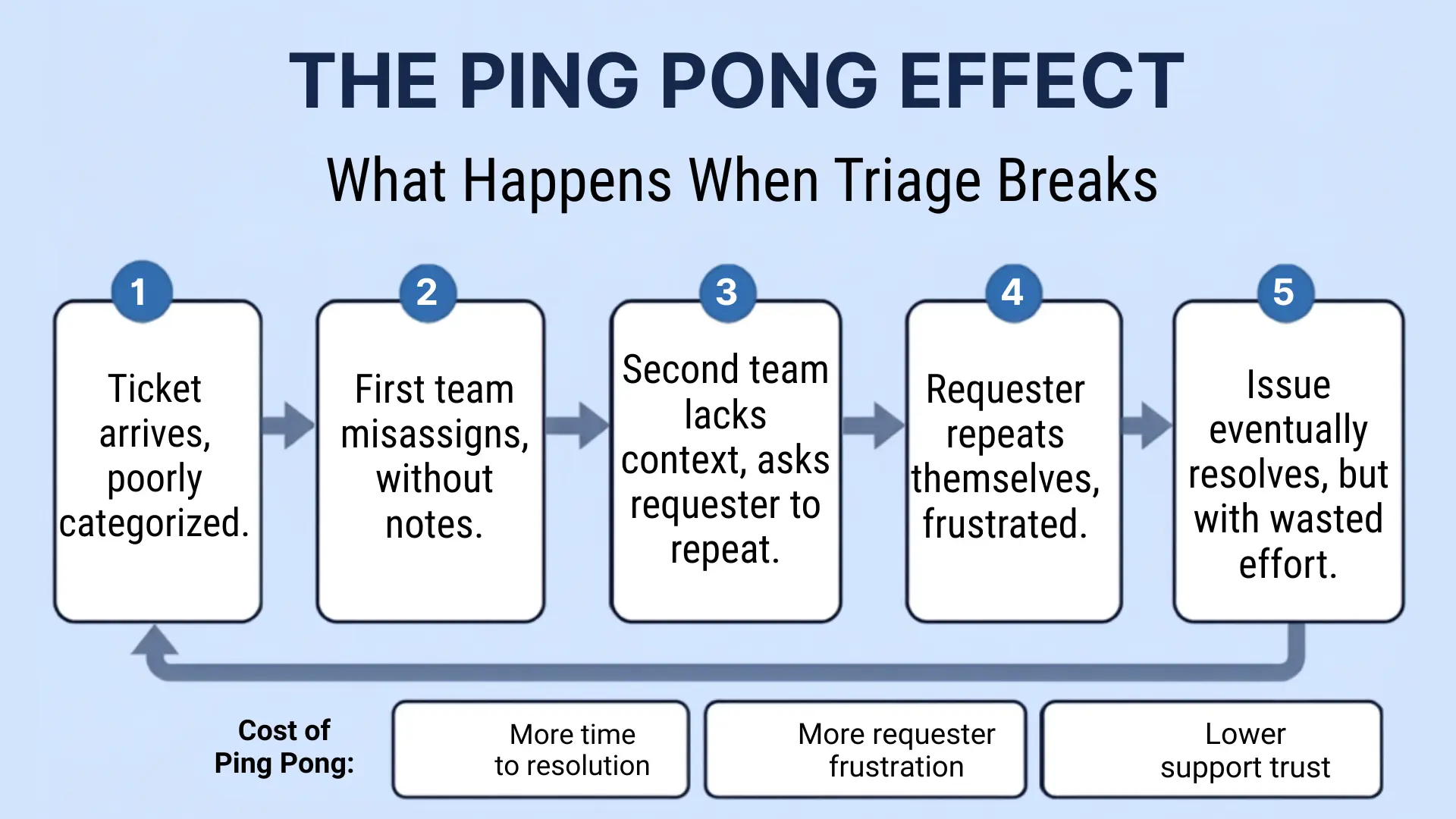
Cost of such a process:
- Many people handle the ticket the labor cost on that ticket is compounded over the teams
- Time of experts senior engineers end up handling Tier 1 tickets due to poor routing
- Data loss through transitions with every transition comes information that is not recorded
- SLA violation clock doesn't stop ticking when the ticket is bouncing
All of the above can be avoided, but only with ticket triage.
How triage looks across help desk, IT, and customer support
Triage is not a one-size-fits-all process. Depending on the situation, the criteria for priority will vary widely. Let us see what these three areas look like.
Triage in Helpdesk
Internal help desks support employees across the organization. Requests usually consist of incidents, where something has stopped working, and service requests, where someone needs access to software or equipment.
Understanding the distinction between these request types is essential. If you're unsure how they differ, learn more about the difference between a service request and an Incident:
Typical triage criteria include:
- Number of people affected
- Business impact
- Urgency
- Required support tier
An employee who cannot access a shared network drive requires a different response than an entire department losing access to a production system.
- Level 1 handles password reset and software installation;
- Level 2 configuration problems;
- Level 3 Infrastructure and escalation. Triage must send a ticket to the correct tier on the first pass.
The goal of triage is to send the ticket to the correct team on the first attempt. For a detailed explanation of support levels, see our guide to customer service and technical support tiers.
Triage in IT Support / ITSM
Within ITSM environments, triage generally follows ITIL practices.
The first step is identifying whether the request is an incident, service request, problem, or change. Each follows a different workflow and carries different urgency requirements.
A critical production outage is an incident that may affect the entire organization.
Ordering a new laptop is a service request that usually carries little urgency.
Business impact also influences prioritization. A CRM outage during business hours may require immediate action, while the same outage during the weekend may have a much lower impact.
For a deeper explanation of how incidents progress from detection through resolution, read our guide to the incident management lifecycle
If you want broader operational guidance beyond triage itself, our help desk-best practices article covers the processes that support high-performing service desks.
Customer Service Triage
Face-to-face interaction is another critical factor in the revenue risk of internal teams. Triage flags for external help desk tickets include customer tier (free, paying, enterprise), customer churn risk, support channel (live chat escalations are faster than e-mail), language, and pre- or post-sales nature of the issue.
A paying enterprise customer raising an invoice issue is a totally different triage situation than a free-tier customer asking a question about product usage, despite the identical ticket text.
The Triage Priority Matrix
Urgency and Impact are the two axes every triage decision comes back to. Urgency is how quickly the situation deteriorates if left unaddressed. Impact is how many people or how much of the business is affected.
Definition of urgency:
- Blocked: The user cannot move ahead without solving the problem. No workaround is possible.
- Impedes: The user from moving forward, reducing productivity. A workaround is possible but not ideal.
- Informational: Has no impact on the product's functionality. Aesthetic issues, general questions, and forward-looking queries.
Impact levels:
- Organization-wide: This affects the entire organization or the client's production environment.
- Department/team: affects a specific group of users or a non-critical service.
- Individual: An individual user is affected. This will have no further effects on other components.
For more information about ticket categories, refer to the ticket categories guide.
Beyond the matrix context that overrides standard priority
The matrix gives you a starting point. These conditions override it.
- VIP/executive ticket: A CEO filing a minor inconvenience doesn't create much urgency × importance on any matrix; however, it will be escalated based on the cost of a poor experience for such an important stakeholder to the organization. Design VIP escalation as a separate rule, not a workaround.
- Keywords related to security: Any ticket that contains the following keywords "phishing," "breach," "ransomware," "unauthorized access," "suspicious login," etc., should be automatically routed to security irrespective of the reported urgency. Even "a strange email I got" might be a tip-off about a security breach.
- Churn-related triggers: A paying customer with a long tenure who is upset and frustrated, evidenced by several follow-ups and references to the account termination. Support tooling can help surface these factors automatically and, therefore, make it easier for agents to act accordingly.
- Compliance: Any reference to audits, GDPR, HIPAA, SOC 2, or any other regulatory framework must be routed to the legal/security teams, regardless of the reported urgency. Compliance issues carry a risk that doesn't show up in a standard priority matrix.
AI in ticket triage: what's mature and what isn't
AI is all over the SERP for ticket triage. Here is what is being done in production settings in 2026.
Mature AI applications in triage in 2026:
- Classification: Classification of tickets into existing categories based on linguistic similarity. This works well for high-volume, repeatable types of tickets.
- Routing: Routing of tickets based on patterns of how they are usually routed to specific agents. Useful if routing is consistent.
- Deflection: Resolution of simple tickets based on KB content, before tickets hit the agent queue. Best ROI in current implementations. Organizations looking to automate these repetitive tasks can benefit from an AI Ticketing System, which uses AI to classify, prioritize, route, and deflect tickets while keeping agents in control of more complex decisions.
- Suggested first response: Creating a suggested reply for an agent. Reduces time to first response but doesn't automate the process.
- Duplicate detection: Identification of multiple tickets originating from one incident and their merging.
What is not replaced by AI:
Judgment decisions on escalated customer tier sensitive incidents when business context overrules the technical one
Novel incidents which cannot be classified against any existing history
Incidents requiring accountability, empathy, or making a decision that requires a human to take responsibility
The realistic operating model:
Fully autonomous ticket triage remains uncommon outside highly standardized environments. Most organizations use a human-in-the-loop approach, in which AI recommends ticket classifications, priorities, and routing, while agents validate or adjust those decisions.
As AI learns from historical tickets, manual overrides become less frequent. For teams using conversational platforms like Slack, AI can classify, prioritize, and route requests directly within the conversation, streamlining the triage process without requiring users to switch tools.
SLAs and how they connect to triage
Service Level Agreements (SLAs) define how quickly different types of tickets should receive a response and be resolved. Effective ticket triage ensures every request is assigned the appropriate priority so those commitments can be met consistently.
Priority levels should map directly to response and resolution SLAs. For example, if a P1 incident isn't acknowledged within its required response window, the issue isn't the ticket itself; it's a failure of the triage and SLA process.
Accurate triage keeps SLA timers aligned with business priorities, while poor prioritization increases the risk of missed response targets and delayed resolutions. Track SLA performance by priority level rather than as an overall percentage, since aggregate metrics can hide repeated failures on critical incidents. For more guidance on designing, measuring, and improving SLAs, read our guide to service level agreement(SLA) best practices
Common ticket triage mistakes
1. Allowing requesters to set priorities themselves Every request becomes “URGENT” when users have control over the priority field. Self-assignment immediately compromises sequencing. Priority should be determined using triage principles rather than asserted by requesters.
2. No process for ticket escalation is described If a ticket does not follow a standard course, it is rejected. The lack of an escalation process leads to ad hoc decisions by agents and inconsistent outcomes. Define your exception process just like you define your standard one.
3. Triage occurring at the wrong level Level 1 agents doing Level 2 diagnostic work to determine whether escalation is needed are wasting their time and slowing down resolution. The categorization and complexity assessments that determine the level of work should take place at the intake stage.
4. Skipping the categorization step before assignment Ticket assignment without categorization routes tickets based on gut feelings rather than rules. And most importantly, without categorization, reporting will never tell you which types of tickets drive traffic volume.
5. Lack of re-triage on changing conditions What starts off as a simple impairment for one user could easily escalate into a department-wide disruption within an hour. Triage is not an activity carried out once and then forgotten about upon intake.
Metrics That Tell You If Your Triage Is Working
- Response time: Time taken to receive a valid confirmation. Health indicator connected with the speed of triage.
- Time to first action: Elapsed time between creation of the ticket and any action performed by the agent with regard to the ticket. It is a triage-only metric, not to be confused with response time.
- Misrouting ratio: Ratio of tickets being misrouted after initial triage. A high ratio suggests a poor categorization process or inappropriate routing rules.
- Rate at which SLAs are being fulfilled for each tier: Rate of fulfillment of the response and resolution SLAs for each tier. Always report by tiers; aggregate metrics will hide the problem.
- Triage-to-resolution time per category: Resolution time for specific ticket categories. Any discrepancy in the values would suggest issues with either the categorization or the skills.
If there is an artificial intelligence-powered triaging process, these two indicators must show a change in numbers once the AI starts functioning. Otherwise, the introduction of AI is unnecessary.
Where to go from here
An effective ticket triage process prevents issues from bouncing between teams, protects SLA performance, and ensures support resources are focused where they create the greatest impact. Whether you're supporting employees, IT operations, or customers, consistent triage helps every ticket reach the right team at the right time.
Once your process is in place, the next step is supporting it with the right workflows and automation. Explore Suptask’s ticket triage solutions and AI-powered ticket best practices to see how intelligent routing, prioritization, and automation can improve support operations at scale.
FAQs
What is ticket triage in IT support?
Ticket triaging in IT support is a process by which every IT support ticket is categorized, prioritized, and assigned to a certain team that is most likely able to handle it based on its nature (incident, service request, problem, or change). It occurs before any work is done on the ticket.
How does one triage a support ticket?
The four stages of successful support ticket triage are: eliminating noise and duplicates; routing tickets to the relevant teams based on their categories; sequencing tickets in the queue by priority; and deflecting easy-to-solve issues with automation or self-service.
What is the difference between ticket triage and ticket routing?
Ticket triage is the complete intake analysis, including filtering and sequencing tickets, as well as other aspects beyond routing. Ticket routing is just one of the outputs of the triage process. Tickets can be correctly routed but badly sequenced.
What is the difference between ticket triage and ticket handling?
Ticket triage determines how incoming requests should be categorized, prioritized, and routed before work begins. Ticket handling refers to the activities involved in investigating, communicating, and resolving the issue after triage is complete.
Can AI automate ticket triage completely?
No, not reliably as of 2026. AI handles classification, routing, deflection, and response generation in high-volume, repeatable environments. It does not reliably deal with unique tickets, escalation cases where human judgment is important, or cases where human accountability is required. This operating model works: AI proposes; humans confirm.
What are ticket triage priority levels?
Most frameworks have P1 through P4, or even P5, depending on urgency-by-impact combinations. P1 is critical: high urgency and high impact, an all-hands job. P5, the lowest level, is informational and has no functional impact or urgency. Priorities should align with your SLA requirements, not a generic framework.