An IT incident, whether it is a system outage, slow service, or a critical app that will not load, costs the business money and credibility for every minute it lasts. A structured lifecycle is what turns chaotic firefighting into a process, so the same incident should take less time when it comes back.
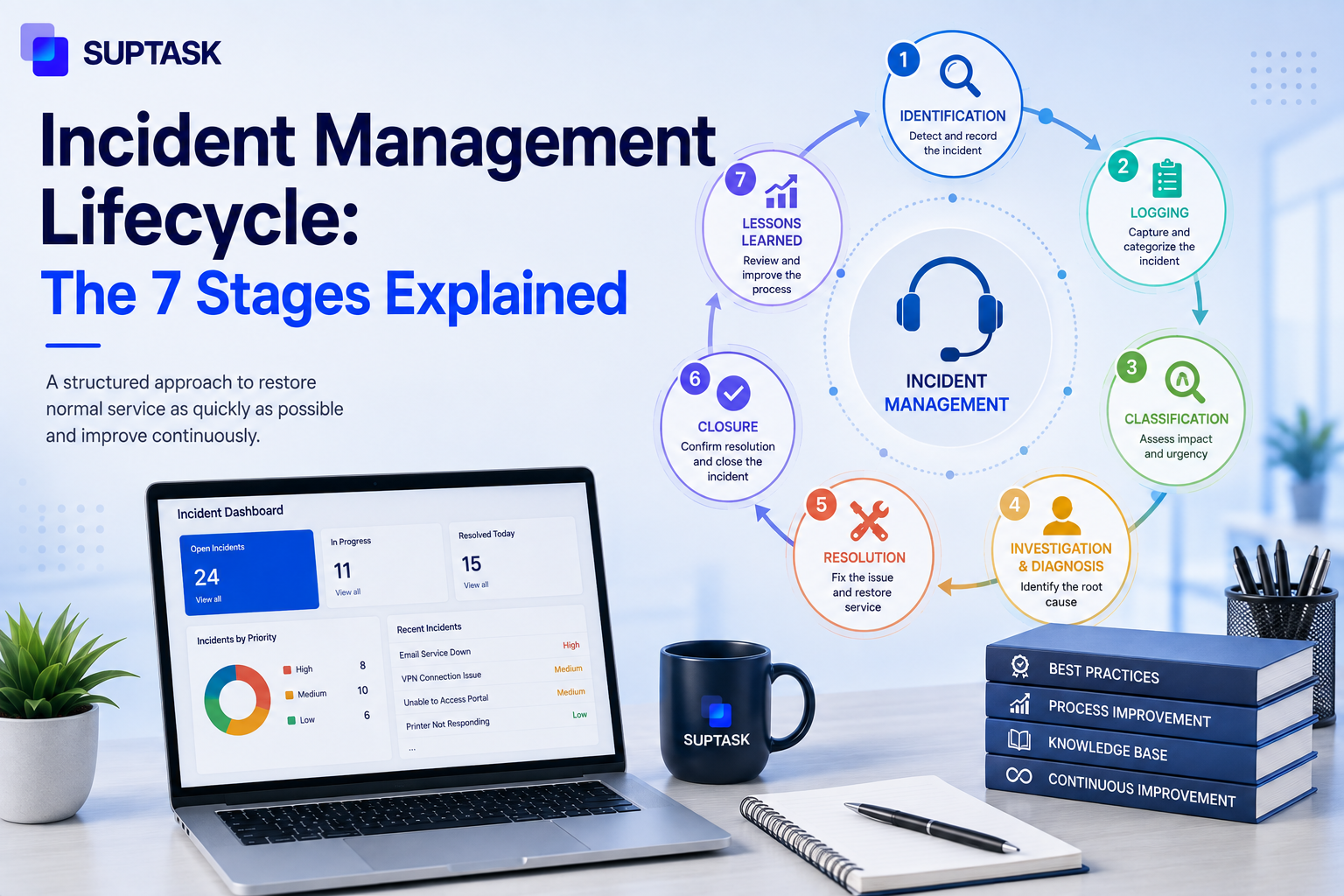
The incident management lifecycle is the end-to-end process IT teams follow to handle service-affecting incidents, from detection through to closure. The ITIL-aligned lifecycle has seven stages: identification, logging, categorization, prioritization, diagnosis, resolution and recovery, and closure with post-incident review. Each stage has a defined owner, its own inputs and outputs, and metrics that measure how well it is performing.
This guide walks through the seven stages of the IT incident management life cycle, names the roles that own each stage, the metrics that matter at each stage, and how the lifecycle adapts for major incidents. It covers incidents only. So if the ticket in front of you is a request for something rather than something broken, the incident vs service request split decides that first.
What is the Incident Management Lifecycle?
Incident management in ITIL 4 is a practice to minimize the negative impact of incidents by restoring normal service operation as quickly as possible. The lifecycle is broken into stages that can be owned and measured. ITIL Version 5 Foundation was introduced in February 2026 and did not change the incident practice, so ITIL 4 guidance is still what service desks work from.
An incident is an unplanned interruption to an IT service, or a reduction in the quality of one. A service request is not that. Nothing is broken, the user is asking for something already on the catalog, like access or a laptop. A problem is the cause of one or more incidents, or the suspected cause, and problem management goes after that cause while incident management restores the service. Change is planned work on the environment, and the fix for an incident will sometimes need a change raised before it can go live.
A loose incident management process still gets incidents resolved, so the case for structure is not that nothing gets fixed. It is that two agents handling the same outage should be taking the same steps in the same order. SLA reporting is only as accurate as the timestamps each stage produces. MTTR comes down over time once the stages are stable, because you can see which stage is eating the time. Prevention is the last piece, and an incident closed with nobody looking back at it feeds nothing into the next one.
Everything here is the ITIL incident management lifecycle. Security incidents run on a separate NIST framework, compared further down.
Why the Stage Count Varies: 5, 6, or 7 Stages
The incident management lifecycle varies from one organization to another. Some have 5, while others have 6 or 7 stages in the lifecycle. In the five-stage version, identification and logging are merged into one detection stage. Six-stage models keep those two apart, but closure and the post-incident review get counted as one. The 7 steps of incident management come from splitting diagnosis away from resolution. All three work with the same purpose of getting an incident resolved, but the way of doing the work is different.
This guide uses seven. Diagnosis and resolution are different work, done by different people, at different points in the ticket, so keeping them apart makes the investigation visible instead of burying it inside a resolution timer. Closure and review are the same case. A review folded into closure does not get measured, and it usually does not happen. If your organization runs a five or six-stage model, these incident management lifecycle phases collapse back together without anything being lost.
The 7 Stages of the Incident Management Lifecycle
These 7 stages of the incident management lifecycle run in order for a standard incident, and they are the process every incident management ticketing system is built around. The workflow does not change much between organizations, the naming of it does. Each stage below gives you the work, owner, what goes in and comes out, where it breaks, and what to measure.
Stage 1: Identification and Detection
Identification gets into the system three ways. A monitoring tool fires an alert, a user reports something, or somebody in IT notices it while working on something else. Detection ensures the potential issues are flagged before the user notices them.
Owner: Service desk for anything the user reported, the monitoring stack, and the on-call engineer for anything automated.
Inputs and outputs
- Alerts from monitoring and event management tools.
- User reports arriving through chat, email, phone, or a portal.
- Out of this stage, you get one thing, a confirmed incident that somebody has acknowledged.
Common failure modes
- Alert noise. When everything alerts, the real one gets scrolled past.
- A user reports something in a DM to an engineer they know, and it never becomes a ticket at all.
Metrics: MTTI (Mean Time to Identify) and MTTA (Mean Time to Acknowledge) are the two that apply here.
Stage 2: Logging and Recording
Everything after this stage depends on what gets written down at it, like who reported the incident, affected services, when it started, and the business impact.
Owner: The service desk agent taking the ticket, or the integration itself when the incident is alert-driven.
Inputs and outputs
- The acknowledged incident from stage one is what enters.
- A ticket comes out with a reference number, timestamps, and the affected service named on it.
- The reporter should get an acknowledgment at this point too.
Common failure modes
- Thin tickets: Three words in the description, and every stage after this one has to go back and ask the user the same questions again.
- Timestamps entered by hand later, which makes the SLA reporting wrong from the start.
Metrics: Field completeness on the ticket, and how often a ticket gets sent back for more detail.
Stage 3: Categorization
Categorization puts the incident into a class, network, application, hardware, access, or security. This categorization decides what your reporting can tell you six months later as well.
Owner: Service desk. Many teams now let an automated or AI-assisted rule take the first pass, with the agent confirming it.
Inputs and outputs
- The logged ticket goes in.
- A categorized ticket comes out, in the right team's queue.
- The category feeds the trend reports, which is the part people forget about when they design the taxonomy.
Common failure modes
- A category list built for reporting instead of routing. If picking a category does not change where the ticket goes, agents will pick anything.
- Two agents filing the same issue under different categories, so the trend data cannot be trusted.
Metrics: Misroute rate and first-time right routing percentage.
Stage 4: Prioritization
Priority comes from two things assessed together: impact and urgency. Impact is how much of the business is affected, urgency is how fast it has to be fixed. Most ITSM tools run the two through a matrix that produces P1 to P4.
Owner: Service desk, working off escalation rules. A P1 goes to the major incident manager.
Inputs and outputs
- Impact and urgency, both assessed against rules that should be written down somewhere.
- A priority level comes out, and with it the clock. A service level agreement (SLA) is what sets the response and resolution targets each tier is held to.
- Notification out to whoever needs to know at that priority.
Common failure modes
- Every user marked their own ticket P1.
- No written trigger for what makes a P1. Without one, priority turns into an argument between the requester and the agent.
Metrics: SLA attainment, broken out per priority tier and not averaged across all of them.
Stage 5: Diagnosis and Investigation
This is where the ticket moves off the service desk, and an engineer works out what is actually wrong. A workaround can go in during this stage to get service back while the cause is still being looked for.
Owner: L2 and L3 engineers. The service desk passes it up and keeps the requester updated.
Inputs and outputs
- A prioritized ticket, plus logs, monitoring data, and recent change records.
- A structured troubleshooting methodology is what keeps this stage repeatable instead of dependent on which engineer picked it up.
- What comes out is either a workaround, a diagnosed cause, or an escalation to the next tier.
Common failure modes
- The workaround never gets applied, so users stay down for the whole investigation.
- Diagnosis happens in DMs and side conversations. When the engineer hands it over at the end of a shift, none of that context is on the ticket.
Metrics: Time in investigation, and first call resolution rate for the tickets L1 closes without escalating.
Stage 6: Resolution and Recovery
The fix has been applied, and service gets restored. The check that matters is whether the user can now do the thing they could not do before, and whether anything adjacent broke while the fix was going in.
Owner: The L2 or L3 engineer applies the fix. The service desk confirms it with the user.
Inputs and outputs
- The diagnosed cause, or the tested workaround, enters here.
- Service restored and verified with the person who reported it.
- If the fix needs controlled work on production, a change request comes out of this stage as well.
Common failure modes
- Closing the moment the error stops showing on a dashboard.
- No confirmation from the affected user, which is where most reopens come from.
- Side effects on adjacent systems that nobody checked for.
Metrics: MTTR is the headline one, and the reopen rate is what tells you whether that MTTR is real.
Stage 7: Closure and Post-Incident Review
Closure is formal, and it should happen after the requester confirms, not before. Major incidents and anything that keeps coming back get a post-incident review, where the documentation gets updated, and the actions get assigned to named people.
Owner: The service desk closes the ticket. The incident manager runs the review on major incidents.
Inputs and outputs
- A verified resolution and the confirmation from the user.
- A closed ticket with the resolution code and the category checked one more time.
- Where the same incident keeps repeating, that is when an incident becomes a problem, and a problem record should be raised off the back of the review.
Common failure modes
- Auto-closing after a fixed number of days with no reply.
- Skipping the review on a P1 because the team has already moved on to the next incident.
- Review documents that get written, filed, and never read again.
Metrics: Postmortem completion rate on major incidents, and the recurrence rate.
Roles and Responsibilities Across the Lifecycle
The stages only work when somebody is named against each one. A three-person IT team and an enterprise with a standing incident management function run the same seven stages, and the ownership in the two looks nothing alike.
Smaller organizations collapse most of this. The L2 engineer is often the incident manager as well, and the communications lead is whoever is free at the time. Read the table as a maturity reference and not a hiring plan. What matters is that every stage has a name against it, and whether that name belongs to six people or to two does not change the process.
Metrics That Measure Each Stage
Lifecycle maturity shows up in the numbers. Each stage has one metric, or two, that tells you whether that stage is doing its job, and measuring only the total resolution time hides all of it. These are internal process measures, separate from the service level targets themselves, and the SLO vs SLA vs SLI distinction is what separates the number you commit to a customer from the number you watch inside the team.
MTTR is the number that gets reported upward, and the stage metrics are what explain why it is sitting where it is. An MTTR that will not come down is usually a categorization or a diagnosis problem showing up at the end of the process.
How the Lifecycle Adapts for Major Incidents
A standard incident moves through the above-mentioned 7 stages in order. While working on major ones, the stages compress, so categorization takes seconds instead of minutes. They run in parallel too, with containment going on at the same time as the diagnosis. Extra layers get added that a normal ticket never has, a war room, executive updates, and a public status page.
- Identification: Monitoring alerts and on-call escalation are what start it, the first user report usually arrives after the page has already gone out.
- Logging: A dedicated incident channel becomes the running log, and the ticket gets built out of it.
- Categorization and prioritization: Collapsed into one moment. P1 is declared, and the routing follows the declaration.
- Diagnosis: Several teams working at once, usually in a war room or a channel opened for the incident, with somebody holding the timeline so the parallel work does not get lost.
- Resolution: The workaround goes in first, and the root cause waits. Communication becomes its own workstream here, and it should be assigned to somebody who is not also fixing the thing.
- Closure and PIR: A full postmortem is mandatory, and the action items coming out of it should be tracked to completion like any other work.
What counts as a major incident should be written down before you need it. Most teams use a defined trigger, a sev-1 by definition, a set percentage of users affected, or any customer-facing service being down.
Channel First Incident Response: Where the Lifecycle Actually Runs in 2026
These 7 stages are written to be followed inside a ticketing portal. Stages 1, 5, and 6 especially run in chat, in Slack or Teams, where the on-call engineers are already coordinating with each other in real time.
The ticket is still the system of record. The channel is where the work happens, so the ticket should be created from the channel along with the timeline, and the resolution log should be in the same channel.
An incident management system keeps the two apart and will produce a record nobody trusts. Suptask works the other way round, a Slack thread becomes a tracked ticket from the message itself, so the channel conversation and the ticket history stay synchronized through the lifecycle.
Lifecycle Adjacencies: Problem, Change, and Request Management
Incident management does not run on its own. There are three other ITIL practices which it feeds into, and which feeds back into it, and most of the handoffs are happening at two or three specific stages.
Problem management gets triggered when the same kind of incident keeps coming back, and there is one cause underneath all of them. The review at stage 7 is the most common feeder for it, because that is the point where somebody should be looking at the pattern and not only at the single ticket. The incident-to-problem transition usually has a threshold on it, three of the same incident inside a month or something similar, and you should agree what that threshold is before you need it.
Change management comes in when the fix cannot just be applied on the spot. A resolution at stage 6 will sometimes need controlled work on production, a config change, a patch, a rollback, and all of that has to go through a change ticket with its own approval. The incident can be kept open until the change is done, or it gets closed with the change tracked separately. Different organizations do it both ways.
Misclassification is the third one. It happens a lot. Something gets logged as an incident, an engineer picks it up, and then it turns out nothing was broken, the user just wanted access to something. Categorization at stage 3 is where you should be catching that, and the incident vs service request split is the check being applied. If it gets missed there, then the ticket carries the wrong SLA the whole way through, and your reporting comes out wrong as well.
ITIL vs NIST: Incident Management vs Incident Response
The two frameworks get mixed together in the search results a lot, and they are not the same thing. Everything covered above is the ITIL one, which is for service disruptions, an outage, an app that has failed, a system running slow, and the goal of it is to get the service back. The incident response lifecycle is the security version. That one is for breaches, malware, and intrusions, and what you are trying to do there is contain the threat first, then recover without spreading it any further.
The four-phase model that most sources still quote for this, preparation, detection and analysis, containment, eradication and recovery, and then post-incident activity, comes from Revision 2 of NIST SP 800-61. NIST superseded it in April 2025 with Revision 3, which maps incident response onto the six functions of the Cybersecurity Framework 2.0 instead of the four phases.
Some incidents are going to be both at once. A breach that takes a customer-facing service down is one incident to the security team and a different one to the service desk, and organizations with both practices in place should be running the two lifecycles alongside each other.
Frequently Asked Questions
What are the 5 stages of the incident management process?
In a five-stage model, identification and logging get counted as one detection stage, and closure and the post-incident review get counted as one closure stage. That leaves detection, categorization and prioritization, diagnosis, resolution, and closure. No work is dropped by counting it this way, it is grouped differently, that is all.
What are the 7 steps of incident management?
Identification, logging, categorization, prioritization, diagnosis, resolution and recovery, and closure with the post-incident review. Each of the seven has its own owner and its own decision point, which is the reason for keeping them apart. A team running a shorter model is doing the same steps with two of them combined.
What are the 4 phases of the incident management cycle?
This question is usually about security and not about IT service management. The four phases are preparation, detection and analysis, containment, eradication and recovery, and then post-incident activity, and they come from Revision 2 of NIST SP 800-61. NIST superseded that structure in April 2025 with Revision 3, which uses the six Cybersecurity Framework 2.0 functions instead. The ITIL lifecycle for service incidents is a separate thing, and that is the one with seven stages.
What are P1, P2, P3, and P4 incidents?
They are priority levels, and they come out of impact assessment together with urgency. A P1 is critical, the service is down, or the business is badly affected, and it should trigger the major incident process. P2 is a major fault hitting a lot of users or one important function, P3 is a smaller impact where a workaround exists, and P4 is minor with no real business effect. Response and resolution targets should be set per tier, so the priority you assign is what decides the clock.
What is the difference between incident management and problem management?
Incident management is about getting the service back, and it does not need the cause to be understood before it can do that. Problem management goes after the cause so that the same incident stops happening again. A workaround applied during an incident will close the ticket while the underlying problem stays open for weeks.
What is the difference between incident management and incident response?
Incident management is the ITIL term, and it covers IT service disruptions, an outage, or an application that has degraded. Incident response is the security term for breaches, malware, and intrusions. The stages look similar when they are written down. What you are trying to achieve is different, one of them is restoring a service, and the other is containing a threat before it spreads.
Who is responsible for the incident management lifecycle?
The service desk owns most of it day-to-day, the early stages, and the closure at the end. Engineers at L2 and L3 own the diagnosis and the resolution. An incident manager owns the process itself and takes over on major incidents, and in a smaller team that is going to be the same person doing the engineering work. Somebody should be named against the process even where there is no dedicated role for it.
Closing: Turn the Lifecycle Into a Practice, Not a Diagram
The seven stages are only worth something if the team is actually running them. The difference in practice comes down to whether every stage has a name against it, a number attached to it, and a tool that shows it while the incident is still open.
Run your incident lifecycle where the work is already happening. Start a free trial of Suptask and turn any Slack message into a tracked ticket, with every stage recorded against it.