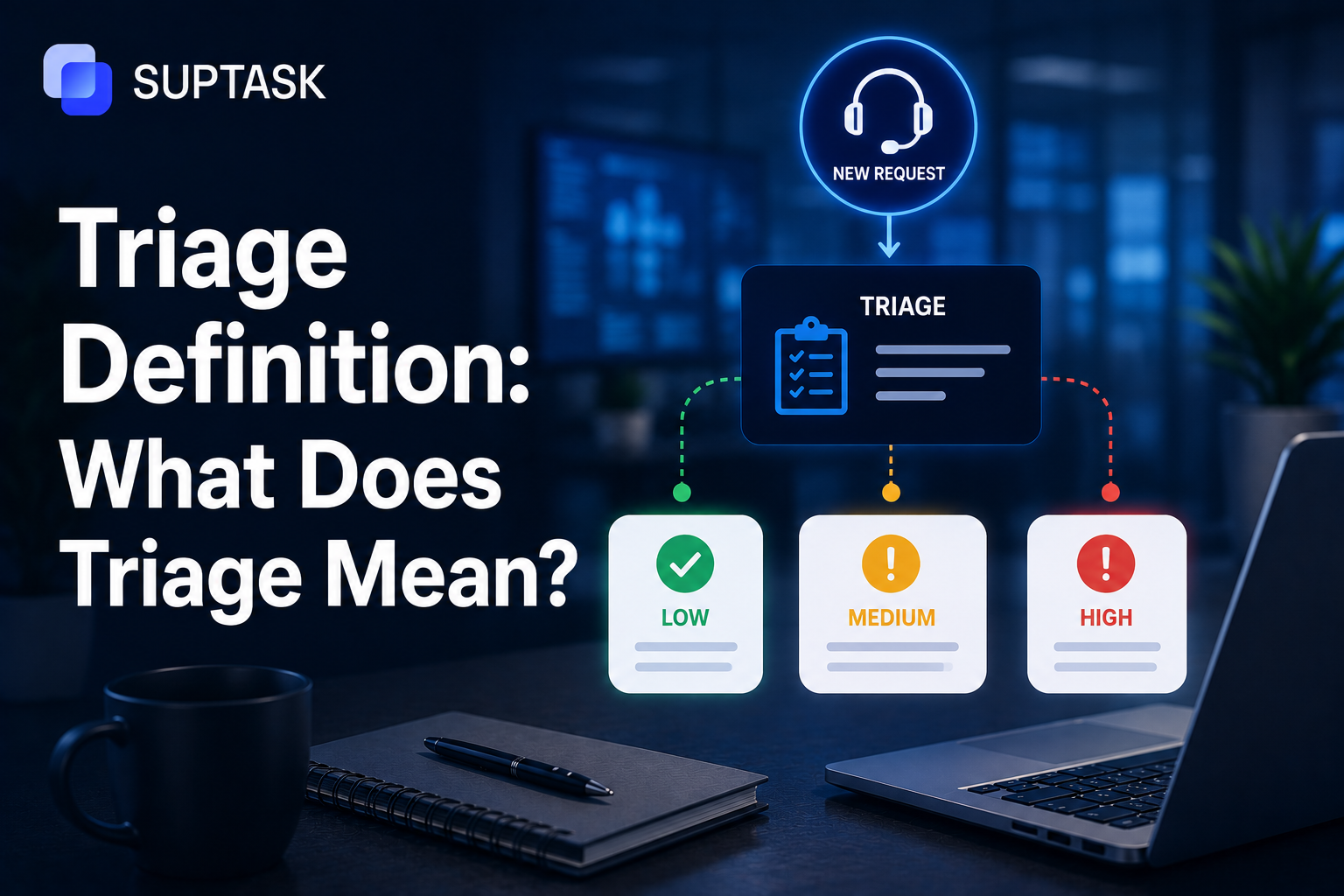
Triage means deciding what to deal with first when more is coming in than you can handle at once. Simply put, triage helps you set a priority when you have a lot of tasks to work on. So you can work on the most urgent tasks first.
However, most people only know the word from a medical setting, where a nurse in A&E decides who is seen now and who can wait. That is where triage began, and for a long time, it was the only place the word was used. However, it did not stay there.
Triage is what happens when a hospital sorts its waiting room, when a support team decides which ticket to open first, and when a security analyst works out which alert is worth chasing. The work is different in each case, but the decision underneath is the same one, because there is always more coming in than there are people to deal with it.
So this guide covers what triage means as a concept, how the process works step by step, and how it is applied in IT support, cybersecurity, software, and healthcare. IT support gets the most space, since that is where most readers here work. So, let's get started.
So, let’s get started.
What does triage mean?
Triage is a practice to decide what to deal with first when you cannot work on all of it at once. You assess what has come in, and you work out on the most urgent one that will have the most demand if it has to wait. So, you pick the highest priority one and start working on it.
The word has a long story. It first came from the French word tier, which means to sort. The medical meaning of it came into existence during the battlefield, where one of Napoleon's surgeons, a man named Larrey, started treating the worst-wounded soldiers first instead of working down by rank.
The triage definition is boiled down to a simple principle that if you cannot help everyone, you should help whoever needs it most, and you help them first.
The same triage meaning has been carried to IT, security, and software teams. Each of them ended up with more requests than they could keep pace with, every one at a different level of urgency, and they needed a quick way to name the sorting they were already doing. Triage described it perfectly, so it also applied to IT.
The core triage process and types
The triage process has five steps that look identical irrespective of where it is put to use. Here is how these processes look alike:
- Intake: Capture and log whatever has come in.
- Initial assessment: Gather enough information.
- Categorisation: Classify the item by type, such as an incident or a request, a bug or a feature.
- Prioritisation: Weigh each request against urgency and impact, or use a priority matrix.
- Routing: Route it to the right team, queue, or person.
This is the simple process, and almost all teams have been running the same version, even if they have no structured process.
Beyond the triage process, there are also different triage types depending on what you have to sort out. For instance, resource-based triage is about handling what you can with the people and time you have, and the rest waits its turn. Another one is severity-based triage, which ignores the order in which things arrived and goes after the highest-impact items first. Also, there is a hybrid approach that most teams actually use, severity-based but boxed in by whatever capacity you have on the day.
So, you might ask, why does it matter? Because without triage, the loudest voice in the room wins, instead of the one with maximum impact. The importance of triage is that it turns priority into a decision you make on purpose, out in the open and applied the same way every time. Left alone, priority just happens to you, and usually badly.
Triage in IT support
Triage in IT support is where every ticket that comes in is checked, categorised, and then sent to the right place before the actual fixing starts. This is what triage means in the IT industry. Therefore, if this step is done right, the urgent tickets get picked up fast. However, if it is done wrong, a priority issue can keep waiting behind a small password reset.
The first question is, what gets triaged in IT? In most teams, there are these four ticket categories:
- Incidents: Something is broken and has to be fixed.
- Service requests: Someone is asking for something, like access or a new laptop.
- Problems: The repeating issues that sit under many incidents.
- Changes: The work that is planned, not reactive.
You should know which category you have, because an incident and a service request do not follow the same process. Every incident has its own incident management lifecycle.
Now, how does IT triage decide what is urgent? Most teams often have a priority matrix for this, which puts together urgency, so it can be decided how fast the response is needed, and impact, which means how many people are affected by it.
The priority matrix has levels such as a P1, or Critical, which may ask the team for a 15-minute response, and a P4, or Low, may give up to 24 hours. So the response time is fixed beforehand, and nobody argues about it later.
The place where triage happens has also changed with time. Earlier, it used to be the service desk, where a person worked the queue by hand. In many companies, it is still like that. But now more of it is happening inside the ticket queue itself, or even inside Slack or Teams, where a request raised in a channel gets routed on its own, without anyone going to a portal.
Who does this triage process is different from team to team. Somewhere, it is a Level 1 agent taking the first call, somewhere a dedicated triage person whose only work is to sort the queue, and somewhere it is automation doing it through rules or AI. Many teams use all three together, the simple calls go to automation, and the difficult ones stay with a person.
Once a ticket is triaged, it is often routed to one particular agent, or to an escalation queue for some specialist team, or back to the user with a knowledge-base article if it is something they can handle on their own. This handoff is the real point of triage, because the ticket finally reaches whoever, or whatever, can deal with it best.
Triage in cybersecurity
Cyber security triage works on the same idea as IT triage, but the thing being sorted is different. Here, what gets triaged are security alerts, the ones coming from tools like SIEM, EDR, and other monitoring systems. These tools send alerts all day, and someone, or something, has to decide which ones actually matter.
The cybersecurity triage process usually moves through a few stages, such as
- Intake: Alert comes in.
- initial classification: The alert is marked as a true positive, a false positive, or something benign.
- Severity scoring: The business impact of the alert is evaluated. If it has a high impact, it gets escalated into the incident response process for the team to act on.
The different cybersecurity triage and IT triage is volume. A normal IT queue is busy, but a security operations centre, or SOC, can see thousands of alerts in a single day. So triage here is not a side task; it is the front line of incident response.
Triage in software development (bug triage)
Software development triage is also referred to as bug triage, and its meaning is kind of similar to triage in IT support and cybersecurity.
Triage in software is about deciding which bugs get fixed, in what order, and which ones can wait. So what is triage in software, in practice? It is the team sitting with a list of reported bugs and sorting them, the same way IT sorts tickets.
What gets triaged here are the bug reports. Bugs could be reported from many places, from QA testers, users who identify something broken, automated tests that fail, and from the customer support team, passing on what people keep complaining about.
Triage process for software development can be summarised in the following steps:
- What gets triggered: First, a bug will be identified as real and not reproduced, because a lot of bugs are often not.
- Bug triage process: The bug gets categorized based on the severity and the code it impacts. After that, it is prioritised against the roadmap, so important ones are solved first. Then it is assigned to engineering and put on a schedule.
- Who triages: Assigns the engineering leads, the product managers, or sometimes a dedicated triage committee to work on the bug.
- A bug triage meeting: A short, regular meeting where the team goes through the queue of new bugs and makes quick decisions on each one.
Bug triage may also connect to IT support, as many bugs are often triaged as IT tickets, and later on, they are escalated to the engineering team.
Triage in healthcare
As said, healthcare is the first one where triage started. In healthcare, triage is beyond the sorting idea, it is practiced on patients instead of tickets or bugs.
It was first practiced from the battlefields of the Napoleonic wars, where army surgeons had to decide which wounded soldiers to treat first when there were far too many of them and not enough time for everyone.
Fast forward to 2026, and the practice has been followed in healthcare, however, in a structured way. When you walk into an A&E, someone quickly assesses how serious your case is and puts you on a severity scale, usually with three to five levels.
In the US, hospitals mostly use the Emergency Severity Index, or ESI, which is a five-level scale. In the UK, the common one is the Manchester Triage System.
The names may change from place to place, but the principle underneath is always the same that when capacity is limited, the most critical cases should be handled first.
Common challenges in triage
Triage practice might sound simple on paper, however, executing it at scale might lead to a lot of challenges. Here, we have compiled the most common challenges in triage you might face.
Triage sounds simple on paper, but running it at scale is where the problems show up. Most guides skip this part, so here are the real ones teams keep hitting.
Subjective priority calls
The same ticket can land on two agents and get two different priorities, just because they read it differently. This is one of the most common triage problems. Therefore, you should have a clear priority criterion that everyone follows, so the call does not depend on who happens to pick up the ticket.
The squeaky-wheel problem
If any issue is escalated that is not the most urgent one, the priority gets distorted. The best practice to fix that issue is for leadership to establish a triage policy that everyone has to follow.
Volume overwhelming the triager
Triage often exists because there are many requests that need to be taken care of. However, if the intake of requests increases to a level that triage cannot keep up with. As a result, every request might end up in the same big queue, and sorting doesn’t help much.
Triage works fine until the intake becomes more than the triager can keep up with. After that point, everything starts landing in the same big queue, and the sorting stops meaning much. This is where automation stops being optional, the easy calls have to be handled automatically so a person can focus on the rest.
Wrong-category triage
If an incident is routed as a service request, or the other way around, it goes down the wrong path and usually breaches an SLA before anyone notices. Most of the time, this comes from ineffective categorisation at the start. Better categorisation at intake, even a few well-chosen fields, fixes most of it.
No feedback loop
The last one is the quiet killer. If nobody ever measures how triage actually went, whether the priorities were right, and whether the SLAs were met, then it can never improve. This is where help desk metrics earn their place, because the numbers tell you where the triage is going wrong and what to fix next.
Triage in modern, AI-augmented IT operations
So far, we have discussed more about how triage has always worked and what challenges you might face. However, these days, as AI disrupts each process, the triage is not left abandoned.
Earlier, triage was a manual process where humans followed the structured process, now, AI is doing the same with minimal human effort required. Here is how AI is helping in triage processes:
- AI-based auto-categorization: Instead of an agent reading each ticket and tagging it, the model classifies the ticket at intake, the moment it comes in.
- Smart routing: Each ticket is routed to the right team or the right skill agent based on what it actually says.
- In-chat triage: When a ticket is created from a Slack or Teams thread, the triage can happen right there in the conversation, so nobody has to open a separate portal and work a queue.
- Predictive priority: AI looks at the language in a ticket and at past patterns, and flags the ones that are likely to blow up later, before they actually do.
- Real-time SLA-risk alerts: AI can also surface the tickets that are about to breach their SLA while there is still time to act, not after the breach has already happened.
This is the area Suptask works in. It is a Slack-native ticketing platform that handles ticket triage inside Slack itself, with AI-assisted routing.
Frequently asked questions
1. Who is responsible for triage in a typical IT team?
Triage is a process that no single person owns it.. It is often processed by different agents involved in the processes. It starts from a Level 1 support agent, the one who picks up the ticket as it comes in. In bigger teams, there may be a dedicated triage role, or even a small team, whose only job is to sort the queue all day. And more and more of the first pass is now done by automation before a human sees it at all. So the honest answer is, it depends on the size of the team, but the responsibility almost always sits with whoever sees the ticket first, person or system.
2. What is the difference between triage and prioritisation?
They are related but not the same thing. Prioritisation is just one step in triage. Triage is the whole process, taking in the ticket, working out what it is, deciding how urgent it is, and sending it on. Prioritisation is only the part where you decide how urgent and how important the ticket is. So you can say prioritisation happens during triage, but triage is more than prioritisation alone.
3. How long should triage take per ticket?
There is no fixed number, but it should be quick. Triage is meant to be a fast first decision and not the actual work, so for most tickets it is a matter of seconds to a couple of minutes. If triaging a single ticket is taking long, it usually means the categories are unclear, or the person is trying to solve the issue instead of just routing it. The point of triage is to move the ticket to the right place fast, the solving comes after.
4. Can triage be fully automated?
Parts of it, yes, but not all of it in most cases. Auto-categorisation, routing, and SLA-risk alerts can run automatically and handle a large share of the easy, clear-cut tickets. The harder calls, the ones where the wording is vague or the impact is not obvious, still tend to need a human to look. So most teams run a mix, where automation does the bulk and a person handles the edge cases. Fully hands-off triage is possible for narrow, well-defined queues, but it is rare across a whole IT operation.
5. What is the difference between triage and escalation?
Triage comes first, escalation comes later. Triage is the initial sorting, where the ticket is assessed and sent to the right place. Escalation is what happens after a ticket cannot be handled at its current level and has to be moved up to a more senior person or a specialist team. So every ticket gets triaged, but only some get escalated, usually the ones that turn out to be harder or more serious than they first looked.