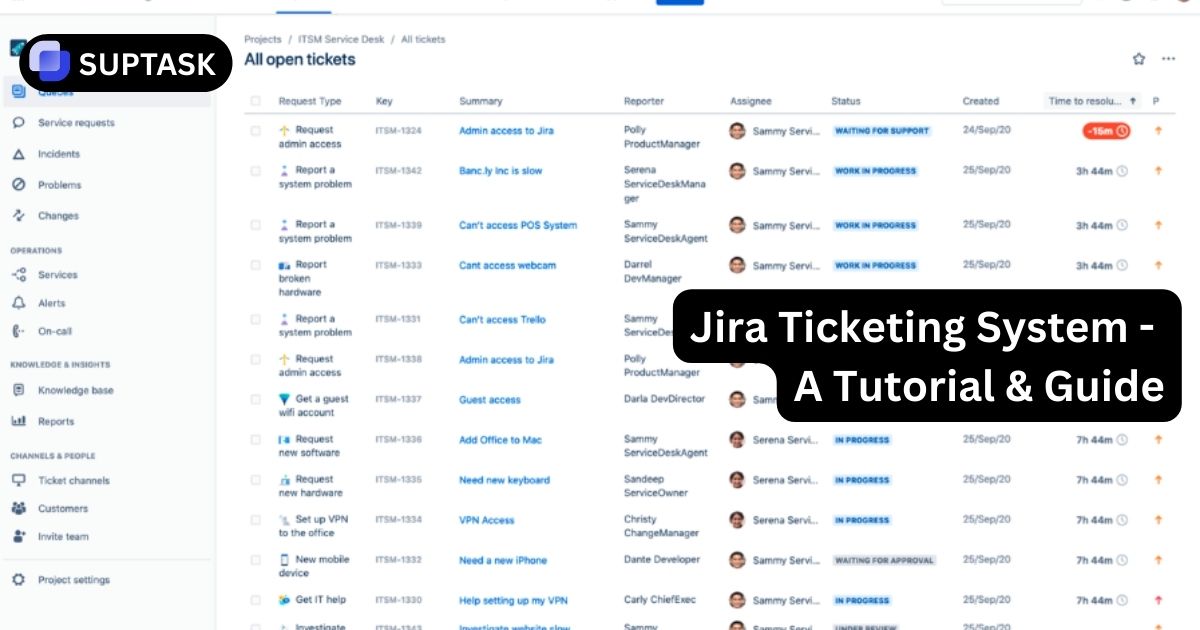
Use Jira Service Management as a ticketing system for IT, customer support, HR, or internal operations. This guide walks through the core concepts, a clean setup checklist, and the configuration patterns that make queues, SLAs, and automation work reliably.
Quick List: Jira Ticketing Setup Checklist
If you want the short version, follow this checklist in order. Each item links to the full section below.
This page targets Jira Service Management as the ticketing product. Jira Software can store issues, but it does not include the same service desk experience out of the box.
Jira Cloud menus can vary by site and rollout. The concepts and configuration order below stay the same, even if a label or navigation item looks slightly different.
What Is a Jira Ticketing System?
A Jira ticketing system is a structured way to intake requests, route work to the right team, track progress, and close the loop with the requester. In practice, most teams do this with Jira Service Management.
What a ticket should do
- ✅Capture context: who requested it, what they need, and the impact
- 🔁Route automatically: to a queue or owner based on type, priority, or category
- ⏱️Track time targets: response and resolution through SLAs
- 📣Communicate clearly: customer updates and internal notes
When Jira Service Management is a fit
- 💼IT support, ITSM, and incident handling
- 🧑💻Customer support and B2B service desks
- 🏢Internal service teams like HR, Facilities, Finance, Legal
- 🔧Operational request workflows that need approvals and auditing
Jira Service Management vs Jira Software for Ticketing
Both products can track work items, but Jira Service Management is designed for service intake and customer communication.
| Need | Best Fit | Why | What to watch for |
|---|---|---|---|
| Customer portal and request catalog | Jira Service Management | Portal + request types + customer experience | Portal access and knowledge base permissions |
| Queues and agent workflows | Jira Service Management | Queues are optimized for triage and throughput | Queue ownership conventions are essential |
| SLAs for response and resolution | Jira Service Management | SLA timers with goals, calendars, and reporting | Define pause conditions like waiting on customer |
| Engineering backlog and sprints | Jira Software | Boards, epics, sprint planning, dev integrations | Not a customer portal by default |
| End to end service and dev handoff | Both | Link incidents and requests to engineering issues | Agree on ownership, priority rules, and SLAs |
Use Jira Service Management for the front door and service workflow. Create linked Jira Software issues only when work needs to enter the engineering backlog.
Jira Service Management manages requests and service delivery. Jira Software manages product and engineering execution.
Jira Ticketing System Components You Must Configure
Most Jira ticketing problems come from skipping fundamentals. These components create a clean service experience for requesters and a reliable workflow for agents.
Channels: how tickets come in
- 🌐Portal: best for structured intake and self service
- ✉️Email: best for external users and low friction submission
- 💬Chat: best for internal support and fast triage when configured
- 🧩Widget: best for websites and in app support when configured
Decision rule
- Start with Portal and Email.
- Add Chat or Widget only after queues and SLAs are stable.
Communication: what agents can write
- 👀Customer visible comments: updates the requester can read
- 🔒Internal notes: private coordination inside the service team
- 📎Attachments: screenshots, logs, and proof for auditing
- 🔗Linked issues: connect to engineering or other services when needed
Consistency tip
- Use internal notes for diagnostics and handoffs.
- Use customer comments for progress, ETA, and closure.
How Jira Ticketing Works: The Ticket Lifecycle
A good lifecycle reduces confusion. It also makes SLAs predictable and keeps reporting clean.
1) Intake
Requests enter via portal or email and become tickets for the service team.
- 🧾Request type determines the form and expectations
- 🏷️Fields capture category, impact, urgency, and system
2) Triage
Agents verify details, set priority, and route to the right queue or owner.
- 🗂️Queue logic ensures nothing gets lost
- 🤖Automation can assign based on request type or component
3) Resolve and close loop
Work progresses through statuses, updates the customer, and closes with clear outcomes.
- ⏱️SLAs track response and resolution targets
- ✅Closure includes confirmation and next steps
Only create statuses you will actually use. A small set of clear statuses usually beats a complex workflow.
SLAs must align with status behavior. If tickets spend time waiting on customers, define a waiting status and use it to pause the right timers.
Step by Step: Set Up Jira Service Management as a Ticketing System
This order prevents rework. Build the intake and workflow foundation first, then add automation and reporting.
Create the service project
Start with a template closest to your use case, then simplify before adding complexity.
Decisions to make
- Service team name and scope
- Default request types to keep vs remove
- Who will be agents and admins
Design request types and forms
Request types are your catalog. Use plain language and ask only for data you will use.
Field hygiene
- Limit required fields to what drives routing and SLAs
- Use conditional fields only when needed
- Define consistent categories and components
Configure portal structure
Group request types so customers can find the right form quickly.
Portal UX checklist
- Clear portal name and description
- Categories that match how users think
- Short request type descriptions with examples
Add email channel
Enable email requests if you need low friction submission or external user access.
Operational rule
- Decide if email creates tickets for all senders or only approved domains.
- Define what counts as the first response for SLA purposes.
Build queues for triage and ownership
Queues are the control panel. Create a small set that matches your operating model.
Minimum queue set
- New and unassigned
- My work
- Waiting on customer
- High priority
- Backlog and aging
Configure SLAs
Define response and resolution targets based on priority, request type, and service hours.
Common SLA pair
- Time to first response
- Time to resolution
Add automation for routing and hygiene
Automation should reduce manual sorting, enforce standards, and prevent silent failure.
High ROI automations
- Auto assign based on request type or component
- Auto set priority based on impact and urgency
- Auto notify on SLA breach risk
- Auto close stale tickets after reminders
Connect a knowledge base
Publish answers for repeated questions and enable agents to share articles directly in tickets.
Knowledge base rule
- Every new repetitive issue should create or update an article.
- Articles must have a clear owner and review cadence.
Set up reporting and reviews
Pick a small KPI set and review on a steady cadence. Avoid vanity metrics.
Starter KPI set
- Volume and backlog trend
- SLA compliance by priority
- First response time trend
- Reopen rate or repeat contact proxy
Permissions, access, and launch
Validate who can submit requests, what customers can see, and what agents can change.
Pre launch checks
- Portal access rules for internal vs external users
- Customer notification templates and triggers
- Test request types end to end
Jira Ticketing Configuration Matrix
Use this matrix as an implementation spec. It maps each component to a clear purpose and owner.
| Component | Purpose | Owner | Quality bar |
|---|---|---|---|
| Request types | Define what customers can ask for and what data is collected | Service owner | Simple names, minimal required fields, clear descriptions |
| Fields and form design | Capture routing and priority inputs without adding friction | Service admin | Fields used for queues, SLAs, automation, or reporting only |
| Queues | Make work visible and enforce ownership | Team lead | Small set of queues, no duplicates, aging and risk visible |
| SLAs | Set time expectations and measure compliance | Service owner | Clear calendars, pause states defined, priority rules aligned |
| Automation | Reduce manual triage and prevent errors | Service admin | Rules are testable, documented, and do not conflict |
| Knowledge base | Deflect repeats and speed resolution | Knowledge manager | Article owners, review dates, and visibility set correctly |
| Reporting | Measure throughput, quality, and SLA outcomes | Service owner | KPIs tied to decisions, reviewed on cadence, action oriented |
Priority Model for Jira Ticketing: Impact and Urgency
A simple priority model makes SLAs fair and routing predictable. This is a common structure you can adapt.
Definitions you can reuse
- 🎯Impact: how many people or systems are affected
- ⏳Urgency: how quickly the business needs a fix or workaround
- ⚖️Priority: a rule-based output of impact and urgency
Priority mapping example
Use a matrix so priority is consistent and auditable. Tune SLA targets by priority, not by emotions.
Rule
- P1: High impact + High urgency
- P2: High impact + Medium urgency, or Medium impact + High urgency
- P3: Medium impact + Medium urgency
- P4: Low impact + Low urgency
Jira Ticketing Reporting and KPIs
The goal is operational control. Start small, review consistently, and connect metrics to actions.
Operational control
- 📥Volume: incoming tickets by request type and channel
- 🧱Backlog: open tickets and aging distribution
- 🚦Queue health: unassigned, waiting on customer, at risk
Speed and targets
- ⏱️First response time: time to first meaningful agent reply
- ✅Resolution time: time to solve or complete
- 📏SLA compliance: percentage of tickets meeting targets
Quality signals
- 🔁Reopen rate: issues that come back after closure
- 🧠Knowledge deflection: repeat questions reduced by articles
- 🙂Customer satisfaction: feedback after resolution if enabled
Daily: queue health and breach risk. Weekly: SLA and backlog trends. Monthly: request type cleanup, knowledge base improvements, and automation tuning.
Jira Ticketing Permissions and Access Control
Permissions are what keep your Jira ticketing system from turning into chaos. Without clear access rules, you risk data leaks, accidental changes, and broken workflows.
There are three layers you must think about:
1. Customer access
Decide who can:
- Submit requests
- View only their own tickets
- View tickets from their organization
If you support external users, make sure organization sharing rules are intentional. Internal IT and external support have very different visibility needs.
2. Agent permissions
Agents should:
- View and edit tickets in their project
- Add internal notes
- Transition statuses
They should not automatically have:
- Workflow editing rights
- SLA editing rights
- Automation editing rights
Keep configuration power limited.
3. Admin control
Only a small group should be able to:
- Modify request types
- Edit SLAs
- Change workflows
- Create automation rules
- Adjust notification schemes
If everyone is an admin, no one owns the system.
Best practice:
Create a simple permissions map before go live:
- Customer
- Agent
- Team lead
- Service admin
- Site admin
Then validate each role in a test ticket before launch.
Migrating to Jira Ticketing from Another System
If you are moving from Zendesk, Freshdesk, ServiceNow, or a shared inbox, migration strategy matters more than data transfer.
There are three migration approaches:
1. Clean break migration
Start fresh in Jira and do not migrate historical tickets.
Best for:
- Small teams
- Messy legacy systems
- When reporting history is unreliable
2. Partial migration
Import:
- Open tickets
- High-priority active issues
- Knowledge base content
Archive the rest in the old system.
Best for:
- Active support environments
- Teams with SLA obligations
3. Full historical migration
Import all tickets for reporting continuity.
Best for:
- Enterprise IT
- Regulated environments
- Audit requirements
This approach requires:
- Field mapping validation
- Status alignment
- SLA recalculation planning
- Duplicate prevention strategy
Critical migration checklist:
- Map legacy statuses to new statuses
- Map priority definitions
- Clean duplicate categories
- Standardize naming before import
- Test with a small batch first
Never migrate bad structure into a new system.
If the old system was chaotic, fix taxonomy before importing.
Best Practices for Jira Ticketing System Design
These practices prevent ticket chaos and make your setup scale with volume and team size.
Keep request types lean
Every request type should exist for a clear reason. Merge duplicates and remove unused types.
- 🧾Use plain language names
- 🧾Require only useful fields
Queues enforce ownership
A queue is only useful if someone is accountable for it and checks it on schedule.
- 🗂️Limit queue count
- 🗂️Add aging and risk views
SLAs match reality
Define service hours and waiting states. Otherwise you will breach SLAs for the wrong reasons.
- ⏱️Pause on waiting status
- ⏱️Targets by priority
Automation is a safety net
Automation should prevent silent failure: unassigned tickets, missing priority, or missing updates.
- 🤖Auto assign and route
- 🤖Alert on breach risk
Treat request types, SLAs, and automation as a product. Keep a change log and run a monthly cleanup.
Do not copy every workflow or status from another team. Your service desk should match your operating model, not someone else's.
Troubleshooting Common Jira Ticketing Issues
These are the most common operational failures teams run into after go live and how to fix them.
Tickets are unassigned and aging
- CauseNo ownership model, or queues not reviewed on cadence
- FixCreate a triage queue and assign a daily rotation
SLAs breach while waiting on customer
- CauseWaiting status does not pause timers or is not used consistently
- FixAdd a waiting status and define SLA pause rules that match it
Customers submit the wrong request type
- CausePortal categories unclear or request types too similar
- FixRewrite descriptions, merge duplicates, add examples
Email creates duplicate tickets
- CauseReply behavior or forwarding creates new threads
- FixStandardize email handling rules and train on replying to thread
Reporting is noisy and inconsistent
- CauseMissing required fields or inconsistent category usage
- FixEnforce field standards and backfill via bulk edits where needed
Too many queues and nobody knows where to look
- CauseQueues created per person or per edge case
- FixReduce to role based queues and keep personal views optional
Go Live Checklist for Jira Ticketing System Rollout
Use this checklist before you announce the portal link or email address to the whole company or customer base.
Functional testing
- 🧪Submit each request type and confirm fields capture correctly
- 🧪Confirm the ticket lands in the right queue or owner
- 🧪Verify customer notifications send at the right times
- 🧪Test waiting status behavior with SLA timers
Operational readiness
- 👥Triage rotation and coverage schedule assigned
- 📚Top repeated issues documented in knowledge base
- 📊Weekly KPI review meeting on calendar
- 🧭One page operating rules shared with agents
Start with a limited user group for one week, then expand. Use early feedback to refine request types and portal copy.
Jira Ticketing FAQ
Fast answers for stakeholders who want clarity before adopting Jira Service Management.
Is Jira a ticketing system?Basics
What is the difference between a request type and an issue type?Concepts
Do customers need a Jira license to submit tickets?Licensing
What should we build first: automation or SLAs?Setup
How do we hand off tickets to engineering?Handoff
Jira Ticketing Glossary
These are the terms your team will see while configuring and operating Jira Service Management.
| Term | Meaning in ticketing | Why it matters |
|---|---|---|
| Request type | Customer facing request option and form | Controls portal clarity and intake quality |
| Queue | Filtered list of tickets for agents | Defines daily workflow and prevents silent backlog |
| SLA | Timer and target for response or resolution | Aligns expectations and measures performance |
| Customer comment | Message visible to requester | Keeps the customer informed and reduces follow ups |
| Internal note | Private agent only message | Supports collaboration without confusing requesters |
| Automation rule | Rule that performs actions based on triggers and conditions | Reduces manual work and enforces standards |
Build a Jira Ticketing System That Stays Clean
The fastest way to break a service desk is to skip fundamentals. If you use the setup order above, keep request types lean, and design queues and SLAs around ownership, your Jira Service Management ticketing system will scale without chaos.
Back to top