If you are like many people, you've noticed your ticket queue growing, that agents aren't responding to tickets quickly enough, and maybe tickets are still bouncing from agent to agent before anyone takes on the responsibility. Most support teams don't run into problems because they don't have a ticketing system. They face challenges because of a lack of a clear workflow for ticket management best practices.
There is of course, no such thing as complicated ticket handling best practices. These are useful ticket management best practices that enable teams to categorise, prioritise, allocate, resolve and close tickets more effectively. Making small changes to your workflow can make a difference to response times, customer satisfaction, and agent workload regardless of whether you're running an internal IT help desk or an external customer-facing support team.
If you're considering software options, take a look at the best ticketing system to compare popular software.
What is Ticket Handling?
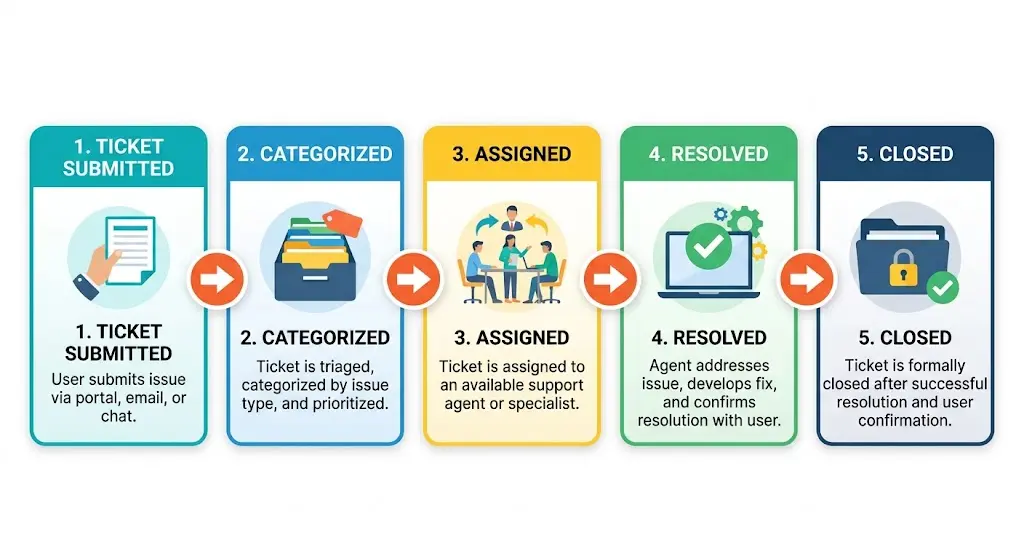
The various activities performed after a support request is submitted such as converting, categorization, triage, assignment, communication, resolution, and closing are all referred to as ticket handling. A well-defined ticketing system ensures teams are able to act in a consistent manner and avoid missed requests.
10 Ticket Handling Best Practices for IT and Customer Support Teams
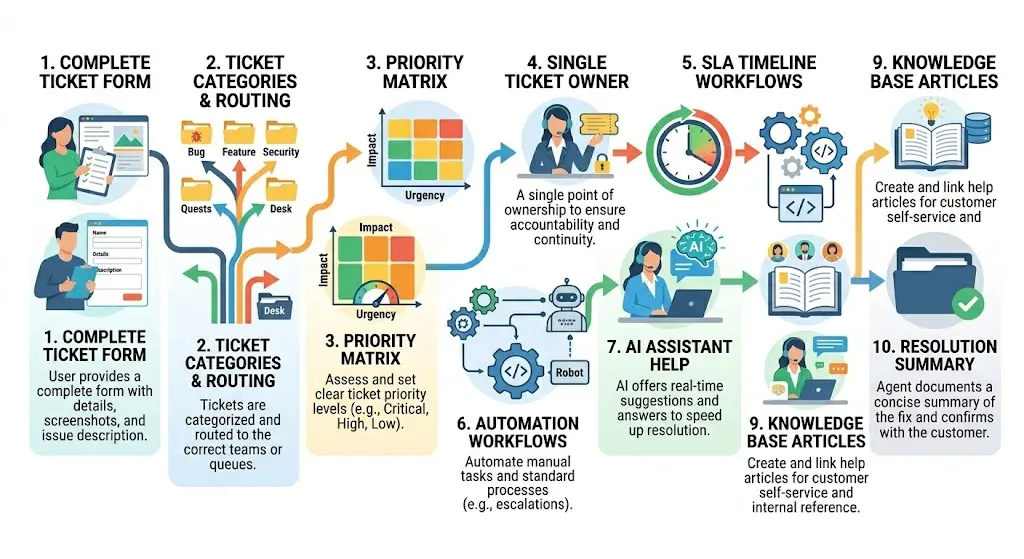
The following 10 best practices cover the workflow habits, automation choices, and team routines that cut ticket resolution time without adding headcount. Each one addresses a common bottleneck, from intake and triage to escalation and post-resolution review. Apply the ones that match where your queue slows down most.
1. Require the Right Information Before a Ticket Is Submitted
What: One of the best ways to slow down a support team is to let incomplete tickets in the queue.
Why: Resolution times will immediately increase when agents must request screenshots, account details, error messages or device information during their initial response.
How
Design forms used to create tickets that need the most information agents need. Request screenshots, affected systems, browser information, error codes or order numbers depending on the request type.
For instance, an IT team troubleshooting a login problem will require different information than a customer support team that has a point of sale issue.
Help desk tickets examples are available for well-structured requests.
Outcome: Improved ticket quality results in quicker first response and resolution times.
2. Create Categories That Drive Routing Decisions
What: It should be possible to get tickets to the right team from categories.
Why: Many organisations will establish a dozen or more categories which seem to appear very helpful in the reports but are confusing in daily operation.
How
Create categories based on work as it gets done. If every ticket that is raised is for a software matter, and you get access requests from a different team, then your categories should be structured like that.
Update your categories no more frequently than every few months; eliminate categories that do not aid in routing and reporting.
For reference, please see all support ticket categories
Outcome: The right people receive tickets more quickly and they don't sit in the wrong queue for so long.
3. Separate Urgency From Ticket Volume
What: The priority should not be based on a busy queue.
Why: Twenty small requests may be less important than one that is of major importance to the entire department. Business impact is not always prioritized and lots of teams make this mistake.
How
Apply basic priority system (using Urgent/Impact Led Prioritisation) Ask:
How many people are impacted?
What is the severity of the problem?
If it's not settled right now, what will happen?
Teams which formalise this process typically use principles of triage definition and structured triage tickets processes.
In other words, a company-wide server outage should take precedence over several normal password changes for employees.
Outcome: Agents are not overwhelmed by the number of high-priority issues they have to attend to.
4. Eliminate Ticket Reassignment Loops With Single Ownership
What: Each ticket must have a definite owner, who is responsible.
Why: When a customer receives an update from several agents who seem to have no knowledge of what had taken place before, the customer becomes frustrated. Internally, it becomes a waste of time and confusion when the constant reassignment has to take place.
How
If there are more than one team, make sure there is at least one person who will be the primary owner to keep communication and track progress.
In the case of IT teams, that could be the service desk analyst who needs to communicate with infrastructure teams.
In a company's customer service, it could be the first person to support the customer and who has to communicate with billing and/or technical experts.
Outcome: Less delay, greater accountability and enhanced customer experience.
5. Build SLA Targets Around Customer Expectations
What: Realistic SLA's are essential to good ticket management best practices.
Why: If there are no clear targets, agents will not know what needs to get done right now and customers won't know what to expect.
How
Set targets for response and resolution for various ticket priorities.
For example:
The key issues: response within 15 minutes
High priority: Response must be made within 1 hour
Medium: Response in 4 hours.
Low priority: Answer within 1 business day.
When developing targets, support leaders should regularly revisit what is SLA and what is a good SLA time.
Outcome: Clearer expectations and better compliance with SLA, with reduced escalations.
6. Automate Repetitive Workflow Steps
What: Not all tickets are necessarily manual.
Why: A lot of agents spend hours each week on routine administrative tasks, which software can do automatically.
How
Automate repetitive activities such as:
- Ticket routing
- Priority assignment
- Approval requests
- Escalation triggers
- Status updates
For organisations that have to deal with approvals, processes that are described in the approval workflows process can be very useful.
For instance, requests for access can, when configured, be automatically directed to the right approver, without having to wait for it to be assigned.
Outcome: Reduced administrative burden and greater time to spend on problem solving.
7. Use AI Where It Helps and Keep Humans Where It Matters
What: AI can improve ticket handling, but it shouldn't replace judgment.
Why: Many support teams expect AI to solve every support challenge. In reality, it works best when handling structured and repetitive tasks.
How
Use AI to:
- Categorize tickets
- Summarize conversations
- Suggest replies
- Recommend knowledge articles
- Resolve simple requests
Avoid relying on AI for:
- Escalation decisions
- Sensitive customer situations
- Complex troubleshooting
- High-risk business issues
For a deeper look at automation strategies, see automated ticketing systems.
Outcome: Agents spend less time on repetitive work while maintaining quality where human judgment is needed.
8. Communicate Before Customers Ask for Updates
What: Silence creates frustration.
Why: When customers are not aware of what is going on, they tend to become impatient. Many issues are caused by the lack of communication and result in more complaints.
How
Update progress on a regular basis:
- Ticket received
- Investigation started
- Escalation required
- Resolution identified
- Ticket resolved
This could include alerting employees on outages status for IT teams.
It can also mean informing customers of when to expect things for customer support teams.
Outcome: Improved customer satisfaction and fewer follow up requests.
9. Turn Repeated Solutions Into Knowledge Base Articles
What: The same question shouldn't be solved in the same way each time.
Why: When agents repeatedly handle the same problems, precious information can be lost in ticket history.
How
Check and resolve tickets periodically and look for common issues.
Turn those solutions into documentation or customer-ready articles.
For teams developing self-service approaches, it is recommended to look at knowledge management for customer service.
If, for instance, someone is getting the same question about resetting their password 50 times each month, then that's information that should be in a knowledge base.
Outcome: Reduced ticket numbers and quicker turnaround.
10. Close Tickets With a Resolution Summary
What: It shouldn't be removed from the queue without a reason.
Why: The poor closure practice leads to confusion and reopen rates. Users might not be aware of what was corrected, or why the problem happened.
How
When closing a ticket:
- Check that the problem has been solved.
- Give a brief summary
- Record the reasons and causes if appropriate
- Take comments if suitable
- This will provide a full history for future reference.
Outcome: Decreased reopen requests, improved document quality.
Common Ticket Handling Process Mistakes to Avoid
Many ticket problems come from poor workflows, not slow agents. These common ticket handling process mistakes create delays, confusion, and poor support quality.
Common Ticket Handling Anti-Patterns
The majority of queue issues are structural and are not related to agent speed. These six pitfalls regularly affect both IT and customer support staff and impact the quality of tickets.
Treating Every Ticket as High Priority
If all of the tickets are marked urgent, they're all not urgent. Priority inflation requires agents to predict what is most important, and renders triage useless. Set a priority system based on actual impact and urgency – not loudness of the requester. Teams that don't have a priority matrix are the ones that end up working the loudest, not the most critical tickets.
Over-Categorizing at Intake
A 40+ category schema would result in inconsistent tagging, broken routing rules and reporting that no one would trust. Agents assign different categories to the same type of issue, so the queue data is not useful. Reduce your schema to 10-15 well-defined categories, and you will notice the accuracy of your routing and visibility immediately improving.
Letting Tickets Bounce Between Assignees
Each re-assignment will cause delay and accountability issues. Information can be lost as the ticket is passed from agent to agent without a reason, and the requester is forced to explain their problem again. The fastest (and only) change that can make a colossal difference for the average resolution time is to name ownership at triage, which is one person, not a team.
Escalating Too Quickly
If it escalates and it's not ready for resolution, that is wasting time and delaying your queue. Not all tickets will have to be handled at L2 or L3. Establish an escalation criteria – if the agent assigned to the issue is not able to resolve within X minutes or without system access, then escalate. When judgment based escalation occurs, there are no criteria, which makes it inconsistent.
Not Closing Tickets Properly
Do not close a ticket for the reason that a reply has been sent, as it should not be resolved but rather the reason it was resolved. If the reopen rate is over 15%, it is almost always due to this habit. Close with a resolution summary. It takes 30 seconds and it won't have to be solved again.
Ignoring Metrics Until Something Goes Wrong
Teams that only view the queue after a complaint will not be aware of any patterns emerging or building over time that are causing an issue, such as: tickets are slow-moving, resolution spikes for certain categories, or unequal agent workload. Teams that improve have a standing weekly metrics review with one action item assigned each week which differentiates them from teams who react.
How AI Is Changing Ticket Handling?
While AI is transforming the way support teams are handling tickets, that's not the way many vendors would like it.The best thing about it is not that you're getting rid of agents. It's reducing the time agents spend on repetitive tasks.
AI has the ability to classify tickets, summarize lengthy conversations, suggest solutions, detect sentiment, and write replies today. These functions enable the teams to reduce manual efforts and act with quickness.
AI, however, still has its limitations when it comes to situations that are very contextual. It can misunderstand what customers are trying to do, ignore critical business factors or suggest unnecessary actions when escalating.
AI can be beneficial for IT Teams in identifying repeating incidents and more efficiently directing requests. It can help to streamline the service process and lessen the burden on the support agents.
The best companies use AI as a helpful tool, not a decision maker. No matter how strong the processes, they are still worth it. AI is just a way of accelerating good processes.
Teams interested in expanding their automation strategy can explore automated ticketing systems to understand where automation delivers the most value without sacrificing service quality.
Measuring Whether Your Ticket Handling Is Improving
If you cannot detect the impact of good ticketing system best practices , then they are not working. If you're measuring the right metrics, it becomes an improvement cycle instead of a guess. Below are the 4 metrics that are significant for both the IT team and the customer support team.
First-Response Time
Measures the time an agent has to wait after a ticket is created to take action on it. When first-response time is increasing, it is nearly always because of an assignment bottleneck, an understaffed shift or tickets which are left unrouted in the wrong queue. Inspect and repair the structure first, instead of faulting the team.
Resolution Time by Category
The actual picture is obscured by the time of the aggregate. Take it apart into categories of tickets, one slow category will almost always have a structural reason. This can be due to missing information at intake, the wrong assignee pool for that category, or unclear ownership. In this sense, a higher resolution time in one category is a cue to explore, rather than report.
Reopen Rate
If the reopen rate is more than 10-15% then tickets are being closed prematurely without the issue being fully resolved. Look for patterns by filtering the closed-then-reopened tickets and searching for patterns: Same category, Same agent, Same type of ticket. A closure is typically the answer, not agent coaching.
CSAT Trend
Please don't read CSAT like a number. Monitor direction of travel for 6 weeks. A three-point drop, rather than a one-week drop, is more actionable. If CSAT drops when resolution remains the same, then it is typically a communication quality issue,not speed.
FAQs
What are the best practices for ticket handling?
The ticket handling best practices are collecting all ticket data, prioritizing by impact, assigning clear ownership, communication, adherence to SLAs, automating repetitive tasks, and recording solutions.
How can I improve the ticket handling process?
First, look at ticket intake, ticket categorization, assignment, communication and ticket closure process. Making minor changes in workflows can result in substantial gains in productivity.
How should support tickets be handled?
The support ticket process should be organized and include ticket intake, ticket classification, ticket priority, ticket allocation, ticket resolution, and ticket closure. Consistency is more important than complexity.
What's the difference between ticket handling and ticket management?
The difference between ticket handling and ticket management lies in their scope and purpose: ticket handling is dedicated to particular ticket flows, and ticket management deals with the overall performance of the ticketing system, including reporting, dashboards, process optimization, and more.
Should I use AI for ticket handling?
Yes, but selectively. AI is great for repetitive tasks and administrative tasks. For complex, sensitive or high-impact situations, human oversight is still necessary.
Final Thoughts
The best practices of handling tickets are don't make more steps in the process. They're focused on consistency. Organizing tickets correctly, prioritizing them appropriately, assigning them clearly, and closing them correctly will help support teams to spend less time dealing with chaos and more time solving problems.
If considering tools along with process improvements, check out the best ticketing system. Look for an automated ticketing system for automation strategies. If you're looking at more than just each ticket's workflow then help desk best practices has a chapter about team level practices.