



Employees and clients may submit, monitor, and resolve assistance requests immediately within Slack or Microsoft Teams using the conversational ticketing support approach, eliminating the need to exit the chat program and access a different portal.
All conversation takes place within the same thread, and incoming messages are automatically transformed into organized tickets with status, priority, and assignee attributes. It includes both external, customer-facing assistance and internal IT and HR support.
The approach removes the friction that makes traditional portal-based ticketing hard to adopt. Support requests flow naturally rather than being ignored or postponed when the intake channel is a tool people already use daily.
What is Conversational Ticketing? (Detailed definition)
Conversational ticketing converts chat conversations into trackable support tickets without requiring anyone to leave Slack or Microsoft Teams. Chat messages are used to submit requests, which are then automatically turned into tickets with information like ownership, priority, status, and progress monitoring.
While the ticket is being handled in the background, agents and requesters are still conversing. This approach is smoother than portal-based submission for both customer-facing and internal support teams such asIT, HR, and operations.
How does Conversational Ticketing Work?
The mechanics follow a consistent pattern regardless of the specific tool used.
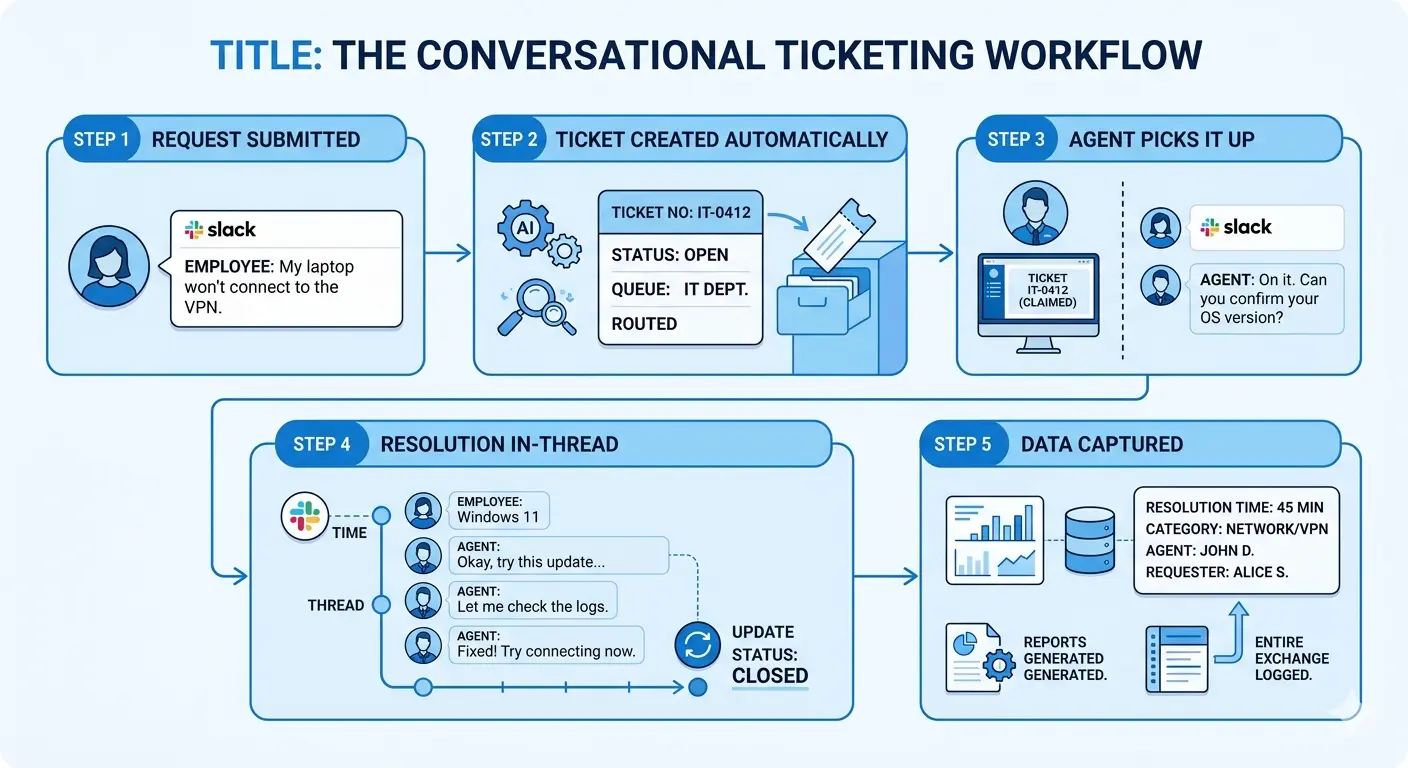
A concrete example illustrates the flow:
Step 1 Request submitted: An employee sends a message in a dedicated Slack channel: "My laptop won't connect to the VPN."
Step 2 Ticket created automatically: The conversational ticketing system detects the message and opens a new ticket in the background. It assigns a ticket number (e.g., IT-0412), sets the status to "Open," and routes it to the IT queue.
Step 3 Agent picks it up: An IT agent sees the ticket in their queue either in Slack or in a connected dashboard. They claim it and respond directly in the original thread: "On it. Can you confirm your OS version?"
Step 4 Resolution in thread: The back-and-forth continues in conversational ticketing Slack. The agent updates the ticket status as work progresses. When resolved, they mark it closed triggering a confirmation message in the same thread.
Step 5 Data captured: Resolution time, category, agent, and requester data flow into reporting. The entire exchange is logged against the ticket, not just sitting in a chat archive.
The requester's experience is entirely chat-native. The agent's experience balances chat and structured workflow. Reporting and audit data are captured without requiring either party to open a separate system.
Conversational Ticketing vs Traditional Ticketing
The comparison below covers the key dimensions at category level not specific conversational ticketing tools. Neither model is universally superior; the best ticketing system depends on team context, compliance requirements, and where your users actually spend their time.
One important clarification: conversational ticketing is not a replacement for structured ticketing data. A well-implemented conversational system carries the same fields, SLAs, and reporting that a portal-based system does the channel changes, the underlying data model does not.
What Conversational Ticketing Isn't?
Conversational ticketing is sometimes confused with three other categories. The differences are important while selecting the appropriate instrument.
Live Chat
Live chat tools like Intercom or Zendesk Chat enable real-time conversations, but they're designed for dialogue, not long-term traceable records. The context is usually lost or hidden when the chat window closes. Conversational ticketing necessitates that a ticket maintain its status, ownership, and history while being separate from the chat thread. Live chat is conversation. Conversational ticketing is conversation plus structure. Gartner predicts self-service and live chat will become the leading customer service channels by 2027.
Chatbots
Chatbots use AI or rules to automatically respond to frequently asked queries. They are able to respond to basic inquiries and occasionally open tickets when an escalation is required. But the chatbot isn't a ticketing system in and of itself. Chatbots may be used in conversational ticketing for data collection, routing, or triage, but human interactions and ticket tracking are still essential. IBM reports that two in three business leaders have seen AI drive revenue growth exceeding 25%.
Shared Inbox
Teams can collaborate on email management from a single address by using a shared inbox. Email workflow management is enhanced by the ability for many agents to see, assign, and reply to messages. Shared inboxes are email-based rather than chat-native, in contrast to conversational ticketing. Conversational ticketing allows requests and ticket updates to occur within ongoing discussions, keeping service within chat platforms.
Benefits of Conversational Ticketing
Conversational ticketing improves support by lowering friction, speeding responses, preserving context, and keeping reporting intact.
Lower Intake Friction
The chat tools that users already use on a daily basis can be used to submit requests. Opening a separate site or filling out long forms are not necessary. People ask for help more easily when the barrier is lower.
Conversation Context Is Preserved
Every conversation stays attached to the ticket. When necessary, agents can examine the entire chat history. This gives troubleshooting and decision-making more context.
Faster Time-to-First-Response
Ticket notifications appear directly in chat. Agents don't need to switch between tools to answer. Users get help faster.
Higher Adoption in Internal IT
Chat is a more popular way for employees to report problems than a different portal. More issues get reported as tickets across the company.
Reporting and Data Integrity
Structured data like categories, priorities, and resolution periods are still recorded in tickets. Teams keep performance metrics and reporting up to date. Support via chat does not equate to visibility loss.
AI-Friendly Workflows
AI can automate routine tasks, categorize requests, and summarize threads. Chat messages give AI rich context to work with. This helps support teams scale.
Conversational Ticketing Use Cases
Conversational ticketing works best when users already communicate in chat and support teams need structured request tracking.
Internal Support (IT, HR, and Operations)
Chat is a natural place for employees to ask for assistance because they already spend a large portion of their day in Teams or Slack for support. Removing the need for a separate portal drives adoption and makes help more accessible.
Typical situations consist of:
- IT support: Specific help channels and threads are used to address hardware problems, software access requests, password resets, and VPN troubleshooting.
- HR support: Chat threads handle employee requests, policy queries, benefits inquiries, and new recruit onboarding.
- Operations and facilities: Through shared support channels, requests for office supplies, reservations for rooms, equipment requirements, and maintenance issues are submitted.
Low requester friction is the main benefit. Workers only need to send a message using a tool they are already familiar with; they do not require training on a helpdesk portal.
Customer-Facing Support
Although it continues to rise, customer-facing conversational ticketing is still less well-established than internal support. It is especially prevalent in business-to-business (B2B) settings where sellers and consumers interact via embedded messaging or shared chat channels.
Typical situations consist of:
- Shared customer support channels: While maintaining the chat experience, customer chats are transformed into trackable tickets.
- Embedded application support: Users ask questions via in-app chat, and discussions are instantly connected to tickets in the background.
This method preserves insight into ticket status, ownership, and service levels while offering a more convenient support experience. Traditional portal-based methods, however, might still be easier to scale for companies with extremely high support volumes.
When Conversational Ticketing Isn't the Right Fit
While conversational ticketing is effective in many settings, it is not the ideal choice for every company. Before implementing it, take into account the following restrictions:
Highly regulated industries
If your industry has strict compliance, governance, or audit requirements, chat-based support may not meet the documentation standard.
Teams that don't use chat platforms
If your team doesn't live in Slack or Teams, conversational ticketing loses its main advantage.
Large-scale customer support operations
Portal-based systems with structured forms, self-service, and queue management at scale are often a better fit for teams handling thousands of requests daily.
Complex audit trail requirements
Chat history alone may not satisfy legal or compliance standards that require detailed records of approvals, actions, and changes.
Conversational ticketing works well for most internal support teams. Before using it as their main support model, firms should assess their communication practices, support volume, and compliance requirements.
The Role of AI in Conversational Ticketing
AI is becoming an important part of conversational ticketing, helping support teams handle requests more efficiently while reducing manual work.
AI-powered triage
Chat messages can be automatically classified, ranked, and directed to the right team or agent.
Conversation summarization
AI can turn long chat threads into succinct ticket descriptions, making tickets easier to review and manage.
Suggested responses
AI-generated response suggestions help agents answer common questions faster and more consistently.
Automated resolution
Occasionally, straightforward, recurring requests can be handled automatically without the need for human participation, which lowers the number of tickets.
Improved efficiency
By handling repetitive work, AI frees agents to focus on complex problems that need human judgment.
Important caveat
AI capabilities are advancing fast, but they're not fully autonomous yet. Most teams still need human oversight to verify classifications, responses, and resolutions.
For a deeper look at AI powered support workflows, see our guides on AI ticketing systems and automated ticketing systems.
Final Thoughts
Conversational ticketing blends the structure of traditional ticketing with the ease of chat. Ticket ownership, SLAs, and reporting are maintained while requests are submitted, handled, and resolved within well-known chat tools.
For a deeper look at the business benefits and adoption drivers, read our guide on why you should start using conversational ticketing. If you're evaluating solutions and want to see how Suptask approaches conversational ticketing, explore conversational ticketing built into Slack.
FAQs
What is the difference between conversational ticketing and traditional ticketing?
Conversational ticketing happens in chat platforms, while traditional ticketing uses portals or forms. Both maintain tickets, workflows, and reporting.
Does conversational ticketing work for customer-facing support, or only internal IT?
Conversational ticketing supports both internal teams and customers. Internal IT is more common, while customer-facing use continues growing.
Do you lose structured data and reporting with conversational ticketing?
No. Chat messages become structured tickets with categories, priorities, assignees, and reporting metrics while keeping conversations attached.
What is a conversational ticketing system?
Conversational ticketing software converts chat requests into trackable tickets, automates routing, and links conversations with workflows.
What is AI conversational ticketing?
AI conversational ticketing uses AI to classify requests, summarize conversations, suggest responses, and automate simple ticket resolution.












