Imagine a customer emails your team about a billing issue, and then follows up in live chat, then calls. Three agents reply separately, each without seeing the full conversation history. Will the customer get the right solution?
These are precisely the situations a ticketing system is designed to prevent.
What is a ticket system? A ticketing system is software that captures, manages, tracks and routes service requests through their full lifecycle so that nothing gets lost and every request has clear ownership and visible status.
From customer support to IT problems, HR requests to operations, a ticketing system helps you manage requests in one place. Learn how ticketing systems work, the benefits of a ticketing system, and the key differences between support and IT workflows.
What Is a Ticketing System?
A ticketing system is software that captures, organizes, tracks, and resolves service requests from customers, employees, or internal teams. Every request becomes a ticket — a structured record containing the issue details, requester information, assigned owner, priority level, status, and full conversation history.
Tickets move through a defined lifecycle, typically from created → assigned → in progress → resolved → closed. Throughout the process, the system keeps a complete audit trail of updates, responses, attachments, and status changes.
Ticketing systems are used across multiple departments and industries. Common use cases include:
- Customer support teams use them to manage external inquiries.
- IT and ITSM teams handle incidents, service requests, and internal technical support.
- HR departments manage onboarding, employee inquiries, and approval workflows
- Operations and internal teams tracking structured requests and day to day tasks
How Does a Ticketing System Work? The Ticket Lifecycle
Do you know how does ticketing system work? The easiest way to understand what is a ticket system is to follow a ticket from start to finish. Here's what that path looks like:
Ticketing Creation
First, a user requests assistance through email, chat, a web form, phone ora messaging app. This is then automatically converted to a ticket with its ownunique ID and the precise time it arrived is recorded.
Categorization and Prioritization
The next step is to categorize that ticket. The system uses tags or labelsto specify the ticket by type (billing issue, access request, HR question).Then system assigns a priority based on rules you have set for example urgency,customer tier or SLA terms.
Routing and Assignment
Now the ticket automatically goes to the right team or agent. Routing can beround robin, or based on who is least busy, or matched by skill set.
Work and Collaboration
The assigned agent picks it up, offers solution of problem through internalnotes, loops in team mates, escalates if needed. Everything is in the sameticket thread. Nothing leaks to the side email chains.
Resolution and Closure
If the problem is solved; the agent responds and closes the ticket. Now therequestor has real-time visibility to that status change.
Feedback and Reporting
The last step is feedback and reporting. After closing, the requester mayreceive a CSAT survey. All that ticket data goes into dashboards such asresponse time, resolution time, agent productivity, SLA compliance.
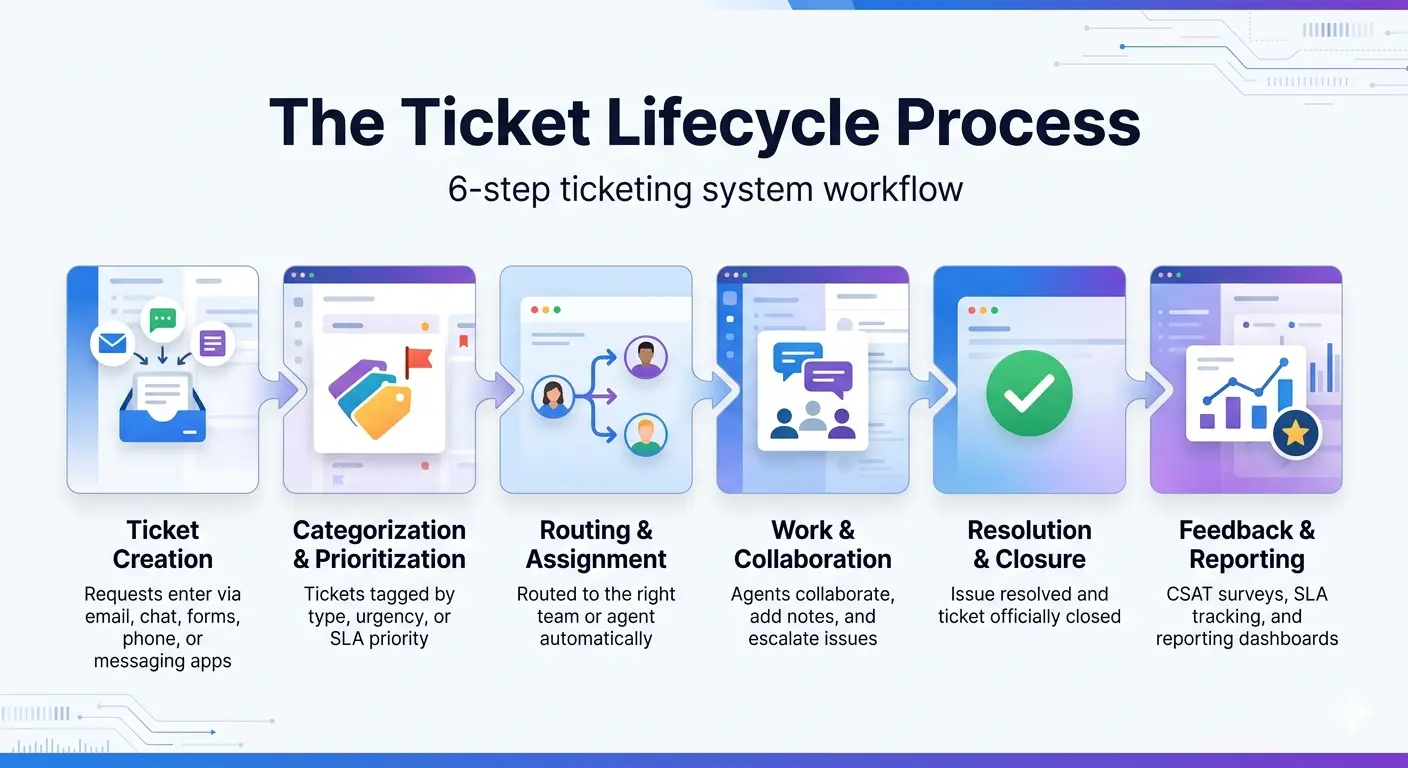
Note: One of innovative point is that most modern platforms automate steps 2 and 3 entirely. AI categorization and workflow rules handle triage and assignment without anyone touching it manually.
Ticketing System vs. Help Desk vs. Service Desk vs. ITSM
The terms ticketing system, help desk, service desk, and ITSM ticketing system are often used interchangeably. However, each has a different role, scope, and purpose within customer support and IT operations.
Bottom line:
A ticketing system is the software tool. A help desk is the support function using that tool. A service desk takes a broader IT service approach, while ITSM is the larger framework covering service management, processes, and operations.
What Is an IT Ticketing System?
It is a centralized system that helps IT teams manage, prioritize, and resolve technical issues faster. Most IT ticketing systems are designed to manage different types of internal support requests, including:
- Incidents: Technical issues that suddenly interrupt work, such as system outages, login failures, VPN connectivity problems, or devices not functioning properly
- Service requests: Everyday employee requests like password resets, software installations, access permissions, or hardware setup
- Problems: Recurring technical issues that require deeper investigation to identify the root cause and prevent repeated disruptions
- Change requests: Planned updates or modifications to IT systems that need proper approval, tracking, and documentation before implementation
IT ticketing systems also differ from customer support ticketing systems in several important ways:
- Audience: Designed for internal employees and operational teams rather than external customers
- Integration depth: Often connected with asset management tools, identity providers (SSO), monitoring platforms, and HR systems
- Process orientation: Commonly aligned with ITIL and broader ITSM practices for managing incidents, requests, and changes
- Approval workflows: Many IT requests require manager, security, or IT approvals before they can be fulfilled
A well managed IT ticketing system helps reduce untracked requests made through hallway conversations, personal chats, or scattered emails. Instead, every issue enters a centralized queue, making it easier for IT teams to prioritize work, monitor response times, and identify recurring technical problems before they become larger operational issues.
Businesses managing employee support at scale often rely on an Internal IT helpdesk ticketing system to centralize requests and approvals.
What Is Ticketing System Software?
Ticketing system software is the digital platform used to manage and automate the ticketing process. When businesses refer to a “ticketing system,” they are usually talking about the software itself rather than the process behind it. The software helps teams capture requests, organize workflows, assign tasks, and track issues from creation to resolution.
Most modern ticketing system software includes several core capabilities, such as:
Multi channel request intake
Converts emails, live chats, web forms, phone calls, and messaging app conversations into organized tickets. Just like Slack’s Email ticketing system helps teams turn incoming emails into trackable requests automatically.
Workflow automation
Automatically categorizes, routes, assigns, or escalates tickets based on predefined rules and priorities
Team collaboration tools
Allows agents to add internal notes, reassign tickets, mention teammates, and collaborate without losing context
Reporting and dashboards
Tracks key performance metrics like response times, resolution times, agent productivity, and SLA compliance
Knowledge base integration
Gives agents quick access to helpful resources while also supporting self service for users
Third party integrations
Connects with CRM platforms, asset management tools, identity providers, Slack, Microsoft Teams, and developer platforms
In current time, most ticketing systems are delivered as cloud based SaaS platforms because they are easier to scale, maintain, and access remotely. However, some organizations in industries like healthcare, finance, and government still prefer on premise deployments where stricter data control and compliance requirements apply.
Why Does a Business Need a Ticketing System?
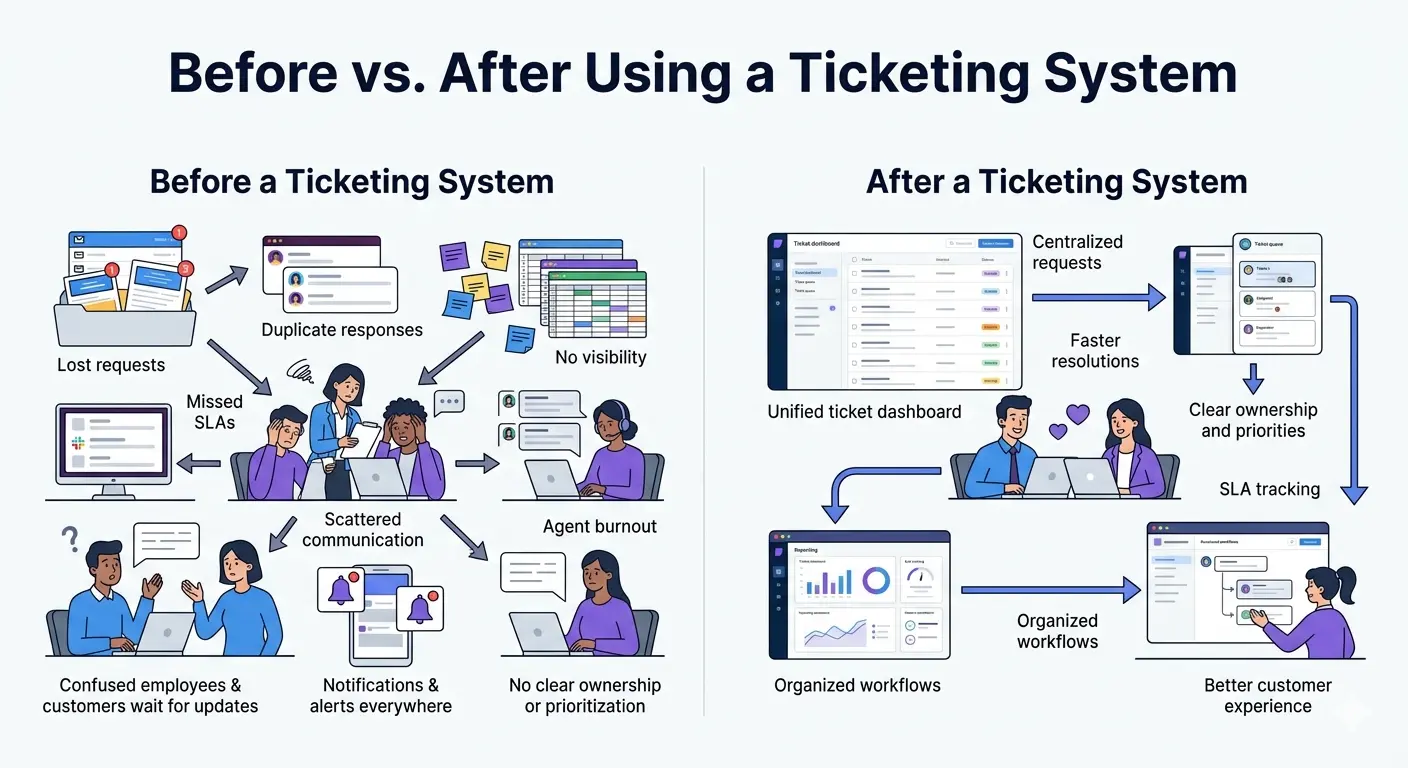
As businesses grow, managing requests through scattered emails, chat messages, spreadsheets, or verbal conversations quickly becomes difficult. Without a structured system in place, support teams often struggle to keep track of requests, priorities, and responsibilities. Over time, this creates operational gaps that affect both team productivity and user experience.
Some of the most common problems businesses face without a ticketing system include:
- Lost requests: Important emails get buried in inboxes, Slack messages are missed, and follow ups are forgotten entirely
- Unclear ownership: Multiple team members respond to the same issue, or worse, nobody responds because responsibility is unclear
- Lack of visibility: Employees, customers, and managers cannot easily track ticket status, workloads, or queue health
- No documented history: Without a centralized record, teams lose visibility into previous conversations, decisions, and resolutions
- Missed SLA commitments: Response time and resolution targets become difficult to monitor or enforce consistently
- Poor prioritization: Urgent issues may sit unresolved while low priority tasks consume time and attention
- No knowledge retention: Teams repeatedly solve the same problems because past resolutions are not searchable or documented
- Team burnout: Constant context switching between emails, chats, and manual follow ups creates unnecessary stress and inefficiency
A ticketing system helps solve these challenges by turning scattered, reactive request handling into a centralized and measurable workflow. Every request is tracked, assigned, prioritized, and documented from start to finish, giving teams better structure and accountability.
There are also several clear signs that your organization may already need a ticketing system:
- Employees or customers frequently ask, “Did anyone see my request?”
- Your support, IT, or HR team cannot quickly view their current workload or open requests
- Multiple agents accidentally respond to the same issue
- SLA commitments are not being tracked consistently
- Your business is scaling with more employees, customers, or support channels to manage
When request volume increases, relying on manual processes becomes difficult to sustain. A ticketing system gives growing teams the structure needed to stay organized, responsive, and consistent.
Key Benefits of a Ticketing System
Implementing a ticketing system helps businesses create a more organized, measurable, and efficient support process. Beyond improving response management, it also strengthens team collaboration, visibility, and overall service quality. Some of common benefits of ticket management system are:
1. Nothing Falls through the Cracks
Every request is automatically captured, assigned, and tracked in one centralized system. This reduces missed emails, overlooked messages, and forgotten follow ups.
2. Faster Response and Resolution Times
Automated routing ensures tickets reach the right person quickly. Teams spend less time sorting requests manually and more time resolving issues efficiently.
3. Clear Ownership and Accountability
Each ticket has a designated assignee responsible for handling it. This gives requesters visibility while helping managers monitor workloads and performance.
4. SLA Compliance and Performance Tracking
Ticketing systems automatically monitor response and resolution targets. Agents receive alerts before SLA deadlines are missed, improving consistency and accountability.
5. Centralized Communication and History
All conversations, attachments, updates, and internal notes stay connected to the same ticket. Anyone reviewing the request can immediately understand the full context.
6. Data Driven Process Improvement
Built in reporting helps teams analyze ticket volume, response times, recurring issues, and customer satisfaction trends. These insights make operational improvements easier to identify.
7. Better Customer and Employee Experience
Requesters receive faster updates, clearer communication, and better visibility into their requests. This creates a smoother and more reliable support experience.
8. Scalability for Growing Teams:
A ticketing system helps businesses manage increasing request volumes without creating operational chaos. New agents, channels, and workflows can be added more easily.
9. Improved Compliance and Audit Readiness:
Every action taken on a ticket is recorded automatically. This creates a reliable audit trail that supports compliance, reporting, and post incident reviews.
10. Reduced Team Burnout:
Structured workflows reduce the stress of juggling requests across multiple channels. Teams can work from a clear, prioritized queue instead of reacting chaotically.
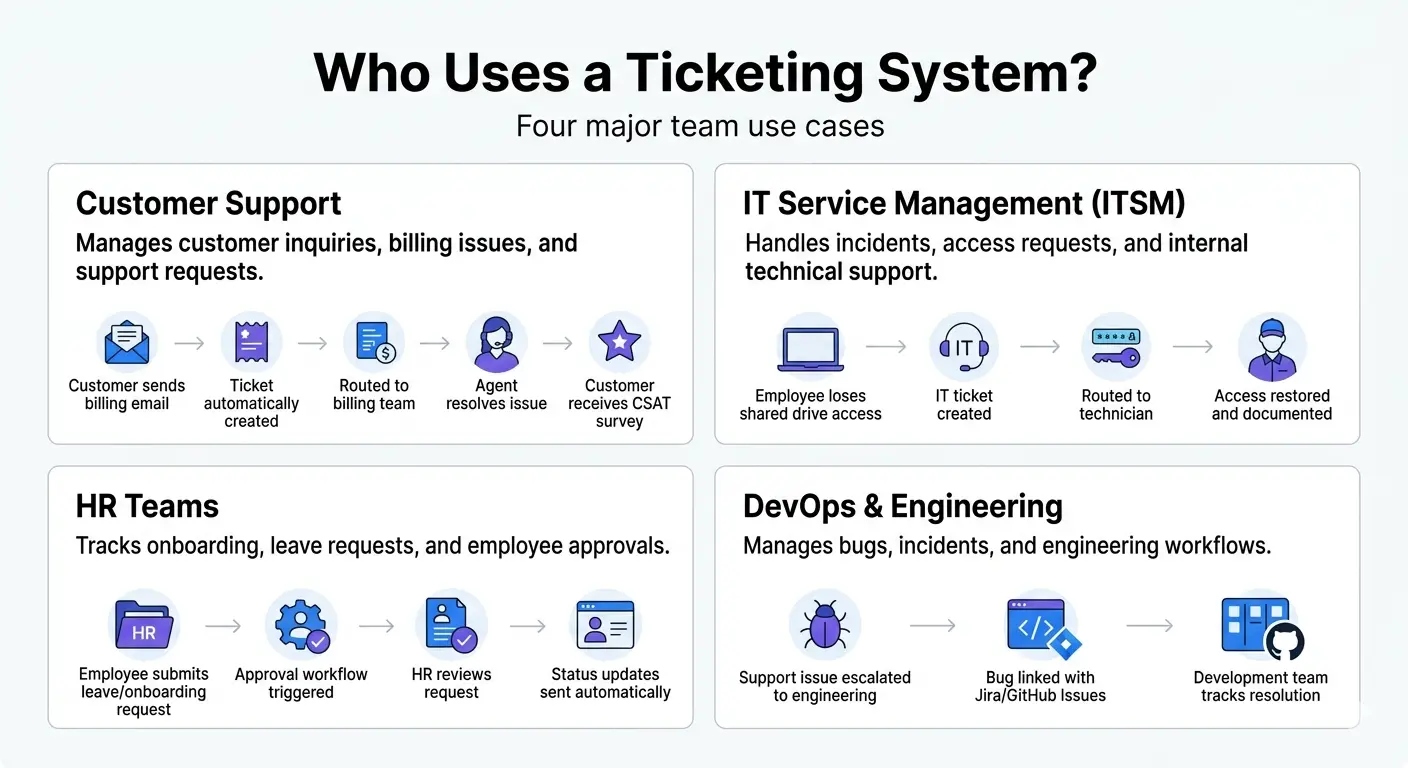
Use Cases: Who Uses a Ticketing System?
Ticketing systems are used across many departments to manage requests, improve response times, and keep workflows organized. While the process is similar, each team uses ticketing systems differently based on the type of requests they handle.
Customer Support
A customer emails about a charge they don't recognize. The Customer support ticketing system captures the email, creates a ticket, routes it to billing based on the keyword, and sends an automatic confirmation with a ticket ID. An agent picks it up, reviews the account history through the CRM integration, resolves the issue, and closes the ticket. The customer gets a CSAT survey. The whole thing is logged and searchable.
IT Service Management (ITSM)
An employee loses access to a shared drive after changing their password. The IT ticketing system categorizes the request, sends it to the correct technician, and documents the fix for future reference.
HR Teams
A new employee submits a leave or onboarding request through an HR portal. The system tracks approvals, updates the employee on progress, and stores the request for compliance records.
DevOps and Engineering
A DevOps ticketing system helps engineering teams track escalated bugs, incidents, and development requests more efficiently.The ticket is escalated to the development team and linked directly with tools like Jira or GitHub Issues for tracking.
Internal Operations, Facilities, and Marketing
Ticketing systems also help internal teams manage structured requests, such as office repair tickets, purchase approvals, or marketing asset requests, through a centralized workflow.
How to Choose the Right Ticketing System
Choosing the right ticketing system depends on how your team works, the type of requests you manage, and the tools you already use every day. A platform that works well for customer support may not be the best fit for IT or internal operations teams.
When evaluating ticketing systems, focus on these key areas along with 10 must have ticketing system features:
Match the tool to your team type
Customer support platforms like Zendesk and Freshdesk are built differently from ITSM tools like ServiceNow or Jira Service Management, while internal team tools like Suptask focus more on Slack based workflows
Consider where your team already works
If most communication happens inside Slack or Microsoft Teams, a native integration can reduce context switching and improve adoption
Plan for future scale
A system that handles 100 tickets per month may struggle with 10,000 as your business grows, so review pricing tiers, automation limits, and scalability carefully
Check integration depth
The platform should connect smoothly with your CRM, asset management software, identity providers, and developer tools
Evaluate AI capabilities
Many modern AI ticketing systems now include AI powered triage, suggested replies, and automated resolutions for repetitive requests
Review ease of administration
Some enterprise systems require dedicated administrators, while others can be configured directly by support or operations managers
The best ticketing system is one that fits naturally into your existing workflows while remaining flexible enough to grow with your team.
How Suptask Approaches Ticketing: Inside Slack
Most ticketing systems require teams to switch between Slack, email, and a separate support portal to manage requests. Suptask takes a different approach by running the entire ticketing workflow directly inside Slack ticketing system. Teams can create tickets from messages, manage conversations in Slack threads, automate routing and SLAs, and track requests without leaving their existing workspace.
This setup works especially well for IT helpdesks, HR teams, and customer support operations that already rely heavily on Slack for communication. For IT focused workflows, teams can also explore Suptask ITSM Ticketing System for more advanced internal support and service management features.
FAQs
What is a ticketing system in IT support?
An IT ticketing system helps internal IT teams manage technical support requests, incidents, and service requests in one centralized system. It tracks issues from submission to resolution while keeping a complete record of updates and communication.
What is the difference between a ticketing system and a help desk?
A ticketing system is the software used to manage and track requests. A help desk is the support team or function that uses the system to assist employees or customers.
Is a ticketing system the same as a service desk?
No. A service desk has a broader IT service management role, covering incidents, service requests, and operational processes, while a ticketing system is the tool used to manage requests.
What is a ticket management system?
A ticket management system is another name for a ticketing system. Both terms refer to software that captures, assigns, tracks, and resolves support requests.
What are the main benefits of implementing a ticketing system?
A ticketing system improves organization, response times, accountability, and SLA tracking. It also helps teams centralize communication, reduce missed requests, and improve reporting visibility.
Why does a business need an IT ticketing system specifically?
Without a centralized system, IT requests often become scattered across emails, chats, and verbal conversations. An IT ticketing system creates a structured queue, improves prioritization, and keeps a searchable history of past issues and resolutions.
How much does a ticketing system cost?
Pricing for ticketing systems ranges from $0 to $300+ per agent per month depending on features, integrations, automation, and enterprise needs. Most small to mid size teams typically pay $15-100 per agent monthly with advanced enterprise ITSM platforms costing more.
Do small businesses need a ticketing system?
Yes. Even small teams benefit from using a centralized system to track requests, reduce missed follow ups, and stay organized as support volume grows. Suptask is one of inexpensive help desk software for small business.