



Most teams outgrow their shared inbox the same way. Your business uses a shared inbox. Two agents reply to the same customer because nobody owns the thread. Other customers sit waiting because everyone assumed someone else replied.
Email ticketing systems convert incoming emails into structured tickets. Each email can be assigned to an owner, can have its status updated, and can have its history recorded. This guide compares 10 tools by how they handle that workflow.
At-a-Glance Comparison Table
What Is an Email Ticketing System?
From the perspective of a user, email ticketing systems operate by converting incoming support emails to support tickets with IDs, owners, and statuses. It also logs the history of the conversations. System users will not experience any disruptions and will not notice any system changes. Each email is processed and converted to a work item with a status.
Shared Inbox vs. Email Ticketing System
A shared Outlook or Gmail inbox works for small teams — two people handling 30–50 emails per day. Beyond that, shared inboxes fall apart.
Shared inbox misses the mark in these areas:
Responsibility: "I assumed you were going to take care of this."
Visibility: No means to differentiate between the emails you have responded to vs. those that are still pending.
Performance: Average response time means emailing reports and performing calculations.
Response Collision: Two agents occasionally reply to the same email.
Suptask's Email ticketing system resolves all the above challenges.
Our Criteria for Tools’ Evaluation
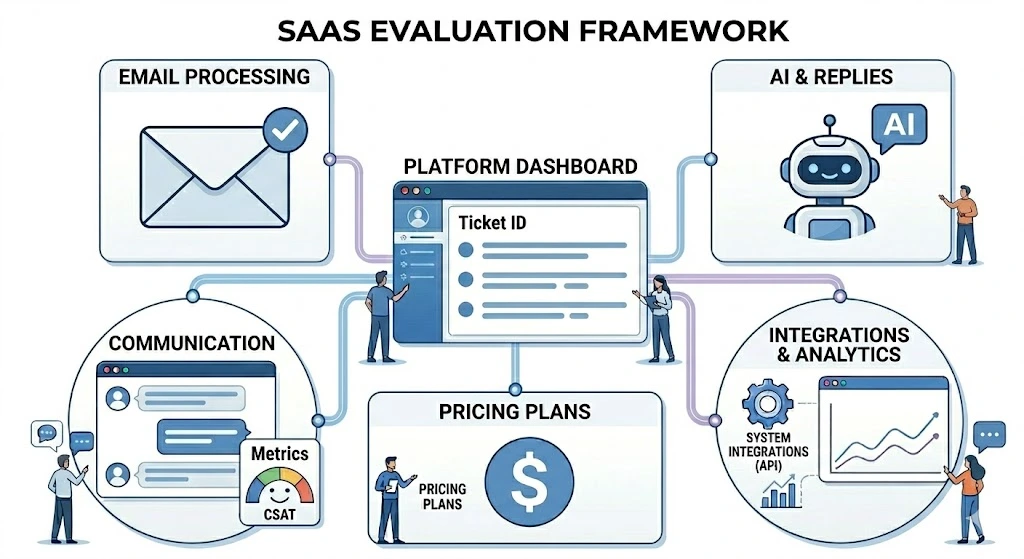
The ticketing system features will be explained in detail, so here is a bullet point summary for quick reference:
The ability to parse an email. Email parsing quality: how well the system detects auto-replies, merges threads, and strips signatures. This is the low bar, and some systems fail to meet even this.
Contacting the customer. Email-centric systems make replies look like they came from a real person.
Transparent Pricing. Every system on the list meets this requirement.
AI Email Responses. System claim they possess AI. There is a massive range of what this means, from suggesting ang a standard response template to composing an entire email that is context-aware. We tested what each system's AI actually does and rated accordingly.
Channel Integration. Gmail and Outlook are a must. Slack and Teams integration is a plus. Two of the systems on this list offer Slack integration.
Analytics. At every paid tier, the system should allow you to answer the question, "What was our average time to first respond for the month?" without having to export data to a spreadsheet.
How to Choose an Email Ticketing System
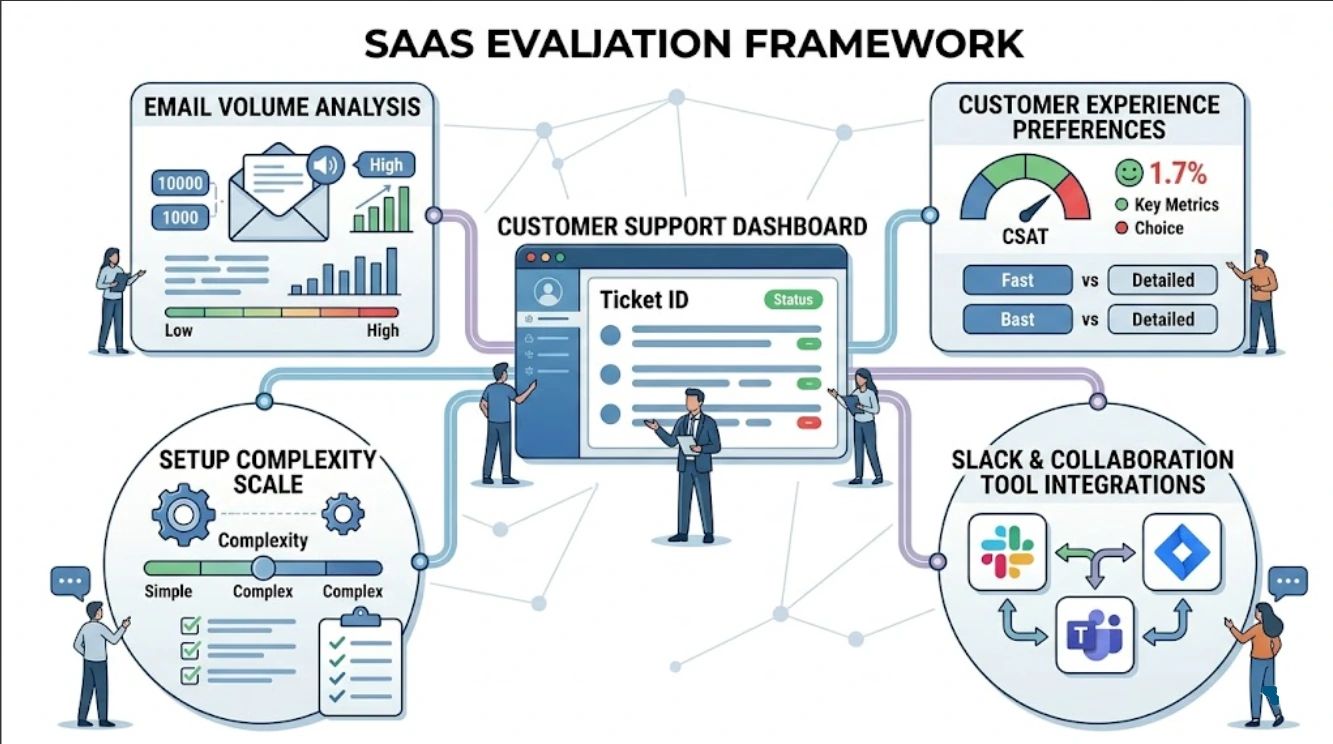
Follow this guide to assist with your email ticketing system selection.
- Check your average email volume, whether it is 30 emails/day with 1-2 agents or more.
- Whether your customer experience needs to feel like an email
- How much setup friction can your team tolerate?
- Does your team already work in Slack or Teams?
The 10 Best Email Ticketing Systems of 2026
The 10 email ticketing systems below are grouped by workflow style, from Slack-native and email-first tools to portal-first help desks and self-hosted options. Each entry covers who it fits best, key features, current pricing, AI email reply maturity, and a watch-out, so you can shortlist without demoing every tool on the list.
Best for Slack/Teams-Native Email Ticketing
This category fits teams that already run daily work in Slack or Teams and want email tickets to land in the same channels, not a separate portal. The tool below turns incoming emails into chat threads with owners, statuses, and SLAs attached.
1. Suptask
Suptask threads all email tickets in Slack and posts status updates in the ticket channel. Agents close tickets in Slack. This tool integrates help desk functionality and the team’s primary work communication tool.
Best for: Support teams that live in Slack and want email tickets in the same place.
Workflow style: Slack-native
Key features:
- Email-to-Slack routing — incoming emails become Slack threads
- In-Slack status/assignment tracking and SLA enforcement
- External ticketing via integrated forms and email
- Basic volume and resolution reporting.
Free option: No
Pricing: $18/user/month (as of June 2026)
AI email reply maturity: Moderate. AI performs well for routing and tagging emails arrive in the correct channel for the most part with good tagging. For full AI reply drafting, consider a tool with a specific AI layer.
Watch-out: Suptask is Slack-centric. Also, Microsoft Teams users or users outside Slack will need a different tool.
Best for Email-First, Customer-Friendly Support
This category fits teams that want replies to feel like personal emails, not portal notifications. The tools below keep the customer experience conversational while giving agents ownership, internal notes, and collision detection behind the scenes.
2. Help Scout
Help Scout allows customers to email support@yourcompany.com and receive a response that appears to be a personal email without ticket numbers or portal links.
Best for: SMB teams.
Workflow style: Email-first
Key features:
- Collision detection
- Integrated Live Chat and Beacon
- Internal notes
- Solid CSAT and response-time reporting
Free option: 15-day trial only
Pricing: $30/user/month (as of June 2026). No extras, AI included.
Reply AI rating: Good. Replies with context from the previous chat.
Watch out for: Reporting has a ceiling around 20-30 users. Teams with SLA needs and advanced escalation will run into limitations.
3. Front
Front is a means of collaborative inbox email. Internal comments and @ mentions are embedded in email threads. Thus, team members can collaborate on email replies without the customers seeing the comments. Front is a good tool for agencies, account teams, and operations functions, designed for users between a shared inbox and a full help desk.
Best for: Teams that have collaborative internal and external email management.
Workflow style: Hybrid
Key features:
- Integrated comments and drafts
- Rules and sequences
- Gmail and Outlook integrations
Free option: No
Pricing: $35/user/month (June 2026)
Reply AI rating: Basic. Front accurately summarizes email threads but fails to address tone in the drafted replies.
Warning: The price increases sharply depending on the number of licenses purchased. More advanced analytics and integrations are available on higher-priced tiers.
4. Intercom
Intercom has evolved from a purely live chat product. It now offers robust email support and other functionalities. It also has the most advanced email reply-drafting engine on this list.
Best for: SaaS companies.
Workflow style: Hybrid / chat-first
Key features:
- Converged Inbox across email, chat, and in-app support
- Fin AI: a full-resolution workflow agent
- Advanced customer data layered with product usage
- Proactive support and engagement
Free option: No
Pricing: $29/seat/month (as of June 2026)
AI email reply maturity: This is the best on the list. Fin is capable of drafting, sending, and resolving tickets using its knowledge base.
Watch-out: Intercom is pricey and has a unique pricing model. Teams that only need email support will end up paying for a ton of unused features.
Best for Full-Featured Help Desk with Email at the Core
This category fits teams that need email as one of several channels, with deeper SLA automation, routing rules, and reporting. The tools below run on a portal-first model and scale from small support teams to enterprise operations.
5. Freshdesk
There is a reason Freshdesk is the default recommendation. Their email-to-ticket conversion is consistent, the free tier is useful, and its drag-and-drop automation builder is the easiest to use on this list..
Best for: Support teams craving flexible, budget-friendly automation.
Workflow style: Portal-first with email inbound
Key features:
- Sophisticated email deduplication and thread merging
- Variable canned responses
- SLA and escalation automation
- Slack, Jira, Salesforce integrations
Free option: Yes, 2 agents, basic email ticketing, and reporting
Pricing: $34/user/month (as of June 2026). Freddy AI included from ~$55/user/mo.
AI email reply maturity: Strong at paid tiers.
Watch-out: The interface doesn’t scale well. Over time, many features have crowded the basics.
6. Zendesk
Zendesk is the benchmark. Email handling is reliable, and the automation and routing engine is the deepest on this list.
Best for: Teams in the mid-to-early enterprise level and above, with complicated, multi-channel engagements.
Workflow style: Portal-first
Key features:
- Deep SLA automation and management
- Email threading, ticket merging
- 1,000+ integrations
- Workforce management and QA tools at enterprise tiers
Free option: No
Pricing: $19/user/month (as of June 2026).
AI email reply maturity: Strong, but incurs a separate charge. The AI generates replies based on case notes and resolves cases at a high standard.
Watch-out: Zendesk requires a real investment in configuration. If no one on the team is taking ownership of the configuration, teams will use only about 20% of what they are paying for.
7. HappyFox
HappyFox has a cleaner UI than Zendesk or Freshdesk. Its Automation rule builder and SKUs for SLA management are more logical.
Best for: Mid-market teams that prefer to avoid the complex configuration of Zendesk.
Workflow style: Portal-first
Key features:
- Readable logic for the Automation rule builder
- SLA management with alerts for breaches
- Email and phone support
- Reporting at every tier
Free option: No
Pricing: $199/user/month (as of June 2026)
AI email reply maturity: Moderate. Offers good contextual suggested replies. Freshdesk's Freddy offers the same and is more competitive on per-seat pricing.
Warning: The price gap to Freshdesk is large and not priced in. It is only justifiable for UI improvement (after spending an appropriate amount of time trialing).
8. Zoho Desk
Zoho Desk is a cost-efficient option. Tickets and CRM records sync automatically, eliminating manual updates.
Best for: SMBs leveraging other Zoho products seeking integrated CRM and helpdesk solutions.
Workflow style: Hybrid
Key features:
- Email ticketing with great threading
- Zia AI supports suggested replies and sentiments
- Comprehensive Zoho CRM integration
- Workflow builder
Free option: Yes, for 3 agents
Pricing: $14/user/month (as of June 2026). Zia AI from the Standard tier.
AI email reply maturity: Moderate. The paid tier feature of Zia, composing replies and detecting sentiments (and negativity) in emails, is useful.
Watch-out for: Outside the Zoho ecosystem, Freshdesk has better utility for most teams.
Best Free and Self-Hosted Options
This category fits teams with tight budgets or a preference for owning their data. The tools below convert email to tickets with no license cost, trading AI reply quality and polish for zero spend or full control.
9. Spiceworks
Spiceworks is a free IT helpdesk solution. Unlike other solutions, there are no seat limits or features restricted behind paywalls. The product is ad-supported.
Best for: IT teams looking to set up a helpdesk solution with no budget.
Workflow style: Email-first
Key features:
- Email ticketing with status tracking and assignment
- User portal for self-service ticket submission
- Integrates IT asset management
- Community support
Free option: Completely free
Pricing: Free (ad-supported)
AI email reply maturity: None. This is a trade-off for the cost.
Watch-out: The ad-supported model means in-product advertising, and the UI feels dated.
10. osTicket
osTicket has been around for a while, is self-hosted and open-source, and converts emails to tickets reliably. It includes custom fields, SLA plans, ticket routing rules, and a client portal.
Best for: Complete control over all data without the costs of licensing.
Workflow style: Email-first
Key features:
- Configurable email-to-ticket pipeline with routing
- Custom fields, filters, SLA, and policies
- Client portal for ticket status
Free option: There are no costs; you simply have to host it yourself.
Pricing: Free
AI email reply maturity: Community plugins are available, but unsupported.
Watch-out: You have full control, but full responsibility for security, backups, and uptime.
What the Shared-Inbox Migration Actually Looks Like
Day one: You forward support emails from support@yourcompany.com to the new system.
Week one: The new system has no backlog. The old support email is usually left open for the backlog.
Weeks two and three: Agent retraining. Expect delays. Expect several weeks of adjustment.
A month in: The benefits of visibility. Managers can report on "what issues did we resolve this week and how long did it take us?" through a report instead of having to manually audit inboxes. You will adapt to ticket handling best practices after some time.
When You Don't Need an Email Ticketing System Yet
A small team can manage fine without an email ticketing system. Two people handling 20 emails a day with no SLA commitments can manage fine with a shared inbox. There is no "did you get my email?" complaints.
There is an expense to a ticketing system: the system has to be built, there will be migration friction, agents will have to be retrained, and configuration will need to be done on a consistent basis. A shared inbox with clear ownership rules works for a small team.
Final Thoughts
Email ticketing systems help scale productivity and grow with your business by fitting how your team already works. They can help you with formalizing the structure of business communications and defining customer service. The best ticketing system has three non-negotiables: who you support, where your team already works, and how complex your workflows really are.
This list contains tools that can convert emails to tickets with a high degree of reliability. Key factors to consider are email-first versus portal-first customer experience, a standalone help desk versus a Slack-native workflow, and the comparative quality of AI replies versus the pricing tiers.
FAQs
Can Gmail or Outlook be used as a ticketing system?
They work as basic shared inboxes but lack ticket tracking, SLA enforcement, and reporting. They're sufficient for roughly 2–3 agents handling 30–50 emails per day.
How do email tickets work?
A customer sends an email. The system converts it into a ticket with an owner, status, and history. The agent replies from the ticket and the customer sees a normal email.
Is it possible to automatically convert emails to tickets?
The systems on this list convert emails to tickets automatically. The quality of the automated ticketing systems varies. Automated ticketing systems of better-quality tools are highly automated compared to less mature tools
Are there free email ticketing systems?
There are options for free email ticketing systems. Spiceworks and osTicket can be set up for free. Freshdesk and Zoho Desk each have free account levels, but these are limited to two to three agents.












