



Running support successfully requires a clear channel structure, Slack Connect workflows, ticket management, automation, and clear response processes. This guide explains how to run B2B customer support in Slack. It covers how to set up Connect, Slack’s integration with ticketing tools, and where dedicated support workflows deliver better outcomes.
Real-Time Support
Instant communication with customers and team members
Smart Ticketing
Convert conversations into trackable support tickets
AI Powered Automation
Streamline repeat tasks and speed up resolutions
Performance Analytics
Track response times and customer satisfaction trends
The power of Slack in numbers
Key Takeaways:
- Using Slack for customer support means managing and tracking customer conversations with Slack instead of relying only on email or support portals.
- Slack works best for customer support when combined with structured ticketing, SLA tracking, reporting, and defined support processes.
- B2B SaaS teams typically use a combination of internal Slack collaboration, Slack Connect, and ticketing workflows to support customers efficiently.
- Successful Slack customer support depends on clear channel organization, automation, and well-defined workflows rather than Slack's messaging features alone.
What “Using Slack for Customer Support” Actually Means
Using Slack for customer support means managing and tracking customer conversations with Slack instead of relying only on email or support portals. Now the question arises, is Slack a customer support tool? Well, Slack itself is a messaging platform. However, with the right workflows and ticketing capabilities, it becomes a practical Slack customer service channel for B2B SaaS teams.
Most organizations use Slack for customer support in one of three ways, although many combine the approaches as they grow.
- Internal-only Slack keeps customer conversations outside Slack while support teams collaborate internally. Customers continue using email and ticketing portals, while Slack serves as the team’s coordination and escalation workspace.
- Slack Connect with customers extends support directly to customers through shared Slack channels. This approach gives customers a dedicated communication space and is becoming increasingly common among mid-market and enterprise B2B SaaS companies.
- Slack-native ticketing keeps conversations and ticket management together inside Slack. Teams can track tickets, manage SLA, monitor progress, and report on support performance without moving work into separate tools.
Most organizations combine these three for faster communication while maintaining the requisite structure to deliver consistent customer support.
Why Use Slack for Customer Support (And When Not To)
Many B2B SaaS companies now view Slack for customer support as a standard service channel, not an optional convenience. The decision, however, should balance operational benefits against practical limitations.
Benefits of Using Slack for Customer Support
Slack offers the following operational benefits that make it a strong customer support channel for many B2B SaaS teams:
Customers increasingly expect Slack support
Mid-market organizations and enterprises increasingly request Slack Connect during vendor evaluations and procurement. Some organizations prefer vendors supporting Slack because it matches their existing communication workflows.
Asynchronous conversations improve response quality
Slack threads support asynchronous communication without interrupting ongoing work. Teams respond with complete context instead of racing against email response expectations.
Collaboration happens where conversations already exist
Support issues often require engineering and operations input before reaching a resolution. Slack keeps these discussions one channel away, reducing delays between teams.
Teams stay inside their existing workspace
Most success and engineering teams already work in the Slack ecosystem. Working there reduces context switching compared to moving between messaging and support platforms.
Limitations of Using Slack for Customer Support
Slack also has limitations that support teams should evaluate before making it their primary customer support channel.
SLA tracking is harder
Native Slack conversations do not automatically enforce response and resolution targets. Without dedicated ticketing software, SLA tracking can quickly become inconsistent.
Customer onboarding to Slack Connect has friction
Not every customer uses Slack or accepts shared channel invitations. Teams may still need email or customer portals alongside Slack support.
Audit and compliance are different from a ticketing system
Audit requirements and regulatory controls differ from dedicated ticketing systems. Regulated industries should configure governance and compliance policies before adopting Slack for customer support.
The strongest Slack for customer support strategy combines Slack’s conversational experience with ticket management and reporting. That approach preserves collaboration without sacrificing operational accountability.
Setting Up Your Slack Workspace for Customer Support
A standard workspace creates consistent support experience and keeps organizing the conversations as request volumes increase. Following steps explain how to use Slack for customer support:
Step 1: Design Your Channel Strategy
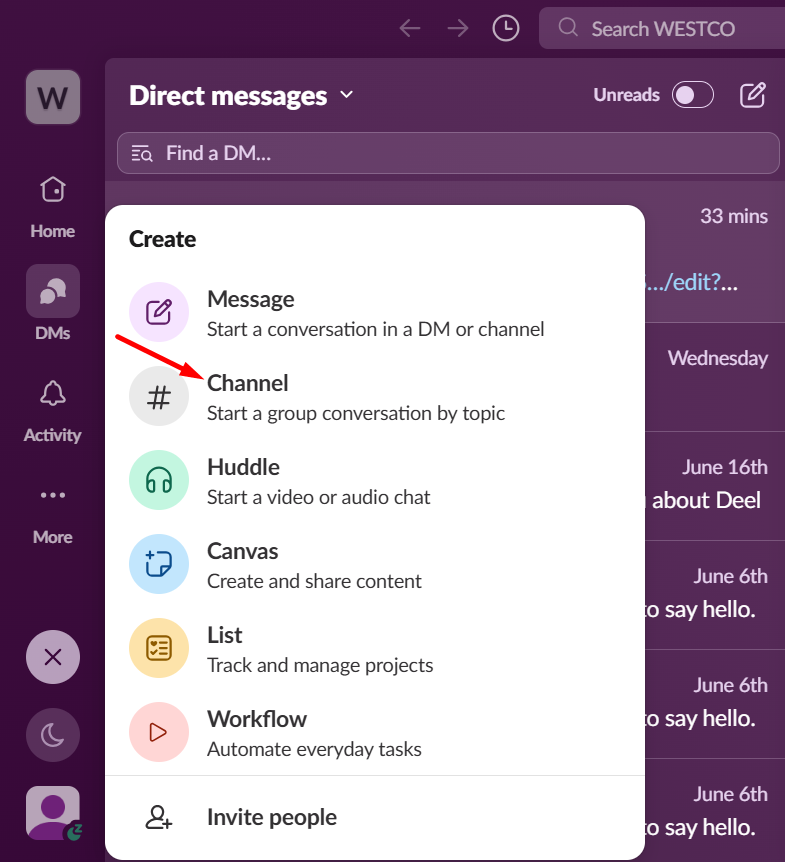
Click on the + button and create a channel. Begin channel setup by creating dedicated channels by topic (such as #support-billing, #support-api), customer tier, or use case. Decide which channels remain public and which require private access. Follow consistent naming conventions so that teams locate conversations without confusion.
Step 2: Set Up Access Controls and Team Membership
Define who manages requests, who handles escalations, and who has view-only access. Include engineering and operations teams where technical escalations regularly occur.
Step 3: Configure Slack Connect (If Using With Customers)
Invite customers into dedicated Slack Connect channels using a consistent onboarding process. Establish channel guidelines and communication expectations before support conversation begins.
Step 4: Set Up Automated Welcome Messages and Response Time Expectations
Create automated welcome messages for new customer conversations. Select support hours and expected response times so customers know what to expect.
Step 5: Connect to Your Help Desk / Ticketing System:
Link Slack conversations with your helpdesk or ticketing platform. Every customer request should become a tracked ticket supporting SLA management and complete conversation history.
Step 6: Document Your Support Process Inside Slack Itself
Keep team guidelines inside Slack using Canvas or Lists. You can also use pinned messages for this purpose. Store escalation procedures and troubleshooting guides where every agent can quickly access them.
Following these steps creates a foundation for using Slack for customer support without sacrificing visibility and operational consistency.
Slack Features that Power Customer Support
These Slack features keep customer conversations collaborative and trackable.
Channels
The basic organizational unit for support topics
What it means:
Channels are dedicated spaces which organize conversations around specific topics or support workflows. Teams commonly create channels for billing, technical issues, enterprise accounts, and internal escalations.
Why it matters for customer support:
Organized channels prevent customer requests from scattering across direct messages and irrelevant conversations. They also make collaboration and issue tracking more consistent as support volumes increase.
Practical example:
A SaaS company routes billing questions to #support-billing while API issues arrive in #support-api. Support specialists immediately join the right conversation without searching across multiple Slack messages.
Slack Connect
Cross-organization channels with customers
What it means:
Slack Connect creates shared channels connecting your workspace directly with a customer’s Slack workspace. Both organizations communicate inside one channel instead of relying on email threads.
Why it matters for customer support:
Shared channels provide faster communication while keeping customer discussions in one searchable location. Support and engineering teams can resolve issues together without switching communication tools.
Practical example:
An enterprise customer reports an integration issue through a dedicated Slack Connect channel. Support invites the engineering team into the same conversation and resolves the problem. It also shares updates without lengthy email exchanges.
Threads
Keep conversations focused without flooding the main channel
What it means:
Threads keep replies attached to a specific message instead of the main channel. Related discussions stay together without interrupting other customer conversations.
Why it matters for customer support:
Threads reduce channel clutter while preserving the complete context of each support request. Team members can collaborate without burying new customer messages beneath internal discussions.
Practical example:
A customer reports a login problem in a shared support channel. The investigation continues within a thread, while unrelated customer requests remain easy to find.
Workflows
Automated multi-step flows
What it means:
Workflows automate repetitive support tasks using preset steps inside Slack. A single workflow can collect request details and route conversations while also notifying the appropriate team automatically.
Why it matters for customer support:
Automation reduces manual effort while ensuring every support request follows the same process. It also speeds up routing and minimizes manual handoff delays.
Practical example:
A customer submits a support request through Slack form. The workflow routes it to the API team and creates a tracked ticket automatically while also notifying the assigned agent.
Canvas
Persistent docs inside channels for playbooks and runbooks
What it means:
Canvas provides persistent documents inside Slack channels for storing shared information. Teams use Canvas to maintain playbooks, runbooks, procedures, and support documentation alongside conversations.
Why it matters for customer support:
Support agents can access standard guidance without leaving the active customer conversation. This improves consistency and reduces search time across separate documentation tools.
Practical example:
The #support-api channel includes a Canvas containing troubleshooting steps and escalation paths. Agents reference the documentation while assisting customers, ensuring every case follows the same process.
Lists
Lightweight tracking
What it means:
Lists provide a lightweight way to track work directly inside Slack. Teams can organize triage queues and escalations without leaving the workspace.
Why it matters for customer support:
Lists give support teams visibility into pending work without relying on scattered messages. They also help track ownership and progress throughout the support process.
Practical example:
A support team maintains a List for high priority escalations awaiting engineering review. Agents update statuses as issues progress, keeping everyone in the loop on outstanding work.
Save Later
Personal action item tracking for agents
What it means:
Save Later lets users bookmark messages and tasks for future action inside Slack. Agents can create a personal queue without interrupting ongoing customer conversations.
Why it matters for customer support:
Agents avoid losing important follow ups while managing multiple customer requests simultaneously. Personal reminders also reduce missed actions after escalations or internal discussions.
Practical example:
An engineer promises a product update after investigating a reported issue. The support agent saves the message for later and follows up once the update is available.
Successful Slack for customer support depends on using these features together, not individually.
Integrating Slack with Help Desk and Ticketing Tools
Why Integration Matters
Best Slack integrations for customer support combine Slack’s real-time conversations with ticket management and operational visibility. Slack keeps customer discussions moving while the traditional help desk options maintain ticket records, SLAs, reporting, and long term accountability. Without integration, support teams end up duplicating work by manually creating tickets after customer conversations.
Three Integration Patterns
Slack-native ticketing: It creates and manages tickets directly inside Slack while preserving complete conversation history. This approach works best for teams whose customers already communicate through Slack.
Bidirectional sync with a help desk: Tickets remain in platforms like Zendesk or Freshdesk while synchronizing updates with Slack automatically. Ticket activity and comments appear inside Slack channels, keeping teams informed without switching applications. This model suits organizations with established help desk platforms.
Email-to-Slack: Support emails automatically appear inside dedicated Slack channels for internal visibility and collaboration. Teams discuss requests in Slack while continuing to manage customer communication through email. This approach benefits organizations handling large volumes of email based support.
What to Look For in Slack Apps for Customer Support
The best Slack apps for customer service should preserve complete conversation context instead of sending simple notifications. They should also provide bidirectional synchronization between Slack and the ticketing platform without creating duplicate work.
Look for ticket creation and management inside Slack, not only within another application. Built-in Slack SLA tracking helps teams measure response and resolution targets consistently. Reporting should include Slack activity alongside ticket metrics, providing a complete view of support performance.
Choosing the right Slack apps for customer support depends on your existing workflows and operational reporting requirements.
AI and Automation in Slack-Based Support
AI is changing Slack for customer support by reducing repetitive work and improving operational efficiency. The greatest value comes from supporting agents, not replacing them.
AI and automation depth capabilities now extend across customer conversations and ticket management.
AI for First Response
AI can answer routine customer questions before a support agent joins the conversation. Customers receive immediate guidance while more complex requests wait for human review.
AI for Summarization
AI summarizes lengthy Slack threads into concise ticket records and escalation notes. Support teams understand customer history without reading every message.
AI for Triage
AI categorizes incoming requests and routes them to the correct support channel automatically. Faster routing reduces manual assignment and shortens response delays.
Workflow Automation in Slack
Automated workflows handle repetitive requests using preset steps inside Slack. Password resets and access requests follow consistent processes without manual coordination.
What AI Doesn’t Replace
AI cannot replace human judgment during escalated incidents or sensitive customer conversations. Complex troubleshooting still depends on experienced support and customer success teams.
Using AI alongside structured workflows creates a more scalable Slack for customer support while preserving accountability and service quality.
Slack Connect: The Modern B2B Customer Support Standard
What Slack Connect Is
Slack Connect creates shared channels between your workspace and a customer's workspace. Both organizations participate in the same conversation while keeping messages and updates synchronized across both Slack environments.
Why It’s Becoming the Standard for B2B SaaS
For many B2B SaaS companies, Slack customer support has become an expected communication option. Mid-market businesses and enterprise customers increasingly request Slack Connect during vendor evaluations because it fits their existing workflows. Teams unable to support shared channels may face a competitive disadvantage during procurement
How to Introduce It Without Overwhelming the Team
Start with a small group of strategic or high value customers before expanding availability. Establish channel ownership and communication guidelines before inviting customers. Clear operating standards help teams deliver consistent Slack customer service as adoption grows.
Customer Onboarding Flow
A structured onboarding process sets expectations from the beginning of every shared channel. Explain how to join, when to use the channel, appropriate request types, expected response times, and escalation procedures. Early guidance reduces confusion and encourages consistent communication practices.
What About Customers Not In Slack
Not every customer uses Slack or wants shared communication channels. A hybrid support model allows Slack Connect depth for Slack-using customers while maintaining email or portal support for others. This approach gives customers flexibility without requiring every account to adopt the same communication channel.
Use Cases: When Slack for Customer Support Shines
Following scenarios show how Suptask's customer support solution supports different B2B models without forcing every team into the same workflow:
B2B SaaS with Enterprise Customers
Enterprise support teams mostly use Slack for customer support as their primary communication channel. Slack Connect keeps support and engineering teams working from the same shared conversation.
Mid-Market SaaS Scaling Beyond Email
Growing SaaS companies often combine Slack with traditional email support. High value customers receive Slack support, while other accounts continue using email or customer portals.
Internal IT Support
Distributed organizations frequently use Slack to manage employee IT requests and service issues. Employees report problems through dedicated channels while IT teams coordinate resolutions without leaving Slack.
Cross-Functional Escalations
Some customer issues require support, engineering, product, and operations teams to collaborate simultaneously. Slack brings every stakeholder into one conversation, reducing delays caused by disconnected communication and repeated context sharing.
15 Best Practices for Running Customer Support in Slack
Knowing how to use Slack for customer support goes beyond enabling channels and inviting customers. Consistent support depends on clear processes, defined ownership, structured workflows, and operational discipline. The following 15 best practices help teams organize conversations and deliver a reliable support experience as customer volume grows:
- Organize Support With Dedicated Channels: Create dedicated channels for customers and issue types to keep conversations organized and searchable.
- Use Slack Connect for Customer Communication: Communicate with customers through shared Slack channels while keeping discussions centralized and accessible.
- Connect Slack to Your Ticketing System: Integrate Slack with your help desk to convert conversations into tracked tickets without manual duplication.
- Add Live Chat Where Appropriate: Combine Slack with live chat to support customers who prefer website-based conversations.
- Build a Skilled and Well-Trained Support Team: Hire and train agents who can resolve issues consistently while communicating clearly across Slack.
- Define Team Ownership Clearly: Assign responsibilities for responses and escalations to avoid missed requests.
- Set Clear Response Standards: Establish response time expectations so customers know when to expect updates and resolutions.
- Maintain a Central Knowledge Base: Document recurring issues and proven solutions to improve consistency and reduce repetitive work.
- Automate Repetitive Support Tasks: Use AI automation to handle routine requests and administrative work efficiently.
- Enable Cross-Functional Collaboration: Bring support, engineering, product, and operations together to resolve customer issues faster.
- Collect and Act on Customer Feedback: Gather customer feedback regularly and use it to improve support processes and service quality.
- Monitor and Enforce SLAs: Track service level agreements to maintain accountability and measure response performance consistently.
- Provide Proactive Customer Support: Share updates and maintenance notices before customers need to ask for assistance.
- Promote Continuous Team Learning: Encourage knowledge sharing and process improvements to strengthen long-term support performance.
- Optimize Support with Analytics: Track support metrics to identify improvement opportunities and continuously refine your support operations.
Follow these practices to build a scalable Slack for customer support operations that balances fast communication with structured service delivery.
Common Pitfalls to Avoid
Even well designed Slack for customer support operations can become difficult to manage without clear processes and ownership. For example:
No Structured Channels
Customer conversations usually move into individual direct messages instead of shared support channels. Knowledge becomes difficult to find and important context leaves when employees change roles. Slack recommends using dedicated channels to centralize collaboration and searchable knowledge.
Treating Slack as a Complete Ticketing System
Slack handles conversations effectively, but it does not replace structured ticket management by itself. Without tracked tickets, teams struggle to measure SLAs and report on support performance consistently. Pair Slack with a customer support ticketing system so every customer message gets an owner, an SLA timer, and a place in your reports, while the conversation stays in the channel.
Unclear Ownership and Response Expectations
Shared channels fail when everyone assumes someone else will respond. Assign clear ownership and response expectations to prevent requests from slipping through the cracks.
Letting Slack Become Every Customer’s Default Channel
Not every request belongs in Slack, and not every customer prefers it. Define which issues belong in Slack and continue supporting email or customer portals when they provide a better experience.
How Suptask Makes Slack Customer Support Work
Slack for customer support keeps conversations moving, but conversations alone do not provide the operational structure growing support teams require. Teams still need structured ticket records, SLA tracking, customer history, and reporting to manage work consistently. Suptask adds that operational layer without requiring teams to leave Slack. Customer conversations become structured tickets with standardized fields, helping teams organize requests and maintain consistent support processes. SLA tracking and reporting provide visibility into response and resolution performance, while customer history remains accessible across conversations and tickets.
This approach is particularly valuable for B2B SaaS organizations. Customers increasingly expect Slack communication, while support teams still need accountability and operational visibility. By combining Slack's conversational experience with support workflows, Suptask’s customer support solution helps teams balance customer convenience with operational discipline.
Frequently Asked Questions
Is Slack a Customer Support Tool?
No, Slack is not a dedicated customer support platform. It’s a collaboration and messaging application that can support customer service when combined with ticketing, automation, SLA tracking, and reporting. Many B2B SaaS companies use Slack for customer support because it keeps customer conversations and internal collaboration in one workspace.
Can You Use Slack As a CRM?
No, Slack is not a CRM and should not replace one. Customer relationship management requires account records, sales history, reporting, and lifecycle management beyond Slack's capabilities. Most teams integrate Slack with CRM platforms, allowing customer conversations and account information to stay synchronized.
How Do You Set Up Slack for Customer Support?
Start by designing dedicated support channels and defining team ownership. Configure Slack Connect for customer-facing communication when appropriate. Then, connect Slack with your ticketing platform and automate repetitive workflows to maintain consistent support operations.
What’s the Difference Between Using Slack Internally for Support and Using Slack Connect with Customers?
Internal Slack support helps employees coordinate customer requests while customers continue using email or support portals. Slack Connect creates shared channels where customers communicate directly with your support team. Many organizations combine both approaches to support different customer needs.
Do Customers Actually Want to Receive Support in Slack?
Many mid-market and enterprise B2B customers already work in Slack throughout the business day. Shared Slack channels provide faster collaboration and easier access to support teams. However, not every customer uses Slack, making email and customer portals important alternatives for broader support coverage.
What’s the Best Slack Ticketing Tool for Customer Support?
The best Slack ticketing tool depends on your support model and existing workflows. Teams running support inside Slack choose platforms that provide ticket creation, SLA tracking, automation, and reporting without leaving the workspace. Organizations with established help desks may prefer integrations that synchronize Slack conversations with existing ticket records.












