Vendors are claiming to sell “AI automation” everywhere but their claims are not proved in production sometimes. If you are looking for the best and latest automated ticketing system software then you can get confused as the old rules engines and new LLM-based AI-agents are all grouped together under the “Automation” umbrella. But they perform different jobs.
This guide helps to filter the signal from the noise as it includes key differentiators between the rules based and AI-native automation. We have listed the 11 best tools across both categories to help you out. But let us first start with a brief introduction about the automated ticketing system.
What is an Automated Ticketing System? (And What Changed in 2024-2026)
An automated ticketing system is efficient software that removes manual handling efforts from the support ticket lifecycle. Such platforms notably reduce resolution times by reducing the time spent by the human agent on routing, triaging, and repetitive replies.
However, in the last two years the correct definition of automated ticketing system has been split into two layers:
- Rules-Based or Traditional Automation: This was the foundation of the IT industry for nearly a decade and it includes “if/then” rules, such as skill-based routing, SLA timers, escalation triggers, and canned responses. Furthermore, it includes keyword-based chatbots to handle automated interactions.
- AI-Powered or Newer Automation: This automation is powered by Large Language Models (LLMs) and it involves the semantic triage, really understanding a ticket’s meaning, not just the keywords. It also includes autonomous AI agents, draft-reply generation and thread summarization to close tickets without human intervention.
What Changed? By the end of 2022, LLMs had put AI-driven automation within the enterprise’s grasp. Today, in mid-2026, almost all vendors have a mix of both but they differ considerably in the maturity, quality, and price of the AI features they offer.
Best Automated Ticketing Systems in 2026
Rules-based vs. AI-powered Automated Ticketing System for IT (Actual Difference)
Sellers want buyers to believe it’s just “AI,” It’s not. When it comes to the right automated ticketing system for your business, all that matters is to understand the technical aspects of these two paradigms.
- Rules-Based Automation is deterministic in nature. You create a logic flow for it. For instance, “If Account Tier = Enterprise AND Status = New, auto-assign to
- IP-Support-Squad and apply a 1-hour Response SLA.” So it is a very reliable and rigid set of rules. It requires a manual and constant updating of the process dynamics.
- AI-Powered Automation is probabilistic in nature. It depends on how a model interprets an unstructured data set. For instance, “Read the ticket, identify it as a Figma license request. Check if the user’s department has available budget seats. Auto-provision the seat via Okta and mark the ticket resolved.” It can be very flexible and can make occasional mistakes because it requires a clean knowledge base.
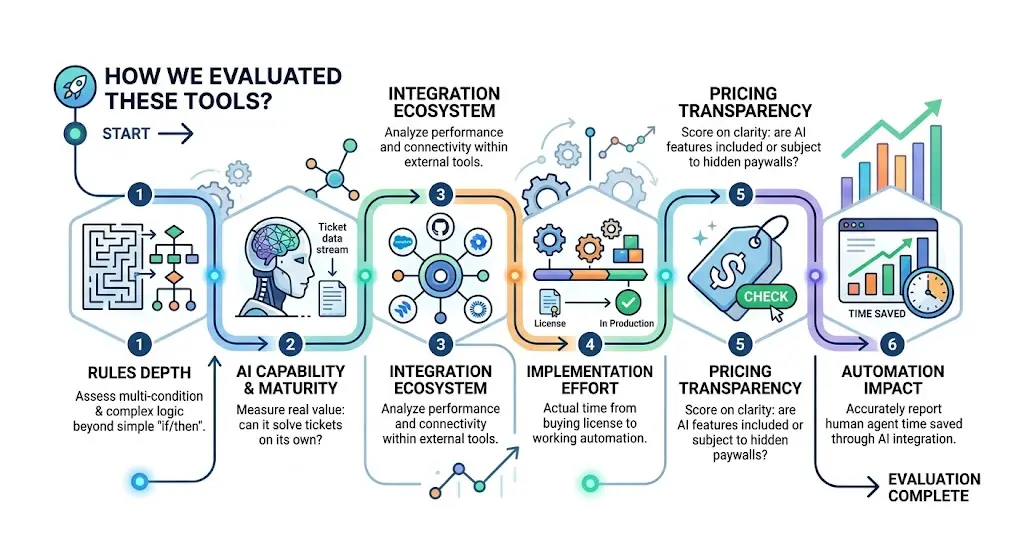
How do we Evaluate these Tools?
We evaluated each tool against the following criteria:
- Rules Depth: It was assessed to know how far the system goes in supporting multi-condition and complex branching beyond simple “if/then” routing.
- AI Capability and Maturity: For measuring the vendor AI claims against the real value it adds, this aspect was analyzed. Can it solve tickets on its own or does it just do basic spell checking?
- Integration Ecosystem: Even the best ticketing system features are useless if they can’t perform in Salesforce, GitHub, Jira, or Okta. So, the integration ecosystem was included in the list.
- Implementation Effort: The actual time from buying a license to having the automation working in production measured.
- Pricing Transparency: The tools score was checked on whether AI features are included in the license or are subject to hidden per-resolution paywalls.
- Automation Impact: We looked at how accurately each tool reports the time human agents saved after AI integration.
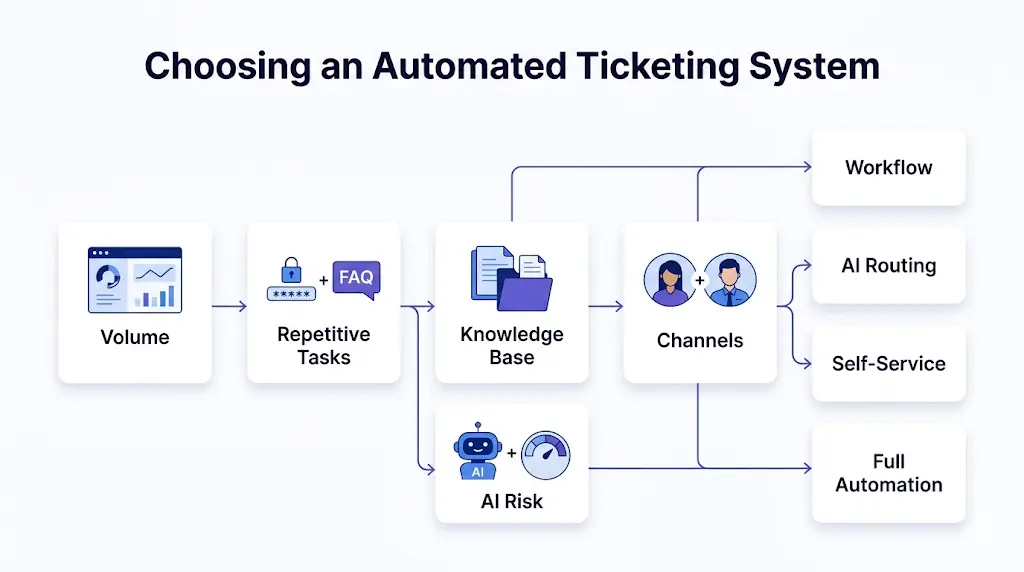
How to Choose an Automated Ticketing System?
Use this framework:
- What is your current ticket volume per agent?
The complex automation isn’t worth it for businesses using less than 20 tickets per week as the setup will likely be causing more than it saves you.
- How much of your volume is repetitive (password resets, access requests, basic FAQs)?
Look for your ticket categories and if you have 40% of your tickets for password resets, basic FAQs, and access requests, an AI auto-resolution would be a great ROI.
- How clean is your existing knowledge base/documentation?
AI auto-resolution depends only on the documentation and when you feed an old internal wikis, the LLM starts to give wrong answers.
- Do you need automation in customer-facing channels, internal IT, or both?
For customer-facing channels, tone and sentiment is the main game while for internal IT tools, strict escalations and asset management are given priority.
- What's your tolerance for AI errors in production?
A strict, rules-based automated ticket system would be safe for finance and healthcare as an LLM agent can hallucinate a non-compliant workaround.
What's Changed in Ticketing Automation Since 2024
If you are exploring this sector for the first time, you may notice some big changes:
- LLM summarization: Now, 20 message thread summarization for an agent is baseline and not a unique selling point anymore.
- Autonomous agents: Automation tools that read and resolve a ticket without human interaction are the core offerings now and not the beta experiments.
- Pricing shifts: The sellers now charged per seat in the past but many of them now charge per seat and a fee per ticket resolved using AI.
- Slack/Teams native ticketing: Conversational ticketing tools now live in chat and they have replaced the old portal-based ticket market.
- High skepticism: Discussions in r/sysadmin show IT professionals are highly skeptical of vendor “AI agents” and the inefficient tools are called out by the community.
The Best Automated Ticketing Systems, by Automation Flavor
Examine the best automated ticketing systems arranged according to their capabilities and automation style. These platforms, which include self-service capabilities, intelligent routing, and AI-powered workflows, assist teams in reducing manual labor and expediting ticket resolution.
Best for AI-powered Automation (LLM-native)
In the best automated ticketing systems, AI is a core product, not an add-on feature. They autonomously resolve tickets. These include:
1. HaloITSM
HaloITSM is an ITIL-aligned service management solution to centralize service requests, IT operations, and asset tracking.
Best for: Medium to large organizations requiring highly customizable and modern workflow automation.
Automation type: AI-Native
Key automation features:
- AI categorization
- LLM-based drafting
- Asset tracking rules automation
Pricing: $25-$45/agent/month depending upon team size and business volume. Halo AI features included as standard.
AI maturity reality check: PCMag has named them “Best Overall” because of their AI features. It identifies IT intent well but cannot fix broken ITIL processes. They require building the underlying workflows.
2. Intercom
Intercom offers AI-first customer services to combine a helpdesk with proactive messaging and customer engagement tools.
Best for: Modern and growth-centric teams seeking automated chatbots and unified conversational support.
Automation type: AI-Native
Key automation features:
- Conversation routing
- Support triggers
- Auto-resolution using “Fin” AI
Pricing: $39-$139/seat/month with $0.99 per AI-resolution using Fin AI Agent
AI maturity reality check: For external support, it is one of the most powerful tools. However, its pricing model can cause costs to spiral if not monitored well.
3. Forethought
Forethought is a generative AI-backed platform that automates service workflows and assists support agents.
Best for: High-volume enterprise helpdesks striving to lower ticket resolution times through automated routing.
Automation type: AI-Native
Key automation features:
- Sentiment routing
- Tier-1 resolution
- LLM triage
Pricing: $3k-12.5k/month depending on resolution volume, annual contract tier, and AI engine usage. They offer custom packages to fit the business needs.
AI maturity reality check: Forethought is used to automate enterprise ticketing systems and it offers measurable deflection but needs massive ticket data for model training. So, Forethought would not be an efficient solution for small businesses.
4. ProProfs Help Desk
ProProfs Help Desk is a ticketing system that features canned responses, inboxes, and built-in knowledge-base integration.
Best for: Small-to-medium businesses requiring a budget-friendly and easy-to-setup system.
Automation type: AI-Native
Key automation features:
- AI draft-assist
- Sentiment tagging
- Automates survey dispatch
Pricing: Free-tier for single users. $40-499/agent/month with standard AI response drafts.
AI maturity reality check: It offers basic LLM drafting tools. It makes ProProfs Help Desk an affordable help desk. Users can not expect an autonomous agent that resolves tickets while you sleep.
Best for rules-based automation (traditional, reliable)
Being traditional, these strictly follow the deterministic workflow engines. These include:
1. Freshservice
Freshservice is a cloud-based service desk that streamlines IT service management and employee operations.
Best for: Firms that want a user-friendly platform to unify asset management and multi-department requests.
Automation type: Rules-Based (AI add-ons)
Key automation features:
- Multi-stage approvals automation
- Drag-and-drop workflow automation
- Automated hardware asset lifecycle tracking
Pricing: $29-$119/agent/month depending on tier. Freddy AI Copilot add-on adding $29/agent/month. Full conversational AI agents require a custom Enterprise tier.
AI maturity reality check: Freshservice offers Freddy AI across all platforms, but its rigid logic tree automation is its core competency. AI asset-matching is a helpful feature of this firm but visual rule constructor is the major aspect.
2. Jira Service Management
Jira Service Management is an enterprise-level tool that brings operations, development, and business teams together.
Best for: Engineering-heavy organizations seeking to integrate bug tracking and code deployment.
Automation type: Rules-Based
Key automation features:
- Direct development ticket automation
- Alert automation routing
- Deployment-linked approvals
Pricing: Free tier available for up to 3 agents. $20-$51/agent/month depending on tier with basic Atlassian Intelligence in Standard tier. Premium tier unlocks full conversational AI virtual agents.
AI maturity reality check: Atlassian Intelligence strives for summarizing bug report comment histories and generating search macros, but Jira Service Management’s highlight is its rule-based links between deployments, development branches, and change requests.
3. GLPI
GLPI is an open-source solution for tracking software, end-to-end hardware, and data center lifecycles.
Best for: Cost-conscious firms aiming to bundle ticketing with automated hardware inventory tracking.
Automation type: Rules-Based (Open Source)
Key automation features:
- Emails for regular expression engine
- Automatic inventory importation rules
- Multi-criteria ticket routing mapping
Pricing: $23/user/month on Network plans. Pay-per-AI feature costs and scales up to $1160/month depending on tier.
AI maturity reality check: It lacks LLM components and is a classic and rules-based automation platform, making it a pro choice for those who prefer structure scripting and have security restrictions.
Best for hybrid (rules + AI, balanced)
This category fits teams that want the reliability of deterministic rules with an AI layer on top for intent detection, summaries, and reply drafting. The tools below combine a mature automation engine with AI features that assist agents rather than replace them.
1. Zendesk
Zendesk is a cloud-based omni-channel service platform that handles interactions into one agent workspace.
Best for: Businesses with high customization requirements for managing conversations across multiple channels.
Automation type: Hybrid
Key automation features:
- Native intent and sentiment analysis
- Advanced programmatic routing
- Offers deep automation rules engine
Pricing: $19-$115/agent/month depending on tier. Advanced AI add-ons (like Zendesk AI) cost ~$50/agent.
AI maturity reality check: Zendesk’s rule engine is bulletproof with newer AI add-on packages that are very powerful for sentiment mapping and pre-categorization, but the cost of add-ons means it is a big financial investment.
2. HubSpot Service Hub
HubSpot Service Hub is an efficient ticketing software built on top of HubSpot’s CRM platform.
Best for: Businesses already using the HubSpot ecosystem and want to connect customer support with marketing data.
Automation type: Hybrid
Key automation features:
- Ticket-to-deal automation pipelines
- Contact status update triggers
- Unified omni-channel routing logic
Pricing: Free tier available with basic ticketing. $10-$100/seat/month depending on tier and add-on Breeze AI credits.
AI maturity reality check: It offers a very smooth automated routing logic and its AI features act as helpful assistants within emails and chats instead of automated problem-solving agents.
3. Freshdesk
Freshdesk is cloud-based ticketing software that unifies communication from phone, email, and chat into a central system.
Best for: Scaling teams that require collaborative and easy-to-deploy desk space for simplifying daily tasks.
Automation type: Hybrid
Key automation features:
- Collision detection
- “Dispatcher” rule sets for tickets
- “Supervisor” hourly routine rules
Pricing: Free tier available for up to 2 agents. $23-$107/agent/month depending on tier. Freddy AI Copilot add-on costing $29/agent/month. Automated AI agents scaling via usage packs.
AI maturity reality check: The Freddy AI feature of Freshdesk handles automated replies and ticket categorization, but it still works optimally when backed by hard-coded routing rules.
Best for Slack/Teams-native automation
This category fits internal IT, RevOps, and support teams that already run daily work in chat. The tool below turns Slack messages into tracked tickets, routes them through conversational AI, and deflects repetitive requests without pulling anyone into a separate portal.
1. Suptask
Suptask is an AI-based and native ticketing software and service desk. It is built entirely inside Slack.
Best for: Fast-moving internal teams want to manage, resolve, and track support requests,
Automation type: Slack-Native
Key automation features:
- Slack threads into tracked tickets conversion
- Contextual conversational routing
- Custom forms within chat channel deployment
Pricing: $18-$45/agent/month depending on tier. Dynamic workflows and native Slack AI Assistants in Growth plan.
AI maturity reality check: Suptask doesn’t offer customer-facing chatbots, its AI is internal that scans workplace history and auto-answers repetitive IT queries. It doesn’t troubleshoot complex bugs but deflects basic questions without breaking flow. See our guide on what is conversational ticketing and our AI ticketing system page for more on this approach.
What does AI auto-resolution actually mean in 2026?
Ignore the 60% vendor hype as the actual AI auto-resolution tops out around 25-40% on basic tasks. AI works great for clear and knowledge-based fixes. However, when it comes to complex or vague requests, it fails badly.
Vendors usually throw around “auto-resolutions” like magic. Here is the reality of resolution and triage today:
What AI automation ticketing system is actually good at today:
- Password resets are connected to mighty SSO integrations
- Order status checks
- Simple IT categorization
- Basic FAQs backed by updated documentation
What it is still bad at:
- Ambiguous user requests like “My laptop is being weird”
- Multi-step technical troubleshooting (requiring back-and-forth testing)
- Anything requiring compliance escalation judgment
- Sensitive customer contexts
What does the implementation actually look like?
Buying software for this nature of automation is only step one. During deployment, here's what actually matters:
- Training data is the main thing: For optimal results, AI auto-resolution tools requires the latest and clean documentation. If you integrate a messy KB, your AI will be a mess.
- Integration is the real work: Automation is only functional if it can integrate with identity systems like Entra and Okta. It should also be able to talk to your databases and internal tools.
- Ongoing tuning: The quality of AI degrades if left without proper monitoring. For efficiency and catching hallucinations, you must keep auditing the percentage of tickets resolved per week.
- Human escalation paths: The moment the bot gets stuck, every AI ticketing deployments requires an immediate and seamlessly handling by human agents to take control of the situation in time.
- ROI timeline: For setting up the complex rules-based systems, the realistic timelines to see ROI are 3 to 6 months. On the other hand, to train and trust the native AI setup, a period of 6 to 12 months is enough.
When automation isn't the answer
Automation is not always a silver bullet. Sometimes, it is the wrong move completely. That is why, you should poosibly stick to manual triage in following scenarios:
- No documentation: If you don’t have strict guidelines and data documentation, AI cannot invent right answers on its own safely. So, you should have these first.
- Highly bespoke workflow: If you are in a highly regulated industry like healthcare and legal, AI auto-resolution is a liability and almost every ticket would require human context and judgment.
- Small team: If you have less than 50 tickets to process less than 50 tickets per week, you should refrain from buying AI. Otherwise, the overhead of automation engine management would cost more time than what it saves.
Final Thoughts
The market for automated ticketing systems for IT is noisy and the best way to stay safe from the vendor hype trap is to define the needed automation kind. When you are seeking to enforce complex escalations and strict SLA timers, go for the traditional rules-based tool and to deflect repetitive tier-1 password resets with your own knowledge base, choose an AI-native solution.
For RevOps and internal IT teams that are interested in deploying powerful automation directly in chat, explore how a Slack/Team-native AI ticketing system works. If you need to get your help desk fundamentals in order, explore our buyer guide to the best ticketing system.
Check the latest prices before making the final decision.
FAQs
How an Automated Ticket System Streamlines Processes?
It will eliminate human effort by prioritizing, categorizing, and assigning tickets to the right agents to resolve on its own following the rules and AI intent strictly to reduce time-to-resolution.
What is the difference between AI ticketing and automated ticketing?
The traditional automated ticketing automation relies on strict “if/then’ rules and admins build these rules. AI ticketing uses Large Language Models (LLMs) to understand the natural language request, summarize threads and resolve issues according to the linked document.
How much can automation reduce ticket volume?
Sometimes, vendors claim ~60% reduction in ticket volume but in reality, deployments with updated and clean documentation have a 25% to 40% reduction in tier-1 ticket volume. It can be achieved by self-service deflection and AI auto-resolution.
What's the best AI ticketing tool for small businesses?
For small teams that need only the basic AI, tools like ProProfs Help Desk or Freshdesk (with Freddy AI) are highly accessible while for internal IT teams with a chat environment, Slack-native tools like Suptask are the highly effective ones.
Do I need clean documentation before deploying AI ticketing?
Yes, AI auto-resolution tools generate their responses strictly based on your existing knowledge base, linking the messy and incomplete documentation will make AI give wrong answers.