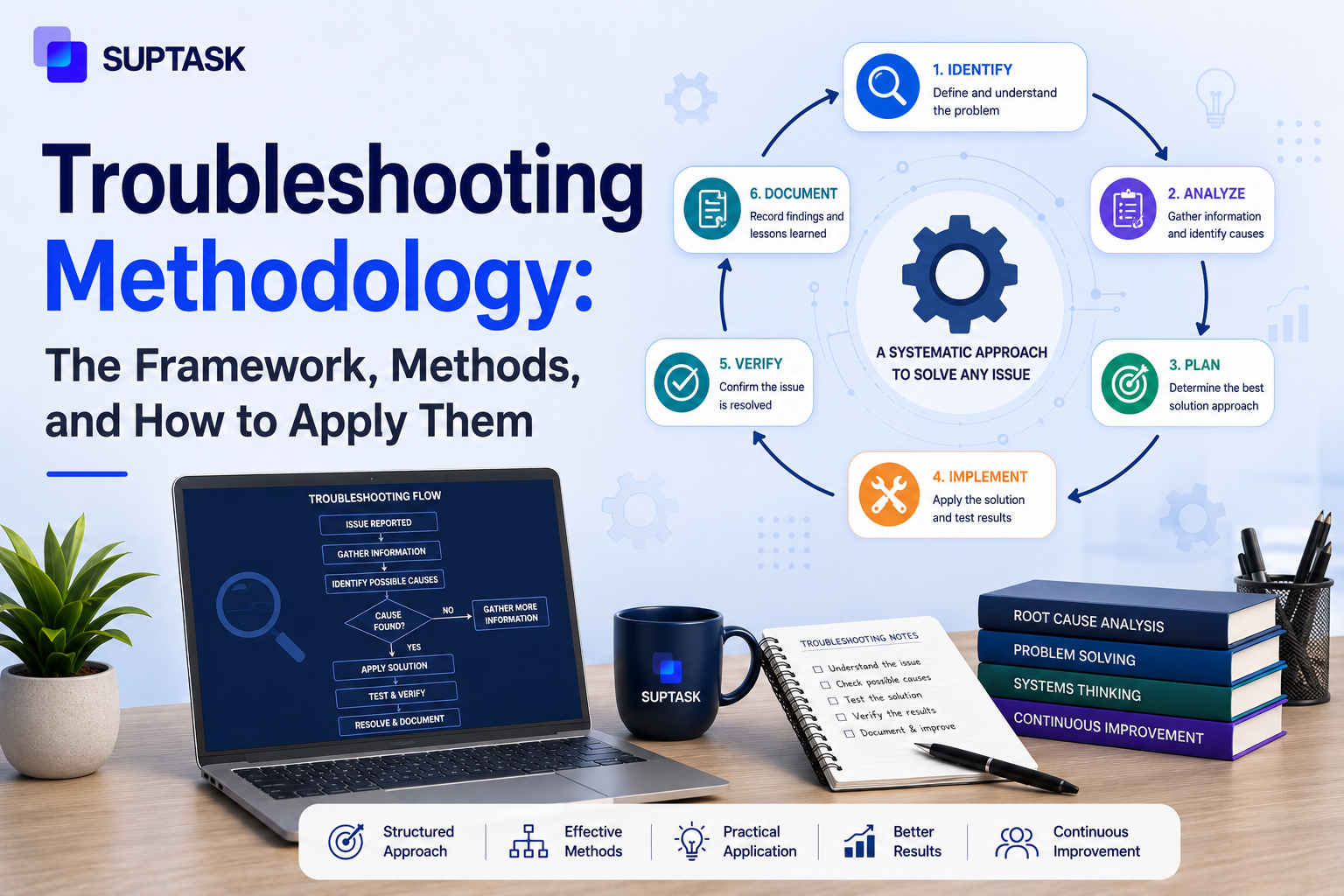
A troubleshooting methodology is a structured, repeatable process for diagnosing and resolving technical problems. The most widely adopted version is the CompTIA six-step model. It starts with identifying the problem, cause, plan, implementing the solution, verifying the fix, and documenting the outcome. Techniques such as the 5 Whys or divide and conquer are applied within these steps as needed.
Most IT problems get solved by guesswork, and methodology turns that guesswork into a repeatable process trusted by every IT certification, SRE handbook, and most senior engineers.
The methodology is the structured process you follow, the methods are the named techniques you use inside it, and most resources cover one or the other. Combining them is what makes the methodology usable.
Here in this guide, we cover the definition, the six steps of the troubleshooting process in full, the methods that fit inside each step, how teams troubleshoot together, and what you should do when the methodology does not get you to a fix.
What Is a Troubleshooting Methodology?
A methodology can be referred to as the framework that helps to decide what to do first, second, and third when something breaks. It works in a structured order that starts from gathering information, forming a theory, and then testing a theory before you touch any configuration.
A tech working without a framework normally starts at the fix instead, restart the service, clear the cache, reimage the machine, and often enough one of them works. Nobody can say afterwards which one it was.
Consistency across techs is the reason for having a troubleshooting methodology. A ticket that says the VPN client connects, but no DNS resolves should be worked the same way by the L1 on Tuesday and the L3 on Friday. Without a process, steps get skipped, and it is always the same ones, the backup before a change and the question of what changed on that machine last week. Documentation goes too, because a fix you stumbled into is not a fix you can write up. New hires have nothing to learn from except the habits of whoever sits next to them.
CompTIA raises the point most write-ups drop, which is time. You work inside an SLA window, and a systematic troubleshooting methodology should stop you putting thirty minutes into the least likely cause.
The word method gets used as though it means the same thing. It does not.
The methodology is the six-step process. The methods are the named techniques, 5 Whys, divide and conquer, top-down, bottom-up- that you apply at a particular step inside that process.
There is more than one model around. Google's SRE book runs a hypothesis-and-test loop instead of numbered steps, and Cisco has one for network faults. This guide uses the CompTIA six-step model because it holds up on hardware, software, and network problems equally, and the SRE version is compared against it later on.
The 6-Step Troubleshooting Methodology
These six steps are from CompTIA, which built the model and put it in the A+ exam objectives. Service desks run it whether or not anyone on the team is certified. What follows is the standard sequence with what a senior engineer actually does at each step, and what L1 techs get wrong.
Step 1: Identify the Problem
The basic need is knowing a problem and gathering the information. The steps end when you can identify the symptoms in your own words rather than how users explain it:
- Ask what changed, on the machine and around it, in the last week.
- Find out whether it is one user, one floor or everybody, before anything else.
- Reproduce it yourself where you can, and write down what you observe, not what was reported.
- Back up anything that matters before you start changing things.
The mistake at L1 is accepting the user’s diagnosis. "Outlook is broken" is a diagnosis. "Outlook prompts for credentials every ten minutes since Monday" is a symptom, and only the second one is workable. The 5 Whys helps to get past that first description, divide and conquer narrows the scope down, and following the data gives you the reproduction.
Step 2: Establish a Theory of Probable Cause
One theory, not a list of everything it could be. You take what step 1 gave you, pick the most probable explanation, and commit to it long enough to test it properly.
- The boring cause gets tested first. A cable, a disabled adapter, an expired password. Occam's razor applies here more than anywhere else.
- Write the theory so it can be proved wrong. "The client is using the old internal resolver" is testable, "something is wrong with DNS" is not.
- A second theory should be held back, unwritten, until the first one fails.
Where L1 goes wrong is reaching for the complicated theory because it sounds better. Storage controller firmware is rarely the answer on a Tuesday morning. Top-down fits when the symptom shows up in an application, bottom-up when a whole site drops with no clear application origin, the OSI walk-down for connectivity faults, and swap-and-test where hardware is suspected.
Step 3: Test the Theory to Determine Cause
A test can either prove a theory or kill it. If it gets killed, you should move back to step-2 with a new one that loop must be followed. Google's SRE book calls the same thing the hypothetico-deductive method, hypothesize and test, then repeat.
- A/B comparison against something known good. The same laptop model that works, the same VLAN, the same account.
- Isolation means one variable at a time. Two changes and a working system tell you nothing.
- Swap-and-test is still the fastest hardware test there is.
The mistake here is subtle, testing a fix instead of testing the theory. Rebooting and watching the problem disappear does not confirm why it disappeared.
Step 4: Establish a Plan of Action and Implement the Solution
Once you have confirmed the cause, a new fix can be planned before it gets applied. On one laptop, the plan can be a single line. On anything shared, it should cover the downtime window, who gets told, and how you undo it.
- Rollback first: Write down how to get back to the current state before you leave that state.
- If the change has a blast radius, it goes to a test environment or one machine ahead of the fleet, which is a staged rollout.
- Communication belongs in the plan, not after the outage has already run long.
Implementing a theory without planning is what turns a twenty-minute fix into an incident, and it happens most on shared systems where the tech is still thinking about one user. Lightweight change management is the method here.
Step 5: Verify Full System Functionality
When symptoms are gone, it doesn’t always mean the same system is working. The verification should be there to cover what you touched and what runs next to it.
- Regression checks the adjacent function, not only the broken one. Fix the printer driver, then confirm scan-to-folder still works.
- The user confirms it, not you. Their environment is the one that counts.
CompTIA's wording for this step includes implementing preventive measures where applicable, which most summaries drop. The common mistake is closing the ticket the second the surface symptom clears. That is the usual reason a ticket comes back two days later.
Step 6: Document Findings, Actions, and Outcomes
CompTIA puts documentation last. In practice, good engineers write as they go, and the SRE book makes the same point, notes taken during the work are worth more than a summary written from memory an hour afterwards. A running note or a shared channel gives you timestamps for free.
- The symptom as reported and the symptom as you found it, both of them.
- The cause, and how you proved it was the cause.
- What would stop it happening again, even where you have no authority to do it.
Recurring tickets should go into the knowledge base, otherwise, each time they come will agent will spend the same time to get the ticket resolved.
Troubleshooting Methods to Apply Within the Framework
The framework helps you with the order. The methods are what you actually do inside each step, and most of them are taken from manufacturing and network engineering. We have mentioned the steps where it fits:
5 Whys
The 5 Whys came out of Toyota, where Sakichi Toyoda used it on production faults, and Taiichi Ohno later made it part of the production system.
You ask why the symptom happened, then why that happened, and you keep going until the answer stops being another symptom. For example, a laptop will not connect, why the adapter is disabled, why a GPO ran on Monday. It belongs in step 1, and it can be used again after resolution when the actual root cause is wanted.
Divide and Conquer
The system gets split in half, and you work out which half holds the fault, then that half gets split again. Ping the gateway before anyone touches the DNS server. This one runs across steps 1 to 3.
Top-Down
Top-down starts at the application layer and works downward toward the hardware. If a user can reach internal sites but the CRM will not load, the CRM is where you start. It suits step 2 when the symptom presents inside an application.
Bottom-Up
When a whole floor loses connectivity and no single application is involved, bottom-up should be the choice instead. You begin at the cabling, the switch port, and the physical layer, then move up until something breaks. Also a step 2 method.
OSI Layer Walk-Down
This is top-down, written specifically for networks, going through the seven OSI layers in order. In practice, you check name resolution near the top, then routing at layer 3, then the port and the cable itself. Step 2, for connectivity faults.
Swap-and-Test
Replace the suspect part with a known-good one and see whether the symptom follows the part. A monitor, a patch cable, a stick of RAM. It is a step 3 test, and it only works on things that can be physically substituted.
Follow the Data
The question this method answers is where the request actually stops. You trace it through logs, a packet capture, or a transaction ID, from the client to whatever it fails on. Useful across steps 1 to 3, and it is often the only practical option when the fault is between two systems that both look healthy.
Fishbone (Ishikawa) Diagram
Kaoru Ishikawa's diagram groups possible causes into categories, normally people, process, tools and environment, so a team can see all of them together. On a whiteboard, it stops a group chasing the first idea somebody says out loud. It fits step 2 on complicated faults, and it is more common in post-incident review.
CompTIA vs Google SRE: Two Views of the Same Process
The Troubleshooting method works around the two models. CompTIA's six steps are numbered, sequential, and prescriptive. It also says that the cause can be found inside one system, laptop, switch, or an account.
The Google SRE book works with another idea. Chapter 12 of the book is called "Effective Troubleshooting," written by Chris Jones, describing work there as an application of the hypothetico-deductive method. You read the telemetry and the logs, then hypothesize a cause and test it. When the test fails, you go round again. It is written for distributed systems, where the fault can be spread across several services, and no single machine is broken. The same chapter also puts triage ahead of diagnosis, and the instruction there is to make the system work as well as it can under the circumstances before anyone goes looking for the root cause.
These two models are not competing with each other. A systematic troubleshooting methodology like the six-step model gives you the order to work in, and the SRE loop is close to what an experienced engineer already does inside steps 2 and 3 once one theory stops being enough. Which one you lean on should depend on how the system is built.
Team and Collaborative Troubleshooting
Most of the problems that are not trivial do not get solved by one person at their desk anymore. A VPN outage, or an integration that stopped working, will pull three or four people into a channel, and the work is happening there, in Slack or Teams or a war room.
The troubleshooting methodology framework can still be used in that setting. Two things should be adjusted, though. The first one is ownership, so step 1 can be run by one person, and testing is owned by somebody, and the rest of the channels know who.
The second one is documentation, which becomes continuous here. The channel is the log already. It only works as a log if people are writing what they have tried, and not what they are thinking.
There are some things which go wrong in the team setting more than others, such as:
- Two engineers will start hypothesizing at the same time without telling each other, and then contradictory theories are getting tested in parallel, so whatever comes back from either test cannot really be trusted.
- The handoff. Somebody goes off shift in the middle of it, and the next person is not told which step the team had reached.
- Verification mostly does not have an owner. Everybody in the channel is assuming that somebody else has gone back to the user and confirmed it.
If the investigation is happening in Slack anyway, then the record should not be sitting in two places. A help desk ticketing system which works inside the channel will help to keep it in one. Teams can turn the channel itself into a tracked ticket with Suptask, and the troubleshooting log and the ticket history are then together.
All of this is collaborative problem solving applied to a technical fault, and the coordination part of it does not change much between the two.
When the Methodology Fails: Escalation and Incident Response
The framework will not solve everything, and that should be said plainly. Some symptoms are not reproducing at all by the time you look at them. Some of the causes are inside systems which your team does not own, a vendor API, a carrier, an identity provider upstream somewhere. There are also cases where it was never one problem, it is two or three smaller ones compounding, and each theory you write covers only a part of what the users are reporting.
There are a few signals which tell you the framework has stopped working, such as:
- Three theories have been tested by now and none of them held.
- The symptom is intermittent. It goes away while you are watching it, then comes back after the ticket gets closed.
- Several users are reporting things which overlap but are not the same complaint.
- The fix worked, and then the same thing broke again a day later.
At that point, the theory work should be stopped, and the ticket escalated. L2 or L3 will have context on systems you do not have access to. The handover should also include every theory you already killed, otherwise, they are going to test the same ones over again. If the scope is wide enough, then a major incident should be declared, and the mode changes at that point. Service has to be restored first, and the root cause can be looked at afterwards. The incident management lifecycle covers that side of it, the declaring, the roles, the comms. The difference between the two is mostly the objective, troubleshooting is the work of finding the fix, and incident management is the work of holding the impact down while somebody is still finding it.
Sometimes the framework has not failed at all, it is only telling you the ticket was never a fault. A password which expired on schedule, or access which was never provisioned in the first place, those are requests, and the incident vs service request difference decides which queue it should have gone into.
How to Apply the Methodology to Specific IT Issues?
The six steps look abstract on their own. It is when a real ticket gets put through them that the shape of it becomes clear. Take a slow laptop, which is the most reported and the least specific thing in any queue. Step 1 is what turns it into something workable, slow at what, since when, one machine or the whole floor. Step 2 gives you one theory instead of five. Step 5 is the one that stops the ticket being closed because the machine felt quicker for ten minutes.
An IT troubleshooting methodology gets most of its value from the ordinary tickets, since those are the ones that keep repeating. The common IT help desk issues that come up week after week, slow performance, VPN failures that connect but resolve nothing, MFA prompts that loop, blue screens after a driver update, printers, all of them map onto the same six steps once you know what good practice looks like at each one.
Frequently Asked Questions
What are the 6 steps of troubleshooting?
The six steps are to identify the problem, establish a theory of probable cause, test the theory to determine the cause, establish a plan of action and implement the solution, verify full system functionality, and document findings, actions, and outcomes. CompTIA published this as the best practice methodology in its A+ exam objectives. The steps should be worked in order, though step 3 is allowed to send you back to step 2 as many times as it needs to.
What are the 7 steps of troubleshooting?
There is no separate seven-step model, it is the same process being counted differently. Some sources are splitting step 4 into two, so planning the action becomes one step and implementing the solution becomes another, which then pushes verification to six and documentation to seven. A few versions add "escalate if needed" as a step of its own instead. Nothing about the actual work changes, only the numbering.
What is the first step in the troubleshooting process?
Identifying the problem. That means gathering information from the user, from the system, and from the logs, asking what changed recently, and working out the scope, whether it is one user or many of them. You should also back up anything that matters at this point, because it is the last moment when the system is still in its original state.
What are the 4 methods of troubleshooting?
Top-down, bottom-up, divide-and-conquer, and follow-the-path are the four that get cited most. Top-down starts at the application layer and works downward toward the hardware, and bottom-up runs the other way. Divide-and-conquer splits the system in half, then keeps splitting whichever half the fault is in. Follow-the-path traces a request through the stack until you find where it stops.
What is the difference between troubleshooting methods and methodology?
The methodology is the framework, meaning the ordered process you follow from the first report through to the documentation. A method is one technique used inside that framework, the 5 Whys for example, or swap-and-test. One methodology can hold many methods. The two words get used a lot interchangeably, and that leaves people with a set of techniques and no order to apply them in.
What is the difference between troubleshooting and root cause analysis?
Troubleshooting is aimed at getting the broken thing working, and it can finish without anybody knowing exactly why it broke. Root cause analysis goes after the why, usually once service is already back, and it asks whether the same fault is going to happen again. In ITIL terms, that second piece belongs to problem management, and the ITIL framework keeps it separate from incident handling for that reason.
Closing: Make Troubleshooting a Process, Not a Guessing Game
What separates a tech who solves problems consistently from one who gets lucky is method. A methodology which is written down, and a team which actually knows it, is what moves IT support out of firefighting and into something repeatable.
Turn Slack conversations into tracked tickets, with the troubleshooting log kept in the same place. Start a Suptask trial.